How to Find and Fix Duplicate Listings for Your Pet Store

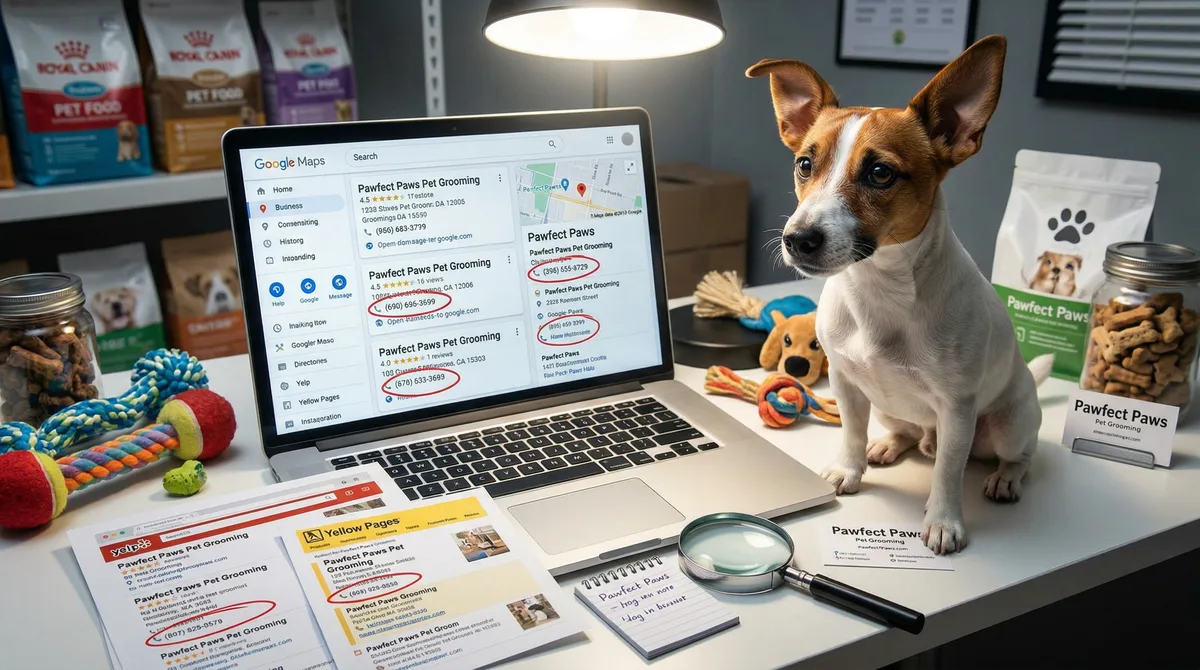
Table of Contents +
- What Are Duplicate Listings and Why Do Pet Stores Have Them?
- How Do Duplicate Listings Hurt Your Pet Store?
- How Do You Find Duplicate Listings for Your Pet Store?
- Which Tools Help You Find and Remove Duplicate Listings?
- How Do You Fix Duplicate Listings Step by Step?
- How Do You Prevent Duplicate Listings From Appearing Again?
- What Does a Duplicate Listing Cleanup Checklist Look Like?
- How Does Duplicate Listing Cleanup Connect to Your Broader SEO?
- Frequently Asked Questions
- References
Find and fix duplicate listings hurting your pet store's local rankings. Step-by-step guide with tool comparison, cleanup checklist, and prevention tips.
Your pet store might have listings you never created. Old directory entries, auto-generated Google profiles, data aggregator errors, and previous owners who never cleaned up after themselves. These duplicate listings sit across the web, showing different phone numbers, wrong addresses, and outdated hours. Every one of them sends a conflicting signal to Google about who you are and where you are located.
The result: Google loses confidence in your business data. Your local rankings drop. Customers call a disconnected number or drive to an old address. 62% of consumers will avoid a business entirely if they find incorrect information online[1]. For a pet store that depends on local foot traffic, duplicate listings are not a minor technical problem. They are a revenue leak.
This guide walks you through how to find every duplicate listing for your pet store, fix or remove them, and prevent new ones from appearing.
TL;DR
Duplicate listings split your reviews, confuse Google, and drive customers to wrong addresses. Businesses with consistent NAP data get 70% more calls. Search Google, Bing, Apple Maps, and major directories for your store name. Claim, merge, or delete every duplicate. Then lock your data with a listing management tool to prevent new ones.
What Are Duplicate Listings and Why Do Pet Stores Have Them?
A duplicate listing is any second (or third, or fourth) profile for the same business on the same platform. Your pet store might have two Google Business Profiles, three Yelp pages, or multiple entries on Bing Places, all showing slightly different information.
Pet stores are especially prone to duplicates for several reasons:
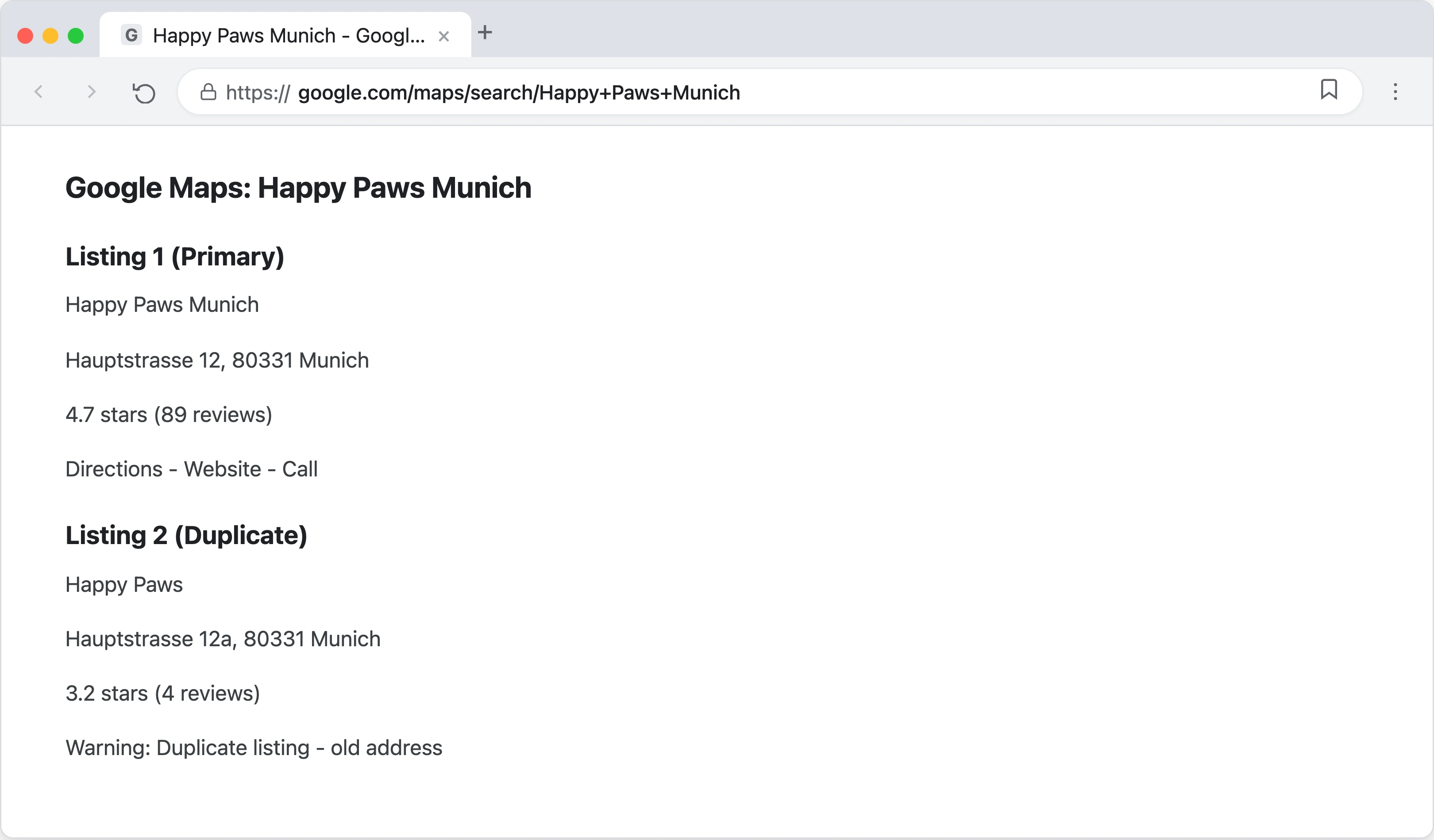
- Store relocations. You moved to a new address but the old listing was never removed. Now two profiles exist: one at the old location, one at the new.
- Ownership changes. The previous owner had profiles on directories you do not even know about. Those profiles still show up in search results with their name and old phone number.
- Data aggregators. Companies like Foursquare, Data Axle, and Localeze distribute business data to hundreds of directories. If they have outdated information, they create new listings instead of updating existing ones.
- Staff or agencies creating new profiles. A well-meaning employee or marketing agency creates a new Google Business Profile instead of claiming the existing one. Now two profiles compete against each other.
- Name variations. "Pet Paradise," "Pet Paradise GmbH," and "Pet Paradise - Your Local Pet Store" might each generate separate listings on the same directory.
- Service expansions. You added grooming services and someone created a separate "Pet Paradise Grooming" listing on Google. Google treats this as a different business.
The core issue is that most pet store owners do not realize they have duplicates. The listings were created automatically or by someone else, and they sit unnoticed while quietly undermining your local visibility.
Petbase automates SEO content for pet stores - publishing 10 optimized articles monthly so you can focus on running your shop - start your free trial.
How Do Duplicate Listings Hurt Your Pet Store?
Duplicate listings cause measurable damage across four areas: search rankings, customer trust, review dilution, and suspension risk.
Search ranking damage
Google cross-references your business data across hundreds of sources. When those sources tell conflicting stories about your name, address, or phone number, Google loses confidence in your business entity. Citation signals account for approximately 11% of local search ranking factors[2], and businesses with inconsistent NAP data rank 2 to 3 positions lower than those with clean data[1].
That ranking drop matters more than it sounds. Businesses in Google's Local 3-pack get 126% more traffic and 93% more actions (calls, direction requests, website clicks) compared to those ranked 4 through 10[3]. Dropping from position 3 to position 5 because of inconsistent listings means losing more than half your local search traffic.
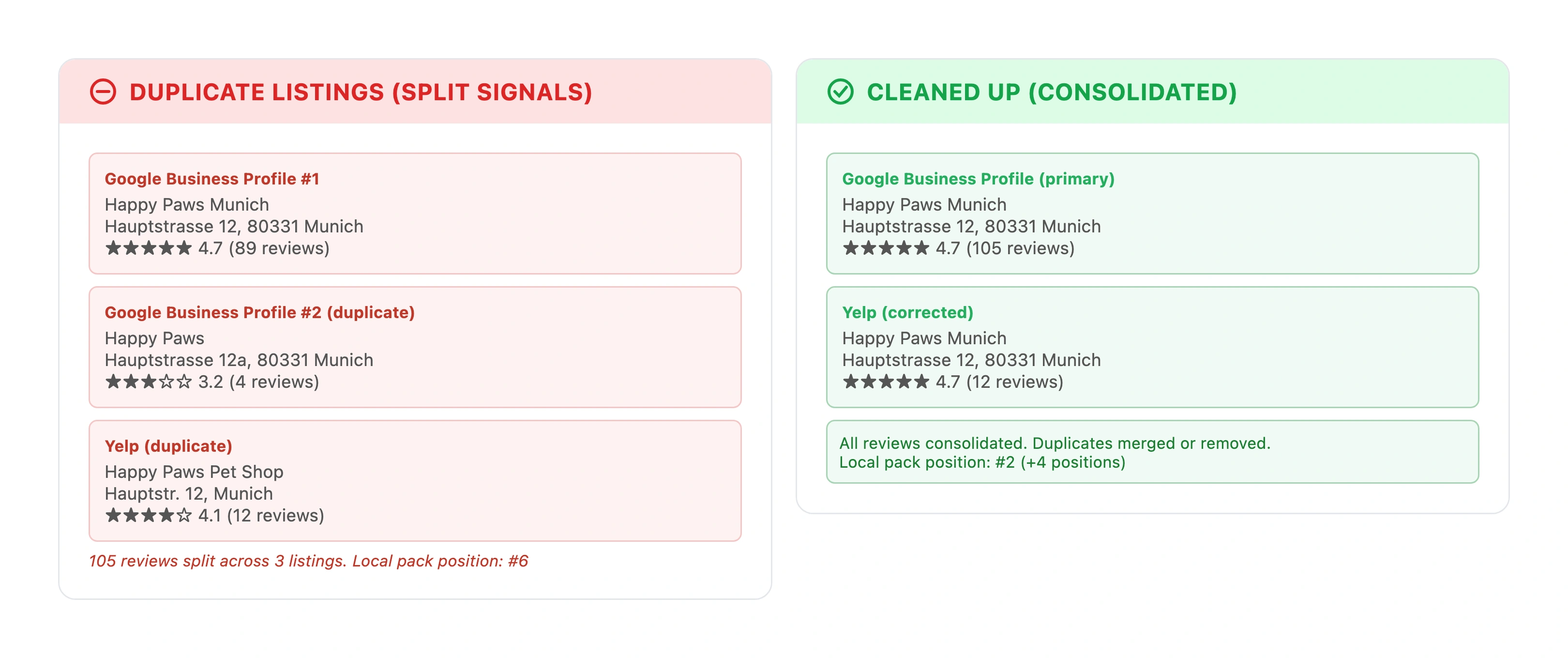
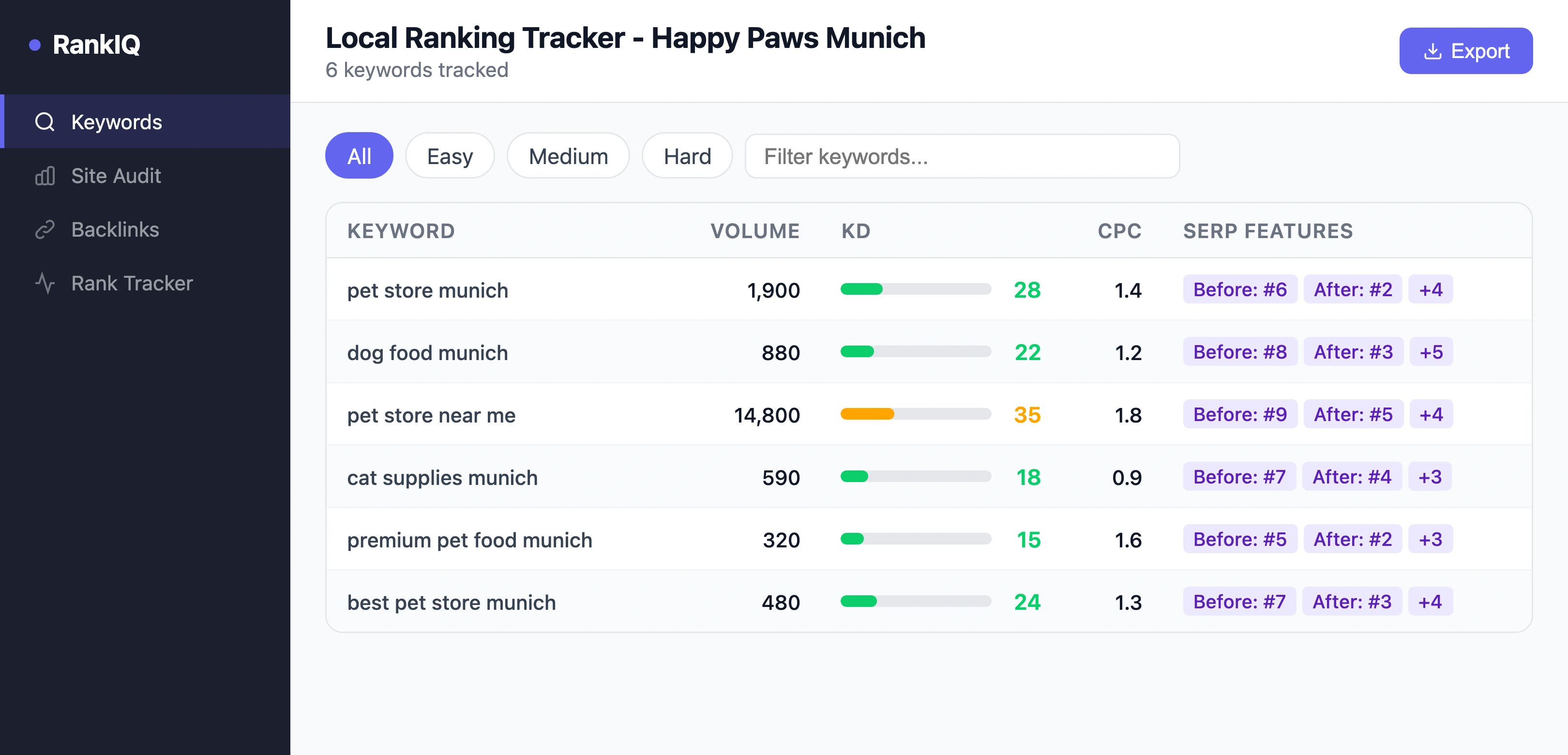
On the positive side, businesses with consistent NAP information across at least 85% of their citations see an average 23% improvement in local pack rankings[4]. Cleaning up duplicates is one of the fastest ways to move the needle.
Customer trust erosion
Over 80% of consumers lose trust in a business when they see inconsistent online information[5]. Imagine a customer searching "pet store near me" and finding two different phone numbers for your store, or one listing showing you close at 18:00 and another showing 20:00. 53% of shoppers say accurate store hours are their top priority when evaluating a business listing[6]. Conflicting hours are enough to send them to a competitor.
Review dilution
When customers leave reviews on a duplicate listing instead of your primary one, those reviews do not count toward your main profile. Your real Google Business Profile might have 45 reviews at 4.7 stars, but a duplicate profile has 12 reviews that should have gone to the original. Those 12 reviews are effectively lost. Since review signals now account for approximately 20% of local ranking factors[7], every review on a duplicate is a wasted trust signal.
Suspension risk
Google explicitly prohibits duplicate Business Profiles for the same location. Approximately 35% of Google Business Profiles face suspension issues annually, and duplicate listings are a leading cause[8]. When a GBP gets suspended, the consequences are severe: businesses typically experience a 90% reduction in customer calls[9]. Reinstatement takes 3 to 7 business days if the issue is straightforward, but complicated cases can take weeks.
In my 25+ years working in SEO, I have seen pet stores lose thousands in revenue from a single suspension caused by a duplicate listing they did not even know existed. The owner had moved locations two years earlier and never removed the old Google profile. When Google detected the conflict, both profiles were flagged.
How Do You Find Duplicate Listings for Your Pet Store?
Finding duplicates requires a systematic search across multiple platforms. Here is the step-by-step process.
Step 1: Search Google for your business name
Open an incognito browser window (to avoid personalized results) and search for your exact business name. Then search for variations: your name plus city, your name without "GmbH" or "Ltd," your old business name if you rebranded. Look at both the regular search results and Google Maps. Click "More businesses" in the Local Pack to see if multiple entries appear.
Pay attention to:
- Listings with your name but a different address (old location)
- Listings with your address but a slightly different name
- Listings marked "Permanently closed" that still appear in results
- Listings with no photos and minimal information (likely auto-generated)
Step 2: Check Google Business Profile Manager
Log into Google Business Profile Manager. You might find multiple profiles listed under your account that you forgot about. If there are profiles you did not create, someone else (a previous owner, an agency, or Google itself) may have created them.
Step 3: Search Bing Places and Apple Maps
Google is not the only platform that matters. Search for your business on Bing Places and Apple Maps. Bing pulls data from multiple aggregators and frequently creates duplicate entries. Apple Maps uses data from Yelp and other sources, which can also produce duplicates.
Step 4: Check major directories
Search for your business on each of these platforms:
- Yelp - common source of auto-generated duplicate pages
- Facebook - unofficial pages created by check-ins
- Foursquare - feeds data to hundreds of other sites
- Yellow Pages / Das Telefonbuch / Gelbe Seiten (for European stores)
- Industry-specific directories - pet directories like PetBusiness.com, local chamber of commerce listings
Step 5: Use a citation audit tool
Manual searching catches the obvious duplicates, but automated tools scan hundreds of directories at once. This is the most thorough approach and the one I recommend for any pet store serious about local SEO.
For a deeper look at how citations work and which directories matter most for pet stores, read our guide to local citations for pet businesses.
Which Tools Help You Find and Remove Duplicate Listings?
Several tools can scan for duplicate listings across dozens or hundreds of directories. Here is how the major options compare for pet store owners.
| Tool | Free Scan | Directories Covered | Duplicate Removal | Best For | Starting Price |
|---|---|---|---|---|---|
| Google Business Profile Manager | Yes | Google only | Manual merge/delete | Every pet store (start here) | Free |
| BrightLocal | Limited | 300+ | Manual + guided | Agencies and hands-on owners | ~EUR 30/month |
| Semrush Listing Management | Yes (basic) | 150+ (via Yext) | Automated sync | Stores already using Semrush | ~EUR 40/month |
| Yext | Yes (basic) | 200+ | Automated suppression | Multi-location pet stores | ~EUR 200+/month |
| Moz Local | Yes (basic) | 100+ | Automated sync | Small stores wanting simplicity | ~EUR 14/month |
| Whitespark | No | 300+ | Manual + guided | Citation-focused cleanup | ~EUR 20/month |
My recommendation: Start with the free Google Business Profile scan. Then run a free scan on BrightLocal or Semrush to identify duplicates across other directories. For ongoing protection, Moz Local or Semrush Listing Management offer the best value for single-location pet stores. Yext is worth the premium only if you operate three or more locations.
One important distinction: tools like Yext and Semrush "suppress" duplicates rather than permanently deleting them. This means the duplicates come back if you cancel the subscription. BrightLocal and Whitespark take a manual approach where fixes are permanent, but require more hands-on work.
How Do You Fix Duplicate Listings Step by Step?
Once you have found your duplicates, here is the process for each platform.
Fixing duplicate Google Business Profiles
- Identify which profile is your primary one. This is usually the one with more reviews, photos, and activity. If both are verified, keep the one with the stronger review history.
- Request a merge. Go to the duplicate profile and click "Suggest an edit" then "Close or remove." Select "Duplicate of another place" and enter your primary listing. Google typically processes merge requests within 3 to 7 days.
- If you own both profiles, log into Google Business Profile Manager, select the duplicate, and mark it as "Permanently closed" or request removal through Google support.
- If someone else owns the duplicate, use the "Suggest an edit" option or contact Google Business Profile support directly. Provide proof of ownership (utility bills, business registration documents).
Fixing duplicate Bing Places listings
- Claim your primary listing on Bing Places if you have not already.
- For duplicates, click "Report a problem" on the listing in Bing Maps.
- Select "Duplicate listing" and provide the URL of your primary listing.
- Bing typically resolves duplicates within 1 to 2 weeks.
Fixing duplicate Yelp listings
- Claim your primary Yelp listing through the Yelp for Business portal.
- For duplicates, scroll to the bottom of the duplicate page and click "Report this listing."
- Select "This is a duplicate" and provide the link to your primary listing.
- Yelp review teams typically process these within 5 to 10 business days.
Fixing duplicates on other directories
For smaller directories, the process is usually:
- Find the "Contact us" or "Claim this listing" option on the directory.
- Request removal of the duplicate, providing your primary listing URL.
- If no contact option exists, check if the directory pulls data from a major aggregator (Foursquare, Data Axle). Fixing the aggregator source often fixes the downstream directories automatically.
For detailed guidance on NAP consistency across all your listings, see our NAP guide.
How Do You Prevent Duplicate Listings From Appearing Again?
Removing existing duplicates is only half the job. Without prevention, new duplicates will keep appearing. Here is how to keep your listings clean long term.
Lock your NAP format
Choose one exact format for your business name, address, and phone number. Write it down. Use it everywhere, with no variations. Not "Pet Paradise" on Google and "Pet Paradise GmbH" on Yelp. Not "Hauptstrasse 12" on your website and "Hauptstr. 12" on Facebook. Businesses with uniform NAP information receive 70% more calls[10]. Even small formatting differences can create problems.
Control your data aggregators
The four major data aggregators in Europe and North America distribute your business information to hundreds of directories:
- Foursquare (formerly Factual)
- Data Axle (formerly Infogroup)
- Localeze (Neustar)
- Yelp (also functions as an aggregator)
Submit your correct NAP directly to each aggregator. When your information is accurate at the source, it propagates correctly downstream. When it is wrong at the source, you will be fixing duplicates forever.
Set up ongoing monitoring
Run a citation audit quarterly. Most listing management tools (BrightLocal, Semrush, Moz Local) offer alerts when new listings appear or existing ones change. For a pet store, a quarterly manual check combined with tool alerts is sufficient.
Create a listing change protocol
Any time something changes about your business - new phone number, new hours, new address, name change - update every listing within the same week. Do not update Google first and "get to the others later." The gap between updates is when duplicates and inconsistencies are most likely to form.
For a broader look at how listings fit into your overall local search strategy, read our local SEO guide for pet businesses.
What Does a Duplicate Listing Cleanup Checklist Look Like?
Use this checklist to work through the entire cleanup process. Print it or save it and check off each item as you go.
Discovery phase (Week 1):
- Search Google for your business name + city (incognito mode)
- Search Google for your old business name, old address, and name variations
- Check Google Business Profile Manager for multiple profiles
- Search Bing Places for duplicates
- Search Apple Maps for duplicates
- Check Yelp, Facebook, Foursquare, and industry directories
- Run a scan with BrightLocal, Semrush, or Moz Local
- Document every duplicate found: platform, URL, what information is wrong
Cleanup phase (Weeks 2 to 3):
- Merge or remove duplicate Google Business Profiles
- Report duplicate Bing Places listings
- Report duplicate Yelp listings
- Contact smaller directories for removal
- Submit correct NAP to all four major data aggregators
- Update your website NAP to match your locked format exactly
Prevention phase (ongoing):
- Document your official NAP format in a team-accessible location
- Set quarterly calendar reminders for citation audits
- Enable listing alerts in your monitoring tool
- Create a change protocol for any future NAP updates
For tracking the impact of your cleanup on search rankings, see our guide on how to track your pet store's Google rankings.
How Does Duplicate Listing Cleanup Connect to Your Broader SEO?
Fixing duplicate listings is a foundational step, not a complete local SEO strategy. Think of it as removing a penalty before you start building. Here is how it connects to the bigger picture.
Google Business Profile optimization. Once your duplicate profiles are merged or removed, your primary GBP gets the full benefit of every review, photo, and post. For a complete GBP setup guide, see our Google Business Profile guide for pet stores.
Local citations. Clean duplicates make your citation profile consistent, which strengthens the trust signals Google uses for ranking. Businesses with 40+ accurate citations rank 53% higher in local search[11]. Our citation guide covers the full directory list.
Google Maps visibility. Duplicate listings directly interfere with your Maps placement. Once cleaned up, your single authoritative listing has a much better chance of appearing in the Local 3-pack. For Maps-specific optimization, see our Google Maps guide for pet stores.
Technical SEO. Duplicate listings are one piece of the technical foundation. Other technical factors like site speed, schema markup, and crawlability also affect your local rankings. Our technical SEO guide for pet websites covers the full picture.
Content marketing. With a clean local presence, content marketing amplifies your authority. Publishing expert articles about pet care topics signals to Google that your business is a legitimate authority in your area. This is where tools like Petbase come in, producing 10 SEO-optimized articles per month (EUR 199/month) so you can focus on running your store while your online presence grows.
Frequently Asked Questions
How many duplicate listings does the average pet store have?
Most pet stores that have never done a citation audit have between 3 and 8 duplicate listings across various platforms. Stores that have changed addresses, names, or phone numbers in the past five years typically have more, sometimes 10 to 15 duplicates spread across Google, Bing, Yelp, Facebook, and smaller directories. The number increases with each business change that was not properly propagated to all platforms.
Can duplicate listings get my Google Business Profile suspended?
Yes. Google explicitly prohibits multiple profiles for the same business at the same location. If Google detects duplicate profiles, it may suspend one or both. Approximately 35% of Google Business Profiles face suspension issues annually[8], and duplicates are among the most common triggers. The impact is severe: a suspended profile typically leads to a 90% drop in customer calls[9]. If you discover a duplicate Google profile, address it immediately rather than waiting.
How long does it take to fix duplicate listings?
The discovery phase takes 2 to 4 hours if done manually, or about 30 minutes with a citation audit tool. The actual cleanup varies by platform: Google merge requests take 3 to 7 days, Bing resolves duplicates in 1 to 2 weeks, and Yelp processes requests in 5 to 10 business days. Smaller directories can take anywhere from a few days to several weeks. Budget 3 to 4 weeks from start to finish for a complete cleanup across all platforms.
Will removing duplicate listings immediately improve my rankings?
You will not see results overnight. Google recrawls directory sites on different schedules, and it takes time for the algorithm to register the improved consistency. Most pet stores see measurable ranking improvements within 4 to 8 weeks after a thorough cleanup. The 23% average improvement in local pack rankings that comes from consistent NAP data[4] typically shows up gradually over this period as Google reindexes your cleaned-up citations.
Should I use a paid tool or clean up duplicates manually?
For a single-location pet store, start with a manual search and the free scans offered by BrightLocal and Semrush. This catches 80% or more of your duplicates at no cost. If you find extensive issues across many directories, a paid tool like Moz Local (around EUR 14 per month) saves significant time. Multi-location stores should strongly consider Semrush Listing Management or Yext for automated ongoing protection. The key question is whether your time is better spent running your store or manually managing listings.
References
- BrightLocal (2025). Local SEO Statistics. brightlocal.com
- Moz (2024). Local Search Ranking Factors. moz.com
- Marketing LTB (2025). Local SEO Statistics. marketingltb.com
- Local Dominator (2025). Local Search Ranking Factors. localdominator.co
- BrightLocal (2024). The Danger of Duplicate Business Listings. brightlocal.com
- BrightLocal (2025). Local SEO Statistics. brightlocal.com
- Whitespark (2026). Local Search Ranking Factors. whitespark.ca
- Sterling Sky (2025). Top Reasons Google Suspended Your Listing. sterlingsky.ca
- Sterling Sky (2025). Top Reasons Google Suspended Your Listing. sterlingsky.ca
- BrightLocal (2025). Local SEO Statistics. brightlocal.com
- Custom Web Audits (2025). Local Citations for Local SEO Success. customwebaudits.com