Multi-Location SEO for Pet Store Chains

Table of Contents +
- What Makes Multi-Location Pet Store SEO Different
- How to Manage Google Business Profiles Across Locations
- How to Create Location Pages That Rank
- How to Avoid Duplicate Content Across Locations
- How to Build Local Authority for Each Store
- How to Scale Content Across Locations
- How to Track Rankings for Multiple Locations
- Frequently Asked Questions
- References
Data-backed multi-location SEO guide for pet store chains. Manage GBPs, build location pages, prevent duplicate content, and scale content across stores.
Multi-location pet store SEO requires a separate local strategy for each store - its own Google Business Profile, unique location page, independent review generation, and location-specific content. Organic search drives 53% of all website traffic[1], and 46% of all Google searches have local intent[2]. For pet store chains with 3, 10, or 50 locations, that means each store is competing in its own local market - and each one needs its own SEO foundation.
This guide covers everything multi-location pet store chains need to know: managing Google Business Profiles across locations, building location pages that rank, preventing duplicate content, scaling content production, and tracking performance per store.
What Makes Multi-Location Pet Store SEO Different
Single-location SEO is straightforward. You optimize one Google Business Profile, build one set of local citations, and publish content for one geographic area. Multi-location SEO multiplies every task while adding new risks - duplicate content, diluted authority, and inconsistent brand signals across cities.
Google treats each store location as a separate entity for local search. Your Munich store and your Hamburg store are not competing with each other. Each one competes against the pet stores in its own city. This means each location needs its own local SEO strategy.
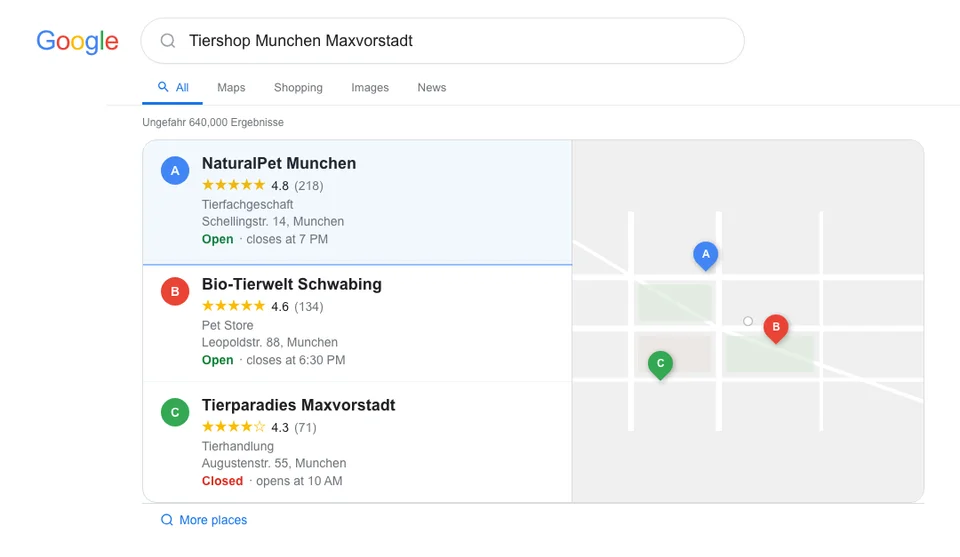
With 139 million pet-owning households across Europe[3], the addressable market for pet store chains is large - but capturing it through search requires location-by-location effort.
The core differences from single-location SEO:
- Each location competes in its own local market. Rankings for "pet store Munich" depend on Munich-specific signals, not your Hamburg store's performance.
- Duplicate content risk is real. If all 10 stores have identical location pages with only the city name swapped, Google may flag this as thin or duplicate content.
- Google Business Profiles must be managed individually. Each location needs its own GBP with unique photos, posts, reviews, and responses.
- Content must serve both the brand and each location. Blog posts on your main domain build brand authority. Location-specific content builds local authority.
- Tracking is more complex. You need to monitor rankings, traffic, and conversions for each location separately.
Here is a checklist of what each location needs:
| SEO Element | Per Location? | Priority | Notes |
|---|---|---|---|
| Google Business Profile | Yes | Critical | Unique photos, posts, hours for each |
| Location page on website | Yes | Critical | Minimum 500 words unique content per page |
| NAP citations | Yes | High | Name, address, phone consistent everywhere |
| Local schema markup | Yes | High | LocalBusiness schema per location |
| Reviews | Yes | High | Each location needs its own review generation |
| Blog content | Shared (mostly) | Medium | Some location-specific posts help |
| Product pages | Shared | Medium | One set unless inventory differs significantly |
| Technical SEO | Shared | High | Site-wide speed, mobile, security |
Petbase automates SEO content for pet stores - publishing 10 optimized articles monthly so you can focus on running your shop - start your free trial.
How to Manage Google Business Profiles Across Locations
Your Google Business Profile is the single most important local ranking factor. Businesses with a complete GBP receive 80% more search appearances and 4x more visits than incomplete profiles[4]. For multi-location pet stores, managing multiple GBPs correctly separates chains that dominate local search from those that struggle to appear.
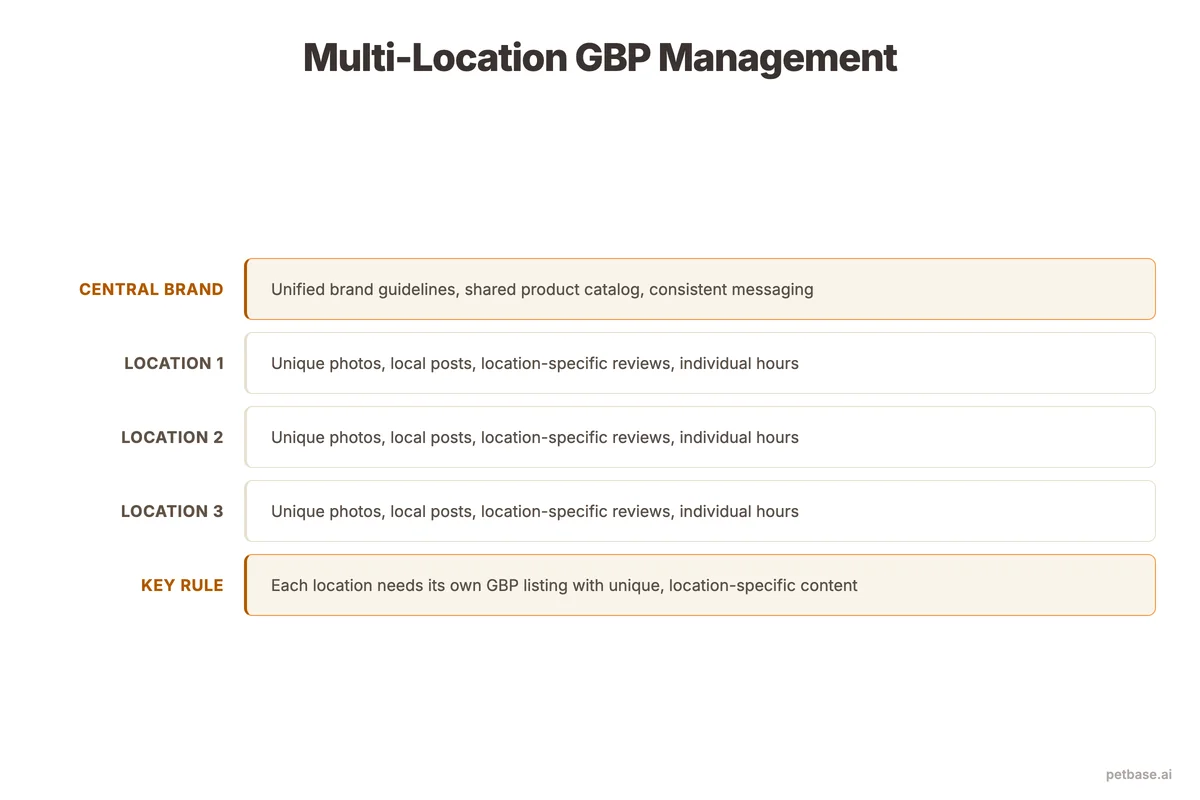
Rules for multi-location GBP management:
Each location gets its own profile
Never try to represent multiple locations with a single GBP. Each physical store address needs its own verified profile. Google's guidelines are clear: one profile per location.
Use a single Google account for all profiles
Create a management account (Google Business Profile Manager) that owns all locations. This lets you manage everything from one dashboard while keeping each profile distinct.
Unique photos for every location
This is where most chains fail. They upload the same generic brand photos to every profile. Business profiles with photos receive 42% more direction requests[5] - but only if the photos are real and location-specific. Each location should have:
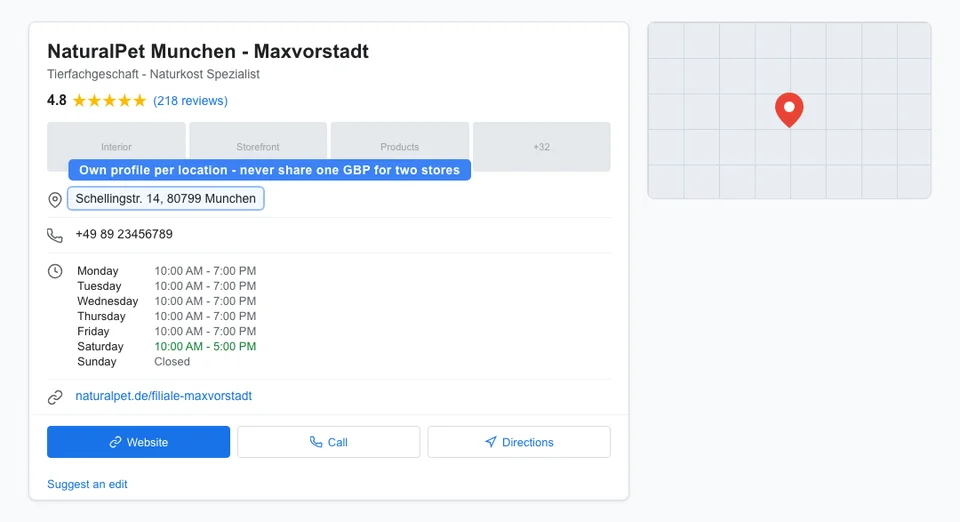
- Exterior photos showing the actual storefront
- Interior photos showing the specific store layout
- Staff photos of the team at that location
- Product photos taken in that specific store
- Event photos from local activities
Google can tell when the same images are used across multiple profiles. Unique photos signal that each location is a real, distinct business.
Post weekly from each profile
GBP posts boost visibility. But do not post the same content to all locations at the same time. Stagger your posts and include location-specific details: "This week at our Munich store..." or "Our Hamburg team recommends..."
Respond to reviews individually
93% of consumers say online reviews affect their buying decisions[2]. Every review on every location profile needs a response. Use the staff member's name or the location name in responses. Generic copy-paste responses across locations look automated and damage trust.
How to Create Location Pages That Rank
Every location needs its own page on your website. This is non-negotiable for multi-location SEO. But the page needs to be more than a template with the city name swapped in.
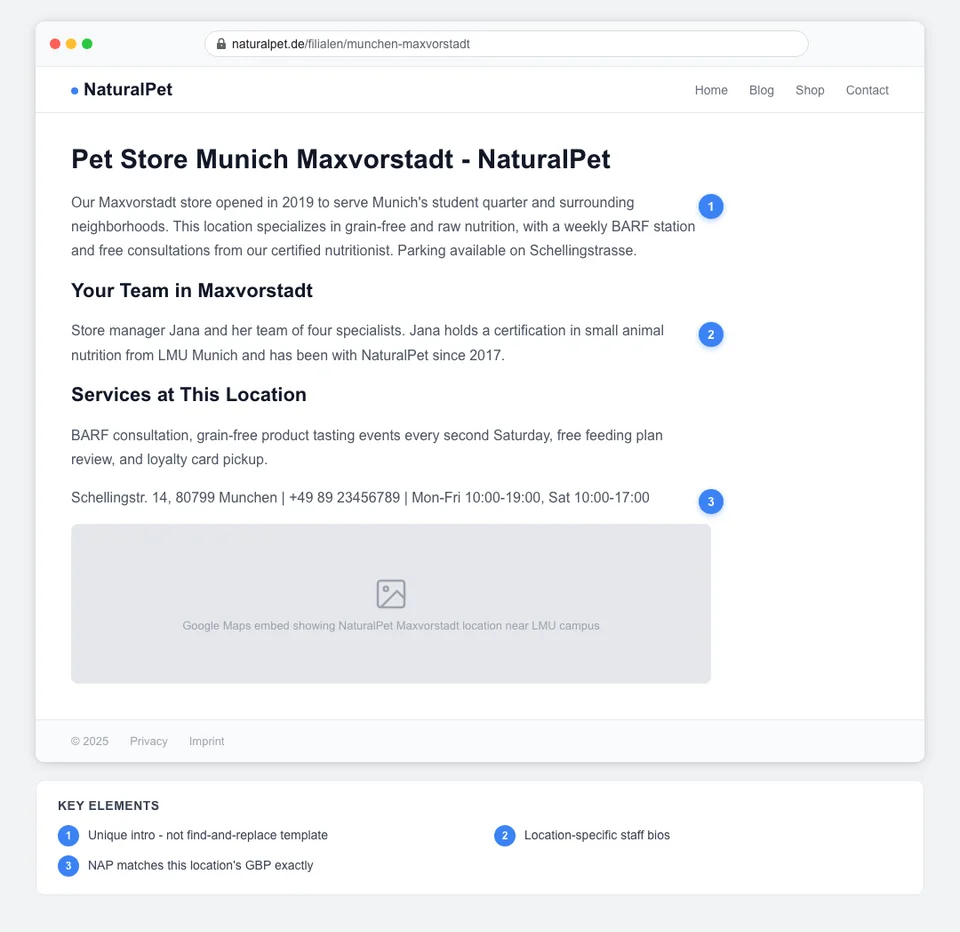
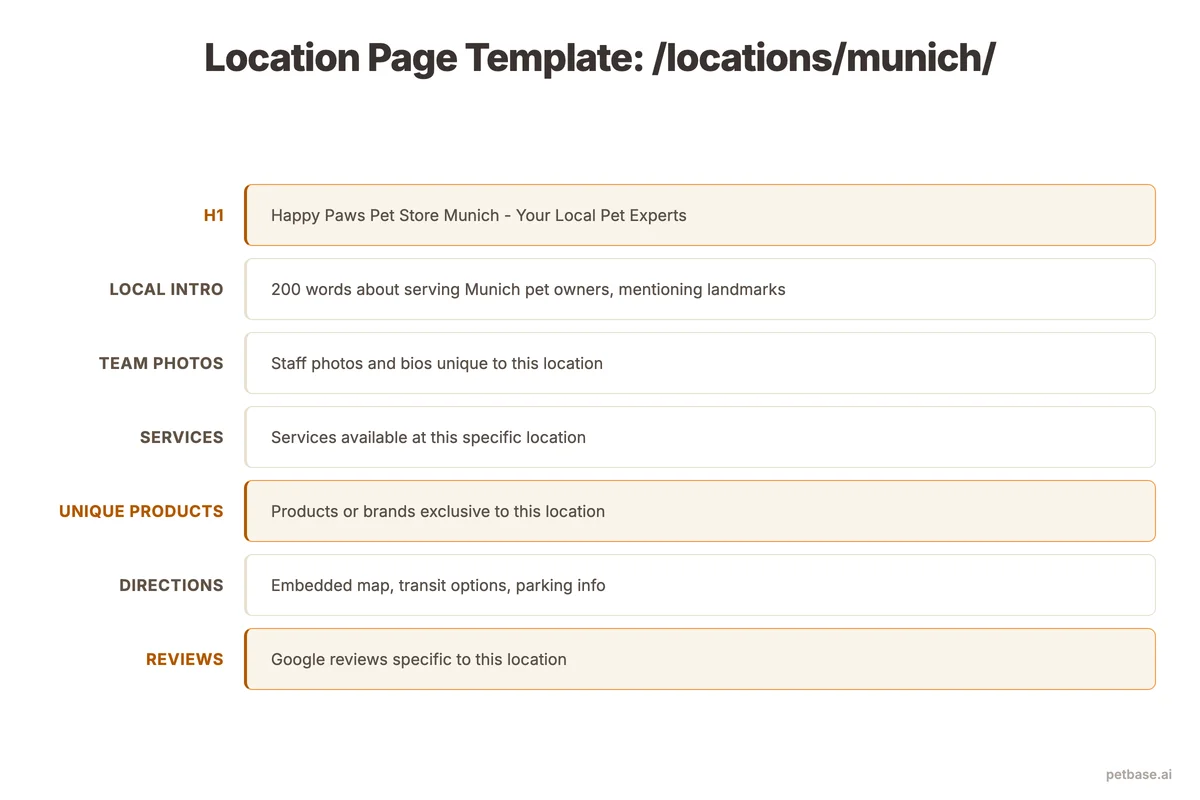
What a strong location page includes:
- Unique introductory content (200-300 words minimum): Describe what makes this specific location different. When did it open? What is the neighborhood like? What do customers here most commonly buy?
- Store details: Address, phone number, email, hours, parking information, public transit access
- Embedded Google Map for the specific location
- Staff section: Names, photos, and specialties of the team at this location
- Local services: Does this location offer grooming? Training classes? Delivery? List services specific to this store.
- Customer reviews: Pull and display reviews from this location's GBP
- Nearby landmarks: "Located next to [local landmark], 5 minutes from [popular area]"
- LocalBusiness schema markup with this location's specific NAP data
The more unique content you add to each location page, the less risk of duplicate content issues. A 200-word template page with just the city name changed is thin content. A 600-word page with unique staff bios, local service details, and customer testimonials is a genuine local landing page.
URL structure for location pages:
- Good: yourstore.com/locations/munich/
- Good: yourstore.com/locations/hamburg/
- Bad: yourstore.com/location?id=3
- Bad: locations.yourstore.com/munich (subdomain splits authority)
Keep all location pages under your main domain in a clear /locations/ directory structure. This passes domain authority to each page. For more on local content strategies, see our guide on local content that ranks for pet stores.
How to Avoid Duplicate Content Across Locations
Duplicate content is the most common technical SEO problem for multi-location pet stores. When you have 10 locations and each has a page about "dog grooming services" with nearly identical text, Google may choose to rank only one - or suppress all of them.
Since organic search accounts for 53% of all website traffic[1], duplicate content problems directly reduce your largest traffic source.
| Approach | Single Site | Multiple Sites |
|---|---|---|
| Domain strategy | One domain with /locations/ directory | Separate domain per location (rare, only for franchises) |
| Location pages | Unique content per page, shared template structure | Fully unique pages per site |
| Service pages | One set of service pages with location selectors | Unique per site |
| Blog content | One blog, occasional location-specific posts | Separate blogs (high effort) |
| Product pages | One set of product pages | Per-site product pages with local availability |
| Authority consolidation | All authority on one domain | Split across domains (weaker per-site) |
For most multi-location pet stores, a single website with location subdirectories is the right approach. It concentrates domain authority, simplifies maintenance, and avoids content duplication across separate sites.
Practical tips to keep content unique:
- Write each location page from scratch - do not use find-and-replace on a template
- For service pages that apply to all locations, use one comprehensive page with a location selector rather than duplicating the page per city
- If product availability differs by location, note this on product pages ("Available at: Munich, Hamburg, Berlin") rather than creating separate product pages per store
- Use canonical tags correctly - each location page should be self-referencing canonical, not pointing to another location
For a detailed walkthrough of technical SEO foundations that prevent these issues, see our technical SEO guide for pet websites.
How to Build Local Authority for Each Store
Domain authority helps your entire website rank. But local authority - the signals Google uses to determine relevance for a specific geographic area - must be built per location. The Local Pack receives 44% of all clicks on local search results[2], making local authority the difference between visibility and invisibility for each store.
Citations
Each location needs consistent NAP (Name, Address, Phone) listings across directories. Submit each store to local business directories, pet industry directories, and city-specific listing sites. Inconsistent citations confuse Google and weaken local rankings. Our guide on local citations for pet businesses covers this in depth.
Local backlinks
Each store should earn links from local sources: local newspapers, community blogs, pet adoption organizations, local veterinary clinics, and neighborhood business associations. A backlink from a Munich community site helps your Munich store but does nothing for your Hamburg store. For a full backlink strategy, see our guide on how to build backlinks for pet stores.
Local content
Publish occasional blog posts with local relevance: "Best dog parks in [city]," "Pet-friendly events in [city] this month," or "Our [city] store's top product picks for winter." These signal to Google that your site has genuine local relevance for each area.
Reviews per location
Each location's review count and quality directly impacts its local ranking. 93% of consumers say reviews affect their purchasing decisions[2], and a store with 200 reviews will outrank a store with 20 reviews, all else being equal. Set up a review request process for each location - QR codes at the register, follow-up emails after purchase, or review cards in shopping bags. See our guide on Google Maps for pet stores for specific tactics, and our online reviews guide for a full review strategy.
How to Scale Content Across Locations
Content is the hardest element to scale for multi-location pet stores. Your blog builds domain-wide authority, but it also needs to serve local audiences at each store. "Near me" searches exceed 1.5 billion per month[2], which means each location needs enough local content signals to appear for those queries in its city.
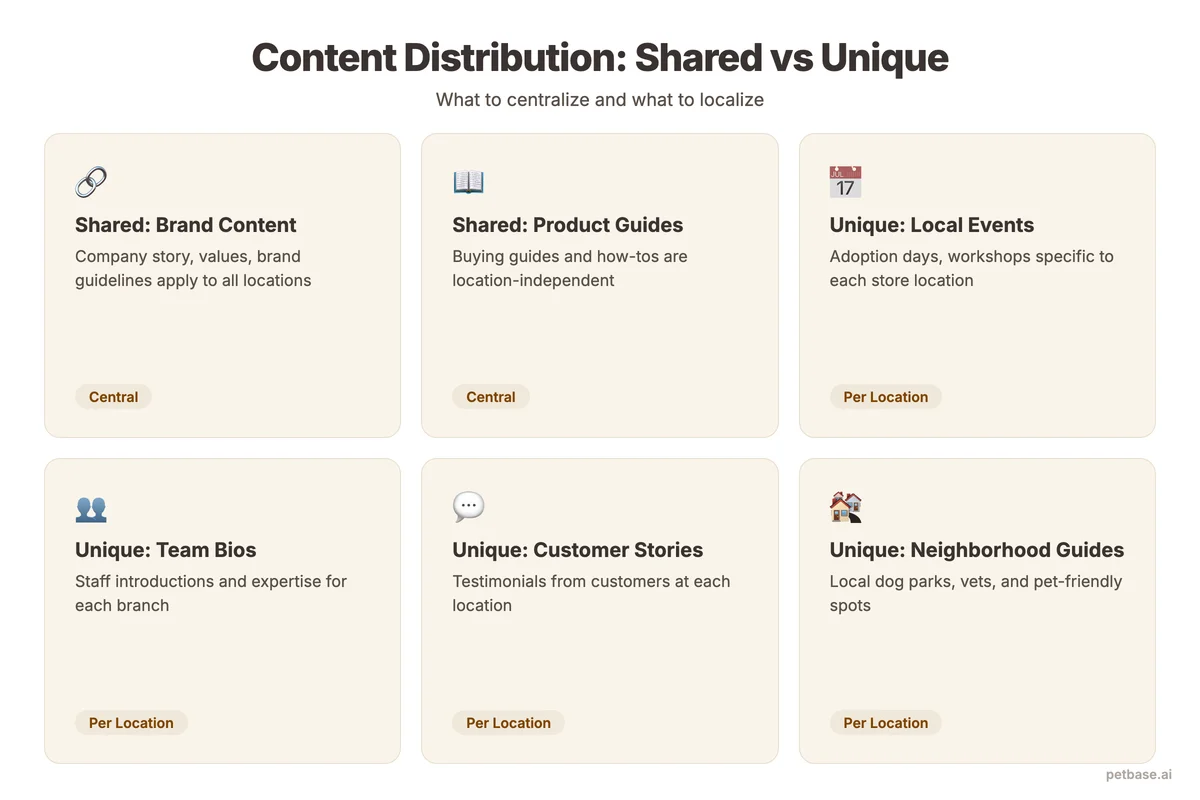
Here is how to think about content scaling:
| Number of Locations | Content Strategy | Monthly Content Volume |
|---|---|---|
| 2-5 locations | One blog with occasional location-specific posts | 8-10 articles/month (2-3 location-specific) |
| 6-15 locations | One blog with a local content calendar rotating across locations | 10-15 articles/month (1-2 per key location) |
| 16+ locations | One central blog for brand authority + location-specific landing pages with unique content | 15-20 articles/month + quarterly location page updates |
The core blog content - product guides, nutrition articles, breed-specific advice - serves all locations equally. This is your topical authority engine. Location-specific content supplements it with local relevance signals. For a complete guide on planning this content, see our content calendar guide for pet businesses.
For pet store chains publishing at scale, Petbase generates the volume needed to serve both brand-wide topical authority and location-specific needs. The system produces 10 articles per month for EUR 199/mo, built around your product categories and specialty areas, with the pet industry knowledge model ensuring accuracy and depth.
How to Track Rankings for Multiple Locations
Tracking rankings for a single location is simple - you check your target keywords once a week. For multiple locations, you need to track each location's performance separately because rankings vary by geographic area.
What to track per location:
- Local Pack visibility: Is your store appearing in the top 3 map results for "pet store near me" searches in that city? The Local Pack captures 44% of all clicks[2], so this is your most important metric.
- Location page organic traffic: How much traffic does each location page get from organic search?
- GBP insights: Views, searches, actions (calls, direction requests, website clicks) per profile. Profiles with photos get 42% more direction requests[5], so track whether photo additions move the needle.
- Review metrics: Total reviews, average rating, review velocity per location
- Keyword rankings by location: Your Munich page might rank position 3 for "pet store Munich" while your Hamburg page ranks position 8 for "pet store Hamburg" - each needs separate tracking
Free tracking approach: Google Search Console filters by page, so you can compare performance of each location page. GBP insights are available in the Google Business Profile dashboard per location. For keyword tracking by geographic area, you need a paid tool - but Search Console data is sufficient for most chains with under 20 locations.
For a deeper look at tracking methods, see our guide on tracking pet store Google rankings.
Set a monthly cadence for reviewing multi-location data. Compare locations against each other to identify what is working and replicate it. If your Munich store is getting 3x the GBP views of your Hamburg store, investigate why - it might be more photos, more reviews, or better local content.
Frequently Asked Questions
Should a multi-location pet store use one website or separate websites?
One website with a /locations/ directory is the right approach for most multi-location pet stores. This consolidates domain authority, simplifies content management, and avoids the overhead of maintaining separate sites. Organic search drives 53% of all website traffic[1], and concentrating that authority on a single domain gives every location page a stronger foundation. The exception is franchised operations where each location is independently owned and needs full brand autonomy. Even then, a single domain with location subfolders usually performs better in search.
How many reviews does each location need?
Aim for at least 50 reviews per location to be competitive in local search. The top-ranking pet stores in most European cities have 100-300 reviews per location. Since 93% of consumers say reviews affect their buying decisions[2], review volume directly impacts both rankings and conversions. More important than total count is review velocity - Google favors locations that receive regular, recent reviews. Target 4-8 new reviews per month per location. A simple ask-at-checkout process can achieve this without additional cost or tools.
Can I use the same blog content for all locations?
Yes, for most of your blog content. Educational articles about pet nutrition, grooming tips, product comparisons, and breed-specific guides serve all locations equally and build domain-wide topical authority. Supplement this shared blog with 1-2 location-specific posts per month (local events, store spotlights, community partnerships) to build local relevance signals. Do not create separate blogs for each location - that splits your authority and multiplies your workload. For more on structuring a blog that drives traffic, see our pet store blog strategy guide.
How long does multi-location SEO take to show results?
Most pet store chains see GBP ranking improvements within 4-8 weeks of consistent optimization per location. Organic rankings for location pages typically take 8-12 weeks. Businesses with a complete Google Business Profile receive 80% more search appearances[4], so the first step - completing every GBP field for every location - delivers the fastest gains. Scaling content and building local backlinks compound over time, with the strongest results visible at the 3-6 month mark.
References
- BrightEdge (2024). How Much Traffic Comes from Organic Search. seoinc.com
- BrightLocal (2024). Local SEO Statistics. brightlocal.com
- FEDIAF/European Pet Food Industry Federation (2024). European Statistics. europeanpetfood.org
- Birdeye (2024). State of Google Business Profiles. birdeye.com
- Sterling Sky (2024). How to Interpret Google Business Profile Performance. sterlingsky.ca