NAP Consistency for Pet Stores: Why Your Address Matters for Rankings

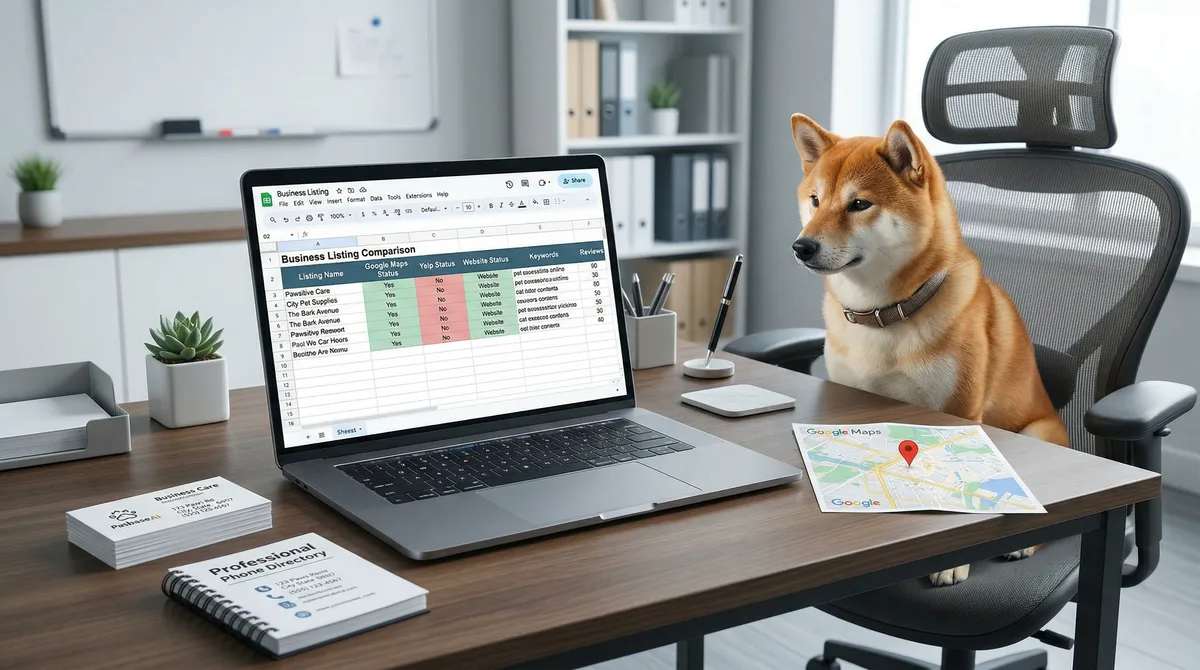
Table of Contents +
- What Is NAP Consistency and Why Does Google Care?
- How Does Inconsistent NAP Hurt Your Pet Store?
- What Are the Most Common NAP Errors for Pet Stores?
- How Do You Audit Your Pet Store's NAP Consistency?
- Which Directories Matter Most for Pet Store NAP?
- How Do You Prevent NAP Inconsistencies From Coming Back?
- How Does NAP Consistency Connect to Your Broader Local SEO Strategy?
- NAP Consistency Checklist for Pet Stores
- Frequently Asked Questions
- References
Learn why NAP consistency matters for pet store local rankings. Step-by-step audit process, common errors table, and a prevention system to stay accurate.
Your pet store is listed on Google, Yelp, Facebook, Apple Maps, and a dozen other directories. But is the information identical on every single one? If your business name is spelled differently on Yelp than on Google, if your address says "Street" on one platform and "St." on another, or if an old phone number still appears on a directory you forgot about - Google notices. And it penalizes you for it.
NAP stands for Name, Address, Phone number. These three data points are the foundation of how search engines verify that your pet store is real, legitimate, and located where you say it is. When your NAP is consistent across every directory and platform, Google trusts your business information and rewards you with higher local rankings. When it is inconsistent, Google gets confused - and confused search engines do not send you customers.
68% of consumers would stop using a local business after finding incorrect information online[1]. For pet stores that depend on local foot traffic, NAP inconsistency is not just an SEO problem. It is a revenue problem.
TL;DR
NAP (Name, Address, Phone) consistency means your pet store's contact information is identical across every online directory. Inconsistent NAP confuses Google, lowers your local rankings, and drives away customers. A structured audit fixes existing errors, and a master NAP document prevents new ones. Stores with consistent NAP are 40% more likely to appear in the local pack.
What Is NAP Consistency and Why Does Google Care?
NAP consistency means that your business name, street address, and phone number appear in the exact same format on every website, directory, and platform where your pet store is listed. Not similar. Not close. Identical.
Google cross-references your business information across hundreds of sources. When it finds the same name, the same address format, and the same phone number everywhere, it builds confidence that your business is legitimate and active. That confidence directly translates into higher local search rankings.
Citation signals - which include NAP consistency, citation volume, and citation relevance - account for approximately 11% of local pack ranking factors[2]. That may sound modest, but consider what is at stake: the local pack captures 44% of all clicks for local searches[3]. In a competitive pet store market, 11% of the ranking algorithm is the difference between appearing in the top 3 map results and being invisible.
Businesses with consistent NAP data across major citation sources are 40% more likely to appear in the local pack[4]. For a pet store competing against other local retailers, groomers, and pet supply chains, that 40% advantage is significant.
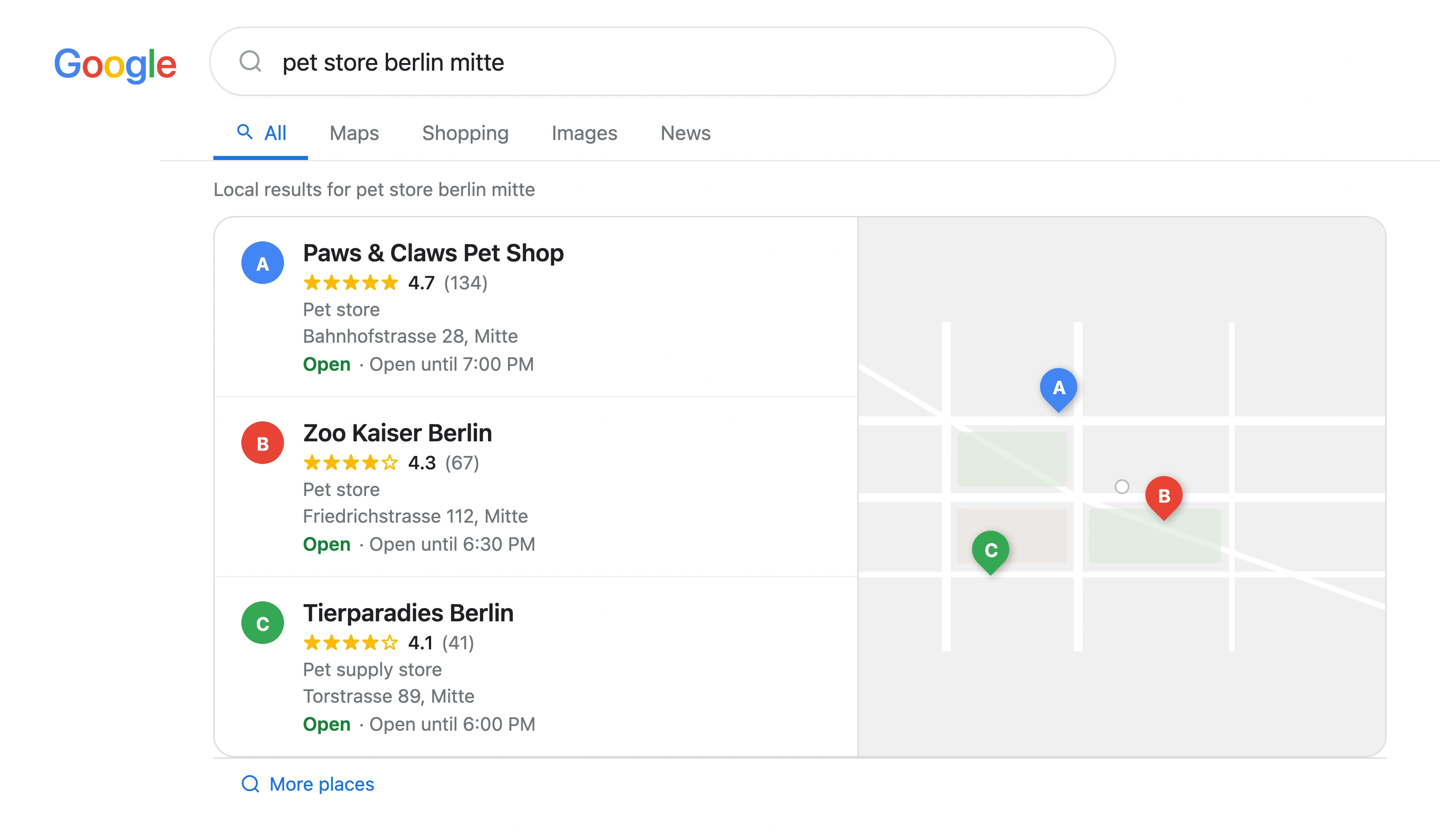
In my experience auditing pet store listings across Europe, NAP inconsistency is the most common local SEO problem I find - and the most underestimated. Store owners assume Google is smart enough to figure out that "Paws & Claws Pet Shop" and "Paws and Claws Petshop" are the same business. It is not. Google treats every variation as a potential signal of a different business or unreliable data.
Petbase automates SEO content for pet stores - publishing 10 optimized articles monthly so you can focus on running your shop - start your free trial.
How Does Inconsistent NAP Hurt Your Pet Store?
NAP inconsistency creates two parallel problems: it damages your search visibility, and it drives away customers who do find you.
The search engine side
When Google encounters conflicting information about your pet store, it cannot determine which version is correct. Instead of guessing, it reduces your ranking. Businesses with inconsistent NAP data rank 2-3 positions lower in local search results[5]. In local SEO, 2-3 positions often means the difference between appearing in the local pack and not appearing at all.
The damage compounds over time. Every new directory that copies your incorrect information from a data aggregator creates another conflicting signal. Without intervention, the problem grows.
The customer side
The numbers paint a clear picture of how consumers react to incorrect business information:
- 93% of consumers get frustrated by incorrect directory information[6]
- 71% had a negative experience in the past year because of incorrect local business information[7]
- 80% lose trust in a business when they see inconsistent contact details[8]
- 22% visited the wrong location because the address was incorrect[9]
- 36% called a wrong number because the phone listing was outdated[10]
For a pet store, these are not abstract statistics. A customer who drives to your old address on a Saturday morning to buy dog food will not try a second time. They will go to your competitor and leave you a negative review on their way home.
What Are the Most Common NAP Errors for Pet Stores?
After auditing hundreds of local business listings, I see the same mistakes in pet store NAP data again and again. Here are the most frequent errors, what causes them, and how they affect your rankings and customer experience.
| NAP Error | Example | Ranking Impact | Customer Impact |
|---|---|---|---|
| Business name variations | "Happy Paws Pet Store" vs. "Happy Paws" vs. "Happy Paws Pet Shop" | Google cannot confirm business identity - lower local pack ranking | Customers unsure if it is the same business |
| Address format differences | "123 Main Street" vs. "123 Main St." vs. "123 Main St" | Each format variation looks like a different location to Google | Navigation apps may not match the address correctly |
| Old address after relocation | New address on Google, old address still on Yelp and 20 other directories | Severe - conflicting location signals confuse the algorithm entirely | 22% of customers drive to the wrong location |
| Multiple phone numbers | Landline on Google, mobile on Facebook, tracking number on Yelp | Google questions which number is real - reduced trust signal | 36% of customers call the wrong number |
| Suite or unit number inconsistency | "Suite 4" vs. "Ste 4" vs. "#4" vs. "Unit 4" | Google treats each as a different address | Delivery drivers and customers cannot find the unit |
| Keyword-stuffed business name | "Happy Paws - Best Pet Store and Dog Grooming Munich" | Violates Google guidelines - risk of listing suspension | Looks spammy and unprofessional to customers |
| Outdated business hours | Pre-pandemic hours on some directories, current hours on others | Signals an inactive or unreliable business to Google | 53% of shoppers say accurate hours are their top priority |
| Inconsistent website URL | "happypaws.com" vs. "www.happypaws.com" vs. "happypaws.com/" | Dilutes link signals across multiple URL versions | Minor for customers but measurable for rankings |
The table above covers the most damaging errors. But the root cause is almost always the same: there is no single source of truth. Without a master document that defines exactly how your business information should appear, every person who creates or updates a listing introduces their own variation.
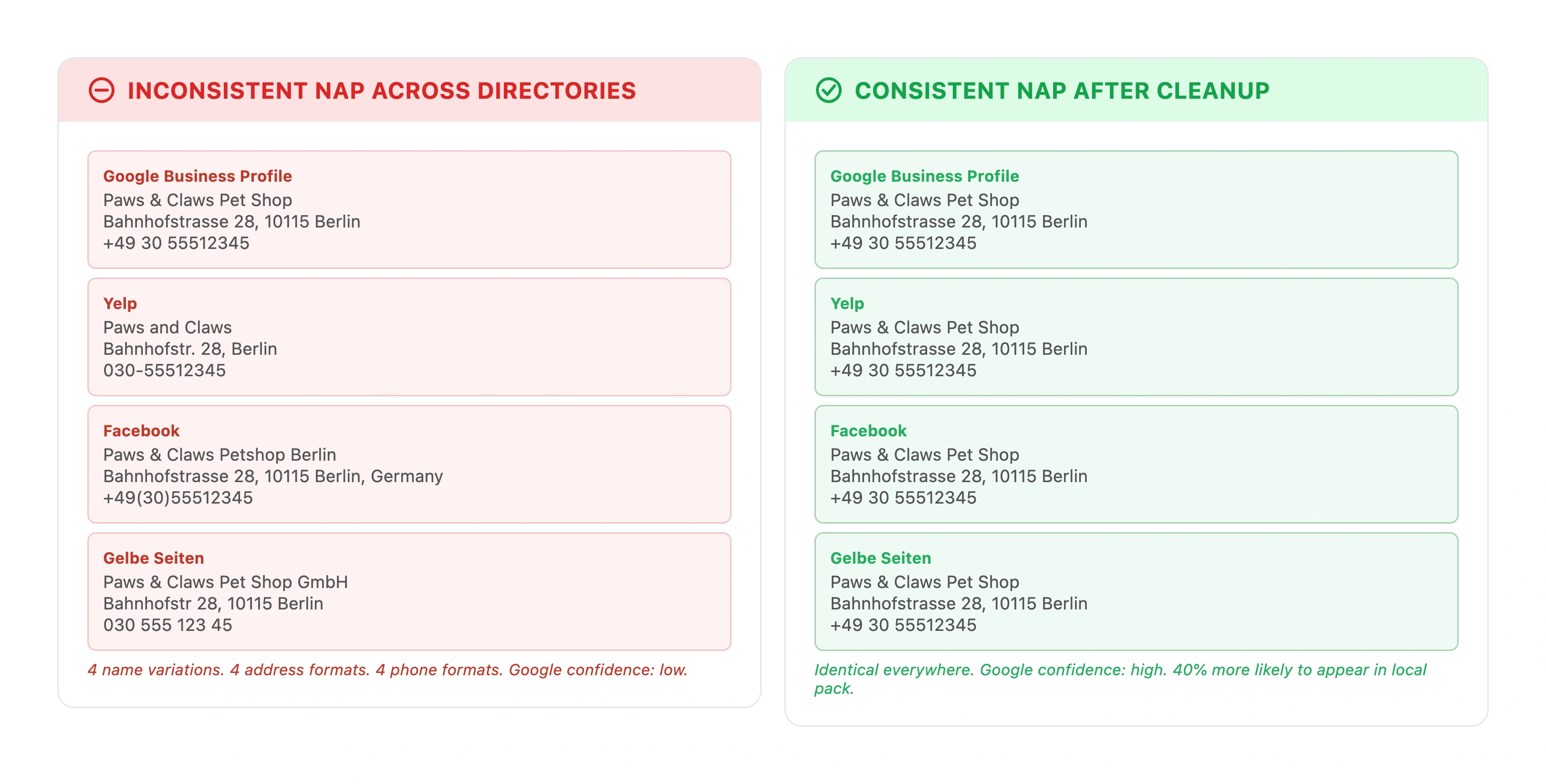
For pet stores in shopping centers, the suite number problem is especially common. A pet store at "Hauptstrasse 15, Unit 3" will appear differently on Google ("Hauptstrasse 15, Einheit 3"), on the shopping center's website ("Hauptstrasse 15, Shop 3"), and on Yelp ("Hauptstrasse 15"). Three directories, three different addresses, one confused search engine.
How Do You Audit Your Pet Store's NAP Consistency?
A NAP audit identifies every place your pet store is listed online and checks whether the information is correct. Here is a five-step process that covers all the bases.
Step 1: Create your master NAP document
Before you check anything, define the correct version of your business information. Write down exactly how each element should appear:
- Business name: Your exact legal or trading name. No keywords, no abbreviations unless that is your official name.
- Address: Full street address with consistent abbreviations (or none). Include suite or unit numbers in a fixed format.
- Phone number: One primary number in one consistent format. For European pet stores, include the country code if you serve international customers.
- Website URL: Choose one format (with or without www, with or without trailing slash) and use it everywhere.
- Business hours: Current hours including any seasonal variations.
Save this document where your entire team can access it. Every listing update, every new directory submission, and every directory correction should reference this document.
Step 2: Search for your business name
Search your exact business name in quotes on Google. Go through the first 4-5 pages of results. Open every directory listing you find and compare it against your master NAP document. Note every inconsistency in a spreadsheet.
Step 3: Search for your phone number and address
Google your phone number in quotes. This reveals listings you may have forgotten about or never created yourself. Data aggregators like Acxiom, Infogroup, and Localeze distribute business data to hundreds of directories automatically - sometimes with errors. Repeat the search with your street address.
If you have ever changed your phone number or address, search for the old information too. Every outdated listing needs to be corrected or removed.
Step 4: Use a citation audit tool
Manual searching catches the obvious listings but misses many smaller directories. Tools built specifically for citation auditing fill the gaps:
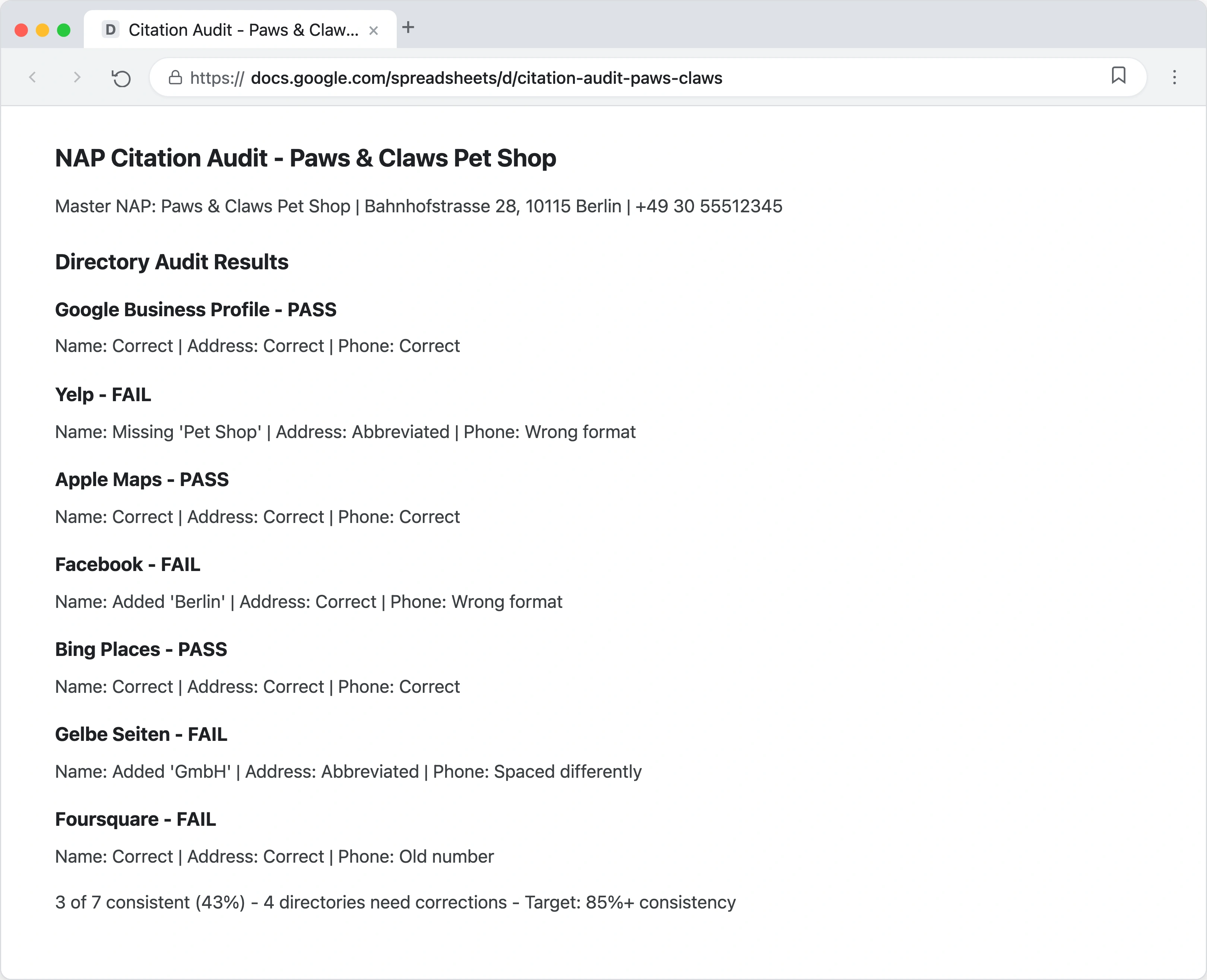
- BrightLocal: Scans major directories and reports where your business is listed, flags inconsistencies, and tracks corrections over time. Starting at approximately EUR 30 per month.
- Moz Local: Checks your NAP across multiple platforms and gives you an accuracy score. Identifies potential issues that need attention.
- Whitespark: Scans multiple directories for NAP inaccuracies. Also helps find new citation opportunities you may have missed.
- Semrush Listing Management: Distributes your correct NAP to 70+ directories and monitors for inconsistencies.
These tools cost between EUR 25-50 per month but save hours of manual work. For pet stores with 30+ existing citations, the time savings alone justify the cost.
Step 5: Prioritize and fix
Sort your findings into three categories:
- Fix immediately: Google Business Profile, Apple Maps, Bing Places, Facebook, Yelp. These high-authority directories have the most impact on rankings. Start here.
- Fix within 2 weeks: Pet-specific directories, local business directories, review platforms. These carry moderate ranking weight.
- Fix within 1 month: Smaller directories, data aggregators, old social profiles. Less ranking impact individually but they contribute to the overall signal.
For each listing, log in (or claim it if you have not already) and update the information to match your master NAP document exactly. For listings you cannot edit directly, contact the directory's support team and request an update.
For a complete directory checklist, see our guide on local citations for pet businesses.
Which Directories Matter Most for Pet Store NAP?
Not all directories carry equal weight. Focus your NAP consistency efforts on the platforms that send the strongest signals to Google and the most traffic to your store.
Tier 1: Non-negotiable (fix these first)
- Google Business Profile - Controls your Google Maps listing and local pack appearance. This is your most important listing.
- Apple Maps (Apple Business Connect) - Default on every iPhone. Growing search volume year over year.
- Bing Places - Powers Bing search, Cortana, and some voice search results.
- Facebook Business Page - 2.9 billion users. Strong local discovery features.
- Yelp - Top review platform. Frequently appears in Google search results.
Tier 2: High value (fix within first week)
- Foursquare - Feeds data to Apple Maps, Uber, Samsung, and 100+ apps. Fix Foursquare and you fix many downstream directories.
- Yellow Pages (local equivalent) - High domain authority, still heavily indexed.
- Trustpilot - Strong Google visibility in European markets.
- Local chamber of commerce - Trusted local domain, often DA 50-70.
Tier 3: Pet-specific directories
- BringFido, Rover, PetBacker, PawShake - Industry-relevant citations that send strong relevance signals to Google.
- These directories tell Google you are definitively in the pet industry, something general directories do not communicate as clearly.
Businesses listed across 50 or more directories with consistent NAP information can improve local rankings by up to 25%[11]. But 50 directories with consistent information beats 100 directories with errors. Quality and accuracy always outweigh raw volume.
If your store has multiple locations, NAP management becomes significantly more complex. Each location needs its own consistent set of listings. See our multi-location SEO guide for a detailed walkthrough.
How Do You Prevent NAP Inconsistencies From Coming Back?
Fixing your NAP is not a one-time project. Without a prevention system, inconsistencies will creep back within months. Here is how to keep your information accurate long-term.
1. Lock in your master NAP document
The master NAP document you created during the audit is now your permanent reference. Store it somewhere accessible - a shared drive, a pinned note in your team communication tool, or a printed sheet at the checkout counter. Anyone who touches a directory listing must use this document.
2. Assign one person as the NAP owner
Designate one team member (or yourself, if you are the owner) as the person responsible for all directory listings. When your store hours change, when you get a new phone number, or when a new directory opportunity appears, this person handles it. Multiple people updating listings in different ways is the fastest path to inconsistency.
3. Schedule quarterly audits
Set a calendar reminder to audit your top 20 citations every quarter. This takes about 30 minutes with a citation tool, or 1-2 hours manually. Quarterly checks catch data aggregator errors, unauthorized edits, and platform changes before they compound.
4. Update everywhere simultaneously
When something changes - a new phone number, adjusted seasonal hours, a slight address correction - update every directory within the same week. Do not update Google and plan to "get to the others later." Later turns into never, and now you have the exact inconsistency you worked to eliminate.
53% of shoppers say accurate store hours are their top priority when checking business listings[12]. If you change your hours for a holiday season, update them everywhere - not just on Google.
5. Monitor data aggregator accuracy
Data aggregators like Acxiom, Localeze (Neustar), and Infogroup distribute your business information to hundreds of smaller directories. If the aggregator has incorrect data, it spreads everywhere. Submit your correct master NAP to each major aggregator at least once per year.
For more on how duplicate and outdated listings affect your rankings, see our duplicate listings guide.
How Does NAP Consistency Connect to Your Broader Local SEO Strategy?
NAP consistency is not an isolated tactic. It is one layer in a local SEO strategy that includes your Google Business Profile, reviews, on-page SEO, and content marketing. Here is how NAP fits into the bigger picture.
NAP + Google Business Profile
Your GBP is the single most important local ranking factor[2]. But Google validates your GBP information by cross-referencing it with your citations. If your GBP says one thing and your citations say another, Google's confidence in your GBP drops. Clean NAP across all directories amplifies the ranking power of your Google Business Profile.
NAP + structured data
Adding LocalBusiness schema markup to your website confirms your NAP in a format Google can process automatically. When your schema, your GBP, and your directory citations all match, Google has three independent confirmations of your business information. That triple confirmation is a strong trust signal.
NAP + content marketing
NAP consistency gets your pet store visible on maps and in the local pack. Content marketing gets you visible in the organic results below the map - which account for 29% of local search clicks[3]. The two work together: consistent citations build Google's trust in your location, while quality content builds Google's trust in your expertise.
Multi-location retail brands with consistent data across listings achieve a 1.4-2.0x lift in engagement compared to competitors[13]. Pair that with regular content publishing, and the compounding effect accelerates.
NAP + technical SEO
Your website's technical SEO should reinforce your NAP. Your contact page, footer, and about page should all display the same business information that appears on your directories. Embedding a Google Map on your contact page with your exact address is another confirmation signal.
For a full local SEO roadmap that puts NAP in context with every other ranking factor, read the complete local SEO guide for pet businesses.
NAP Consistency Checklist for Pet Stores
Use this checklist to track your progress. Complete the items in order - each step builds on the previous one.
| Step | Action | Time Needed | Priority |
|---|---|---|---|
| 1 | Create master NAP document with exact business name, address, phone, URL, and hours | 15 minutes | Critical |
| 2 | Audit Google Business Profile - confirm all info matches master NAP | 10 minutes | Critical |
| 3 | Audit Apple Maps, Bing Places, Facebook, Yelp | 30 minutes | Critical |
| 4 | Search Google for business name, phone number, and old information in quotes | 30 minutes | High |
| 5 | Run citation audit tool (BrightLocal, Moz Local, or Whitespark) | 15 minutes | High |
| 6 | Fix all Tier 1 directory inconsistencies | 1-2 hours | High |
| 7 | Fix Tier 2 and pet-specific directory inconsistencies | 1-2 hours | Medium |
| 8 | Submit correct NAP to data aggregators (Acxiom, Localeze, Infogroup) | 30 minutes | Medium |
| 9 | Add LocalBusiness schema to your website with matching NAP | 30 minutes | Medium |
| 10 | Schedule quarterly NAP audit reminders | 5 minutes | Ongoing |
Total time investment for the initial audit and fix: 4-6 hours. Ongoing maintenance: 30-60 minutes per quarter. For a pet store, that is one afternoon of work that directly improves your local rankings for months.
Frequently Asked Questions
Does NAP consistency affect voice search results?
Yes. Voice assistants like Siri, Google Assistant, and Alexa pull business information from directories and your Google Business Profile. When someone says "find a pet store near me," the assistant returns results based on the same local ranking factors that power traditional search - including NAP consistency. 76% of consumers use voice search to find local businesses[14]. If your NAP is inconsistent, you are less likely to be the result the assistant recommends.
How often should I audit my pet store's NAP?
Audit your NAP at least quarterly. If your pet store recently moved, changed phone numbers, or adjusted business hours, run an immediate audit within the first week of the change. Data aggregators update on their own schedules, so even after you correct a listing, it may take 4-8 weeks for the change to propagate through all downstream directories. Quarterly audits catch these propagation delays before they affect your rankings.
Can I use different phone numbers for tracking on different directories?
This is strongly discouraged. Using different tracking phone numbers on different directories directly undermines your NAP consistency. Each unique phone number looks like a different business signal to Google. If you need call tracking, use a single tracking number consistently across all directories (not different numbers per directory), or track calls only through your Google Business Profile's built-in call tracking. The ranking cost of multiple phone numbers almost always outweighs the marketing data you gain from per-directory tracking.
What happens if a directory will not let me update my information?
Some directories lock listings or require verification before edits. Start by claiming the listing - most directories have a "claim this business" option. If claiming is not available, contact the directory's support team with proof of ownership (business registration, utility bill matching the address). For directories that do not respond, submit a removal request. An incorrect listing you cannot fix is worse than no listing at all. As a last resort, tools like Moz Local or Semrush Listing Management can push corrections to directories that accept automated submissions.
Is NAP consistency more important than getting more citations?
Consistency is more important than volume. 30 accurate, consistent citations will outperform 100 citations with errors. Businesses with consistent NAP across at least 85% of their citations see an average 23% improvement in local pack rankings[15]. Fix your existing listings before adding new ones. Once your current citations are clean, then expand to additional directories - always using your master NAP document to maintain consistency.
References
- BrightLocal (2025). Local Citations Trust Report. brightlocal.com
- Whitespark (2026). Local Search Ranking Factors. whitespark.ca
- BrightLocal (2025). Local SEO Statistics. brightlocal.com
- Whitespark (2026). Local Search Ranking Factors: NAP Consistency and Local Pack. whitespark.ca
- SEOWerkz (2025). Ultimate Guide to NAP Consistency for Local SEO. seowerkz.com
- BrightLocal (2025). Inaccurate Business Information: Nine Stats That Show Why It Is Dangerous. brightlocal.com
- BrightLocal (2025). Local Citations Trust Report: Negative Experiences. brightlocal.com
- BrightLocal (2025). Local Citations Trust Report: Trust Loss. brightlocal.com
- BrightLocal (2025). Local Citations Trust Report: Wrong Location Visits. brightlocal.com
- BrightLocal (2025). Local Citations Trust Report: Wrong Phone Calls. brightlocal.com
- BrightLocal (2025). What Is NAP? NAP Data Accuracy Guide. brightlocal.com
- BrightLocal (2025). Local SEO Statistics: Store Hours Priority. brightlocal.com
- Uberall (2025). NAP Consistency for Multi-Location Brands. uberall.com
- Synup (2025). Voice Search Statistics. synup.com
- Local Dominator (2026). Local Search Ranking Factors. localdominator.co