Online Reviews for Pet Stores: Get More 5-Star Reviews

Table of Contents +
- Why Online Reviews Make or Break Pet Store Rankings
- How Do Google Reviews Affect Local SEO?
- How to Ask Customers for Reviews (Without Being Pushy)
- What to Say When Responding to Positive Reviews
- How to Handle Negative Reviews Professionally
- How Many Reviews Does a Pet Store Need?
- Which Review Platforms Matter Most for Pet Stores?
- How to Create a Review Generation System
- Reviews Are Part of a Bigger Picture
- Frequently Asked Questions
- References
Get more 5-star Google reviews for your pet store. Review request templates, response frameworks, and a system that generates consistent reviews every week.
Pet stores with more Google reviews rank higher in local search, get more clicks, and close more sales. 93% of consumers say online reviews affect their buying decisions, and businesses with a 4+ star average receive 3x more clicks[1]. Yet most pet stores leave review generation to chance, hoping happy customers will find their way to Google. They will not - unless you ask. This guide shows you how to build a review system that brings in 5-star reviews consistently.
Why Online Reviews Make or Break Pet Store Rankings
Online reviews are one of the top three ranking factors for local search. When someone searches "pet store near me," Google considers three things: relevance, distance, and prominence. Reviews are the biggest component of prominence - and 46% of all Google searches have local intent[1].
The Local Pack (the map with three business listings at the top of search results) receives 44% of all clicks[1]. That is nearly half the traffic going to just three businesses. Reviews are a primary factor in which three appear.
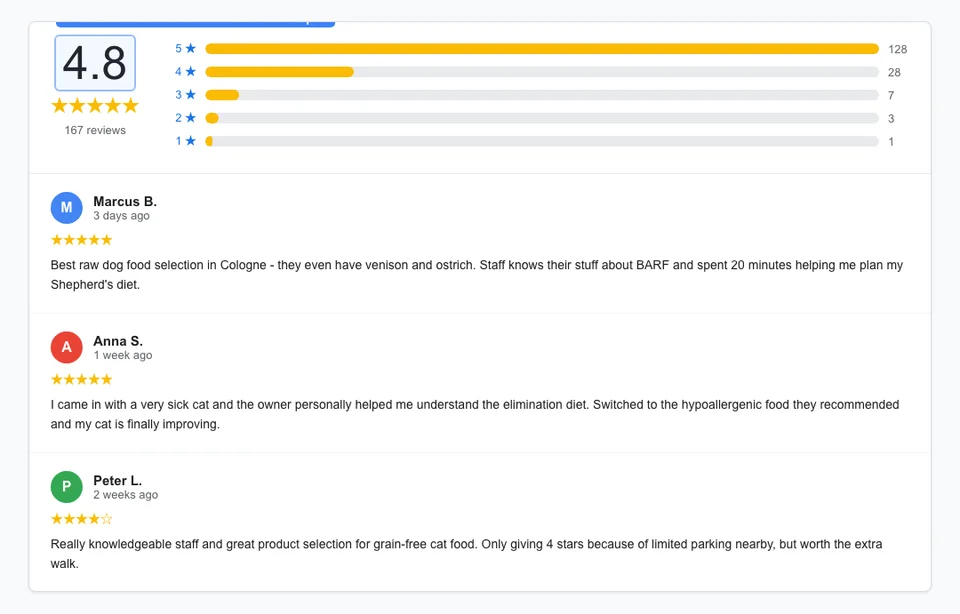
Here is what the data shows:
- Star rating matters. Stores with a 4+ star average get 3x more clicks from Google Maps than those rated below 4 stars[1].
- Review quantity matters. A pet store with 120 reviews will almost always outrank a competitor with 15 reviews - even if the competitor's rating is slightly higher.
- Review recency matters. Google gives more weight to reviews from the last 90 days than reviews from two years ago. A steady stream of new reviews signals that your business is active and current.
- Review content matters. Reviews that mention specific products, services, or pet types ("great selection of raw dog food," "the grooming service for my poodle was excellent") help Google understand what your business offers.
Beyond rankings, reviews directly influence buying decisions. Pet owners are emotionally invested in their purchases. They want social proof that other pet owners trust your store before they walk in or place an order.
Reviews also feed into your broader local SEO ecosystem. They strengthen your Google Business Profile, improve your visibility in "near me" searches, and build the trust signals that Google's local algorithm relies on.
Petbase automates SEO content for pet stores - publishing 10 optimized articles monthly so you can focus on running your shop - start your free trial.
How Do Google Reviews Affect Local SEO?
Google Reviews affect your local SEO in five specific ways. Understanding each one helps you prioritize your review strategy.
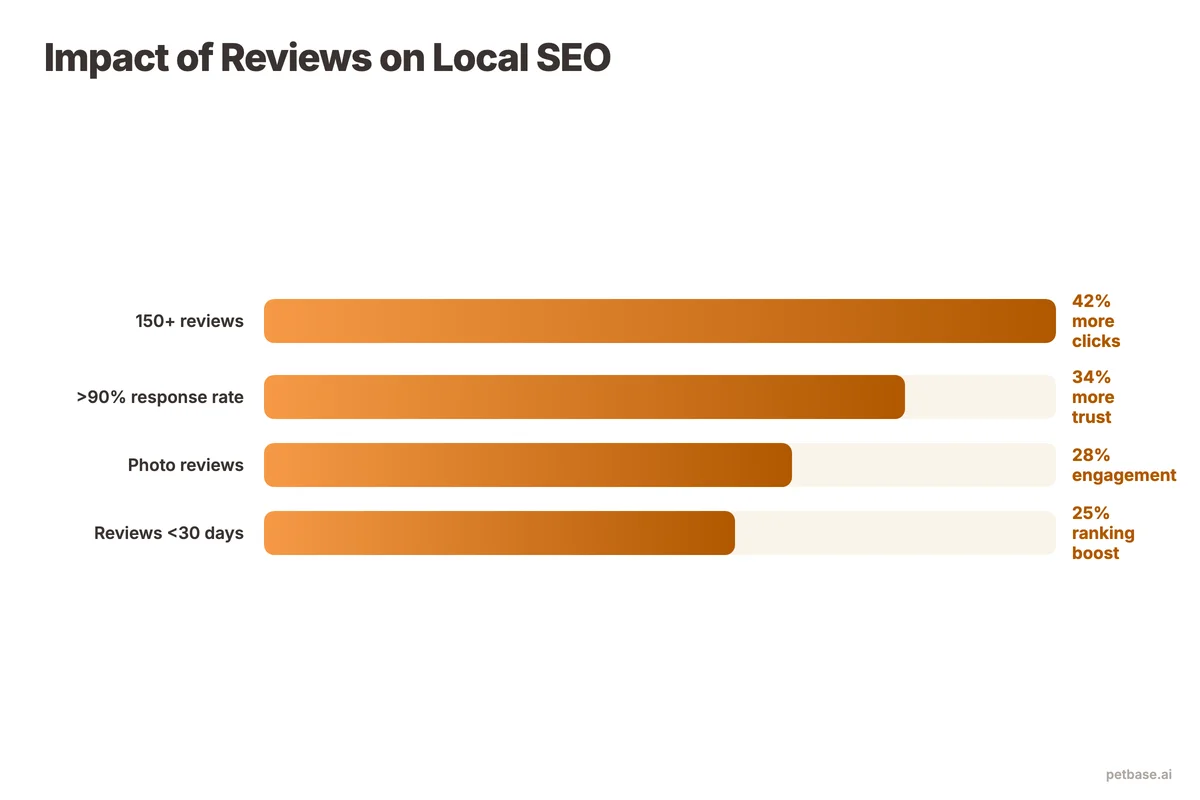
1. Local Pack rankings. The Local Pack is the most valuable real estate for pet stores. Google Business Profile accounts for 81% of all review volume[2], making it the review platform that matters most. Businesses with a complete GBP receive 4x more visits than incomplete profiles[2]. A pet store with 80 reviews averaging 4.7 stars will typically appear above a competitor with 20 reviews averaging 4.9 stars.
2. Click-through rate. Star ratings appear directly in search results. A 4.8-star rating with 150 reviews gets significantly more clicks than a 4.2-star rating with 30 reviews. More clicks send positive engagement signals back to Google, further boosting your rankings.
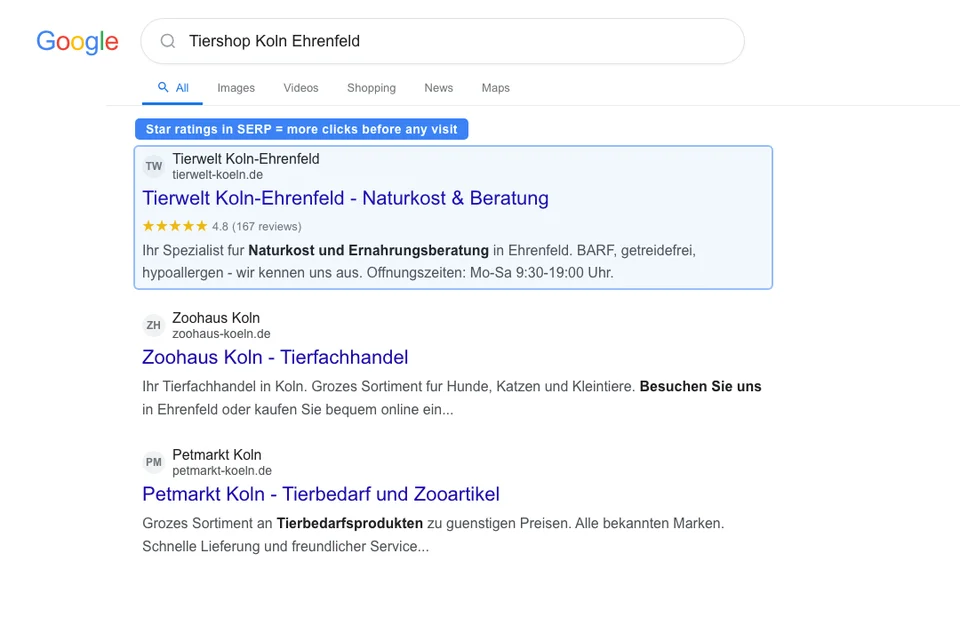
3. Keyword relevance. When customers mention products or services in their reviews ("best selection of grain-free cat food in the city"), Google associates those keywords with your business. This helps you rank for searches you might not have explicitly optimized for on your website.
4. Trust and conversion. A strong review profile converts more visitors into customers. This applies both online (more website clicks, more calls) and offline (more foot traffic). Higher conversion rates mean more transactions, which Google can measure through various signals.
5. Freshness signals. Regular new reviews tell Google that your business is active, relevant, and serving customers. A business that received its last review 8 months ago looks less trustworthy than one that receives reviews every week.
How to Ask Customers for Reviews (Without Being Pushy)
Most pet store customers are happy to leave a review - they just need a prompt. The key is asking at the right moment, in the right way, and making it as easy as possible.
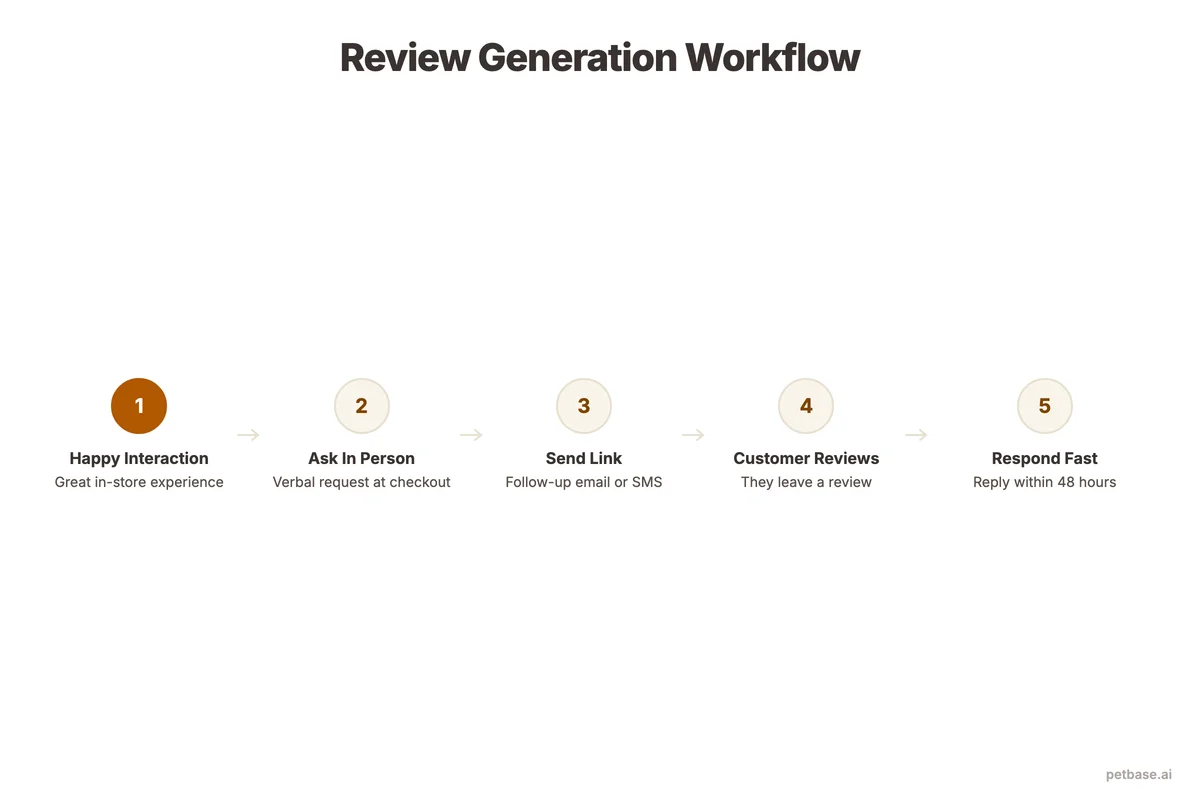
The best moment to ask
Ask immediately after a positive experience. The best timing windows:
- After a purchase where you gave personal advice. "I'm glad I could help you find the right food for Max. If you have a moment, a Google review would really help other pet owners find us too."
- After a grooming appointment. The customer is seeing their pet freshly groomed and feeling good. Hand them a card with a QR code to your Google review page.
- After a positive email or phone interaction. If a customer emails to say they love a product, reply with thanks and a review link.
- After resolving a problem. Customers whose issues are resolved well often leave the most enthusiastic reviews.
How to ask (templates that work)
| Channel | Template | When to Use |
|---|---|---|
| In-person | "Thanks for coming in today! If you have 30 seconds, a quick Google review helps other pet owners find us. Here's a card with the direct link." | At checkout after a positive interaction |
| Email (post-purchase) | "Hi [Name], thanks for shopping with us! How is [Pet Name] enjoying the [product]? If you're happy, we'd love a quick Google review - it takes 30 seconds and helps other pet owners discover our store. [Direct link]" | 3-5 days after purchase |
| SMS | "Thanks for visiting [Store Name]! Enjoyed your experience? Leave us a quick review: [link]. It helps other pet owners find us!" | Same day, 2-4 hours after visit |
| Receipt/packaging insert | "Love your purchase? Tell other pet parents about us on Google! [QR code]" | With every order |
| Social media | "Our customers are the best! If you've had a great experience at [Store], we'd love to hear about it on Google. Link in bio." | Monthly, after showcasing a customer story |
The QR code method
Create a QR code that links directly to your Google review page (not your profile - the actual review writing page). Print it on:
- A small card handed out at checkout
- A sticker on your counter near the register
- The back of your business card
- Inside packaging for online orders
- On your grooming appointment confirmation sheet
The fewer taps between the ask and the review form, the more reviews you get.
What to Say When Responding to Positive Reviews
Responding to every review matters. It shows Google that your profile is active, and it shows customers that you value their feedback. Keep positive review responses personal and brief.
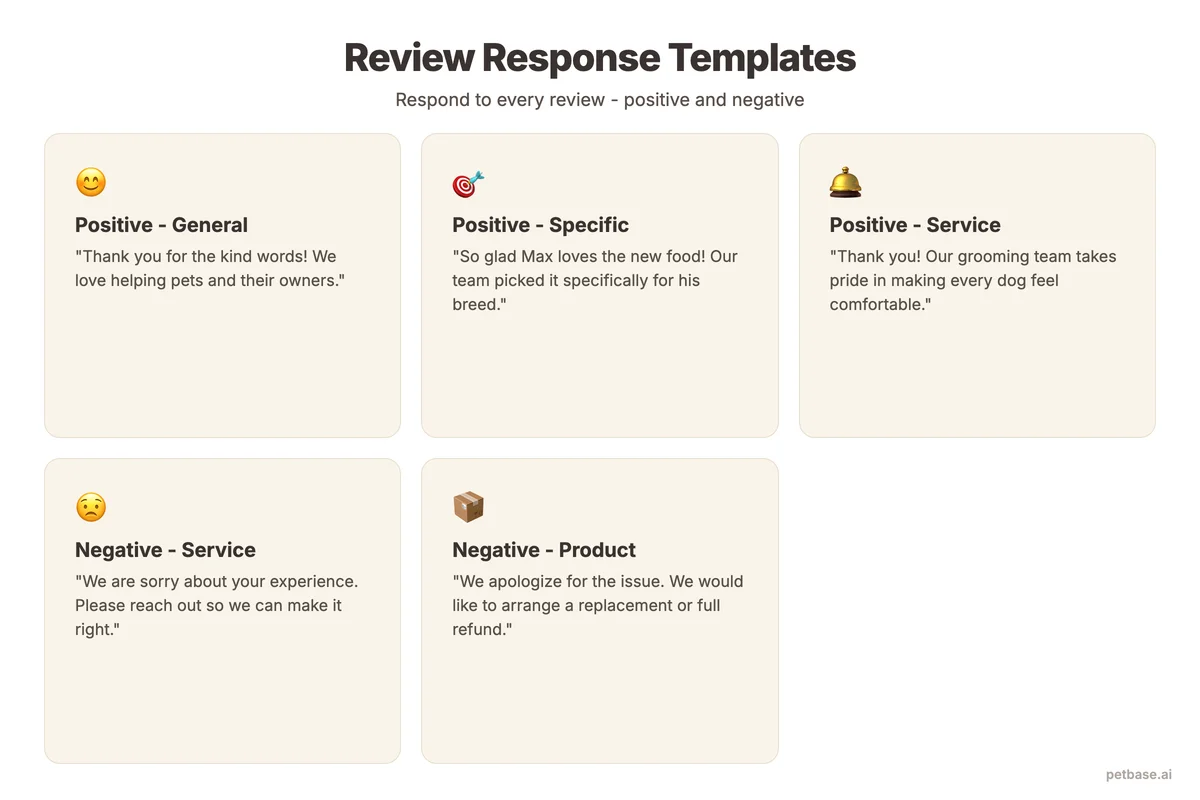
Do:
- Thank the customer by name
- Reference something specific from their review
- Mention their pet's name if they included it
- Keep it to 2-3 sentences
Do not:
- Copy-paste the same response on every review
- Stuff keywords into your response unnaturally
- Use it as an advertising opportunity
- Take more than 48 hours to respond
Example responses:
- "Thanks so much, Sarah! We're glad Bella is loving the new joint supplements. See you both next month!"
- "Really appreciate the kind words, Thomas. It was great helping you set up the new aquarium - hope the tetras are settling in well!"
- "Thank you for the review, Maria! We're happy the raw food transition is going smoothly for Rocky. Let us know if you have any questions along the way."
How to Handle Negative Reviews Professionally
Negative reviews happen to every business. How you respond matters more than the review itself. A well-handled negative review can actually increase customer trust - it shows you care and take responsibility.
| Step | What to Do | What to Avoid |
|---|---|---|
| 1. Pause | Wait 1-2 hours before responding. Process the emotion first. | Responding immediately while frustrated or defensive |
| 2. Acknowledge | "Thank you for letting us know about this. We're sorry your experience wasn't what you expected." | Dismissing or minimizing the complaint |
| 3. Take responsibility | "You're right - we should have [specific action]. That's on us." | Blaming the customer, making excuses |
| 4. Offer resolution | "We'd like to make this right. Please contact us at [email/phone] so we can resolve this directly." | Arguing publicly or sharing private details |
| 5. Follow up | If resolved, politely ask if they would consider updating their review. | Begging, bribing, or pressuring for a review change |
Key rules for negative reviews:
- Never argue publicly. Move the conversation offline as quickly as possible.
- Never fake reviews to bury negative ones. Google penalizes this, and customers can tell.
- Never pay for review removal services. These are scams.
- Do flag reviews that violate Google's policies (spam, fake reviews from non-customers, reviews with personal attacks). Google will remove legitimate policy violations.
How Many Reviews Does a Pet Store Need?
The answer depends on your local competition. Here is a practical framework.
Check your competitors first. Search "pet store" + your city on Google. Look at the top 3 results in the Local Pack. Note their review count and average rating. Your target is to match and then exceed the leader.
General benchmarks for pet stores:
- Getting started: 20-30 reviews establishes basic credibility. Most customers will trust a store with 25 reviews averaging 4.5+ stars.
- Competitive: 50-100 reviews puts you in the running for Local Pack placement in most markets.
- Dominant: 150+ reviews with a 4.7+ average makes you the clear leader in most local markets. At this level, your review profile alone can outweigh other local SEO factors.
Velocity matters as much as total count. Getting 5 reviews per week for 10 weeks is more valuable than 50 reviews in one week followed by silence. Google's algorithm favors consistent, steady review growth. Sudden spikes can actually trigger spam filters.
A realistic target for most pet stores: 3-5 new reviews per week. If you serve 20-30 customers per day in-store, converting just 2-3% of them into reviewers gives you that number.
Which Review Platforms Matter Most for Pet Stores?
Google is the priority. Google Business Profile accounts for 81% of all review volume[2], which means it is the single platform that moves the needle most for local search visibility. But it is not the only platform worth your attention.
| Platform | Priority | Why It Matters | Best For |
|---|---|---|---|
| Google Business Profile | Critical | Directly impacts Local Pack rankings and map visibility | Every pet store |
| High | Social proof for customers who check your Facebook before visiting | Stores with active social media presence | |
| Yelp | High | Yelp listings frequently appear in Google search results | Pet stores in the US and major cities |
| Trustpilot | High | Dominant review platform in Europe, strong Google visibility | Online pet stores, European markets |
| Apple Maps | Medium | Growing user base, especially among iPhone users | Stores where many customers use iPhones |
| Industry-specific (BringFido, etc.) | Lower | Niche credibility and qualified referral traffic | Stores offering grooming, boarding, or pet-friendly dining |
Focus 80% of your review-building efforts on Google. Spread the remaining 20% across Facebook and one other platform relevant to your market. Trying to build reviews on five platforms simultaneously dilutes your effort and overwhelms your customers.
For how reviews fit into your broader local presence, see the local citations guide for pet businesses and the Google Maps optimization guide.
How to Create a Review Generation System
Random requests get random results. A system gets consistent reviews. Here is how to build one for your pet store.
Step 1: Create your Google review link
Go to your Google Business Profile. Click "Ask for reviews" - Google will give you a short URL that takes customers directly to the review form. Save this link everywhere. Businesses with photos on their GBP receive 42% more direction requests[3], so make sure your profile is complete before you start driving reviewers there.
Step 2: Set up a post-purchase email sequence
Configure an automated email that goes out 3-5 days after a purchase. Include a personalized greeting, a reference to their purchase, and a direct link to your Google review page. Keep the email short - 3-4 sentences maximum. Pet owners are busy.
Step 3: Train your staff
Every team member who interacts with customers should know how and when to ask for reviews. Create a simple script: "If you enjoyed your visit today, a quick Google review really helps other pet owners find us. Here's a card with the link - it takes 30 seconds." Role-play it once so it feels natural.
Step 4: Place QR codes everywhere
Print QR codes that link to your Google review page. Place them at the register, on packaging inserts, on grooming appointment cards, and in your email signature. The goal: every customer interaction should include a low-pressure review opportunity.
Step 5: Monitor and respond daily
Set a Google alert for your business name. Check Google Business Profile daily. Respond to every review within 24-48 hours. This keeps your profile active and shows Google that you are engaged.
Step 6: Track your metrics monthly
Record your review count, average rating, and review velocity each month. Set a target (for example, 15 new Google reviews per month) and track your progress. If you fall behind, increase your in-store and email asking frequency.
This system takes about 2 hours to set up and 15 minutes per day to maintain. The return - better rankings, more foot traffic, more online sales - is worth it many times over.
For more strategies to improve your local presence, see the local SEO guide for pet businesses. To track how your reviews affect your search visibility, see the ranking tracking guide.
Reviews Are Part of a Bigger Picture
Reviews do not work in isolation. They are one piece of a local SEO strategy that also includes your website content, your Google Business Profile, and your backlink profile. Organic search drives 53% of all website traffic[4], which means your blog and service pages pull in customers who are not searching specifically for your store but for the products and advice you sell.
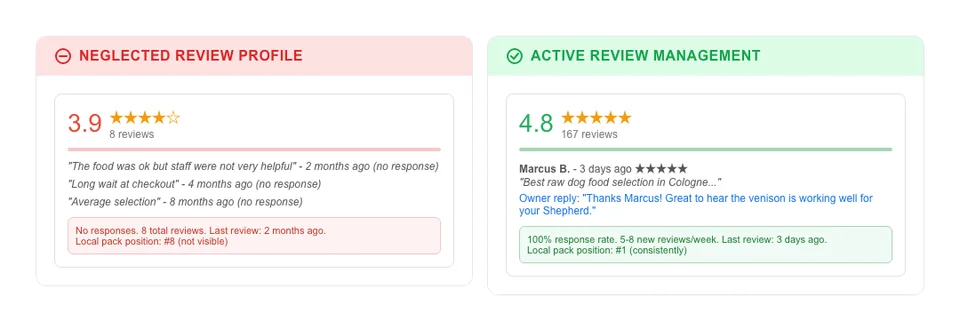
The global pet market is valued at $273.42 billion[5], and online is where that money moves first. Yet 61% of small businesses are not investing in SEO at all[6]. That gap between demand and competition is the opportunity. If you combine a strong review profile with consistent content, you take market share from the majority that is not showing up online.
Petbase publishes 10 SEO-optimized articles per month to your website for EUR 199/mo - covering the content side so you can focus on the customer experience that generates 5-star reviews. Reviews bring the local trust. Content brings the organic traffic. Together, they compound.
Start your free trial and see what consistent, research-backed content does for your rankings.
Frequently Asked Questions
Is it okay to offer discounts or freebies in exchange for reviews?
No. Google's guidelines explicitly prohibit incentivized reviews. Offering a discount, coupon, or free product in exchange for a review violates their terms of service. If Google detects incentivized reviews, they may remove the reviews and penalize your profile. Instead, focus on making the review process easy and asking at the right moment. Most happy customers are willing to leave a review when asked directly - they just need a simple nudge and a direct link.
What should I do about fake reviews from competitors?
Flag them through Google Business Profile using the "Flag as inappropriate" option. Provide evidence that the reviewer was never a customer (for example, if you have no record of their name in your system). Google takes 5-20 business days to review flagged reviews. If the standard flagging process does not work, escalate through Google Business Profile support. Document everything. In the meantime, the best defense against fake negative reviews is a strong base of genuine positive reviews - they dilute the impact and make the fake ones obvious to readers.
How do I recover from a low Google rating?
A low rating (below 4.0) requires a two-pronged approach. First, address the issues causing negative reviews. Read every negative review carefully, identify patterns, and fix the underlying problems - whether that is product quality, customer service, store cleanliness, or wait times. Second, actively generate new positive reviews to raise your average. If you currently have 30 reviews averaging 3.5 stars, you need roughly 30 new 5-star reviews to bring your average up to 4.2. At 5 new reviews per week, that takes 6 weeks. The key is fixing the root cause first, otherwise new customers will leave more negative reviews and cancel out your progress.
References
- BrightLocal (2024). Local SEO Statistics. brightlocal.com
- Birdeye (2024). State of Google Business Profiles. birdeye.com
- Sterling Sky (2024). How to Interpret Google Business Profile Performance. sterlingsky.ca
- BrightEdge (2024). How Much Traffic Comes from Organic Search. seoinc.com
- Fortune Business Insights (2024). Pet Care Market. fortunebusinessinsights.com
- Clutch (2025). SEO Statistics. clutch.co