How to Optimize Pet Store Category Pages for Google


Table of Contents +
- Why Category Pages Are Your Best Ranking Opportunity
- How to Structure Category Page URLs for Pet Stores
- How to Write Category Page Content That Ranks
- How to Optimize Category Page Headings and Meta Tags
- How to Handle Product Filters Without Creating SEO Problems
- How to Build Internal Links From Category Pages
- How to Add Schema Markup to Category Pages
- Why Page Speed Matters for Category Pages
- How to Avoid Thin Content on Category Pages
- Category Page Optimization Checklist
- Frequently Asked Questions
- References
Optimize pet store category pages for Google with URL structure, content strategy, meta tags, filter handling, and internal links. Full checklist included.
Category pages are the pages that sit between your homepage and your individual product pages. They list all the dog harnesses, all the grain-free cat foods, or all the bird cages you carry. For most pet stores, these pages drive more organic traffic than any single product page because they target broader, higher-volume keywords. Organic search accounts for 53% of all website traffic[1], and category pages capture a large share of that because they match the way shoppers actually search.
A well-optimized category page for "dog harnesses" can rank for dozens of related searches, while a single product page ranks for just one or two. Despite this, most pet stores treat category pages as empty grids of product thumbnails with no text, no headings, and no internal links. Google sees a page full of images with no context and has nothing to rank. This guide shows you how to fix that - step by step - so your category pages become the strongest ranking assets on your pet store SEO foundation.
Why Category Pages Are Your Best Ranking Opportunity
Category pages target the middle of the search funnel - keywords where shoppers know what type of product they want but have not picked a specific item yet. Someone searching "grain-free dog food" is further along than someone searching "is grain-free dog food good" (informational) but not as committed as someone searching "Orijen Original 11.4kg price" (transactional). This middle-funnel position is where pet stores can win.
Here is why category pages outperform other page types for SEO:
- Higher search volume: "Dog food" gets 10 to 50 times more searches than any specific dog food product name.
- Commercial intent: Searchers are looking to buy, not just learn. Long-tail keywords make up 70% of all searches and convert at 36%[2], and category pages sit right at this intersection of specificity and purchase intent.
- Link equity concentration: Internal links from every product in the category flow up to the category page, concentrating ranking power. The page ranking #1 for any given query has 3.8x more backlinks than positions 2 through 10[3], and category pages accumulate this authority naturally from their child products.
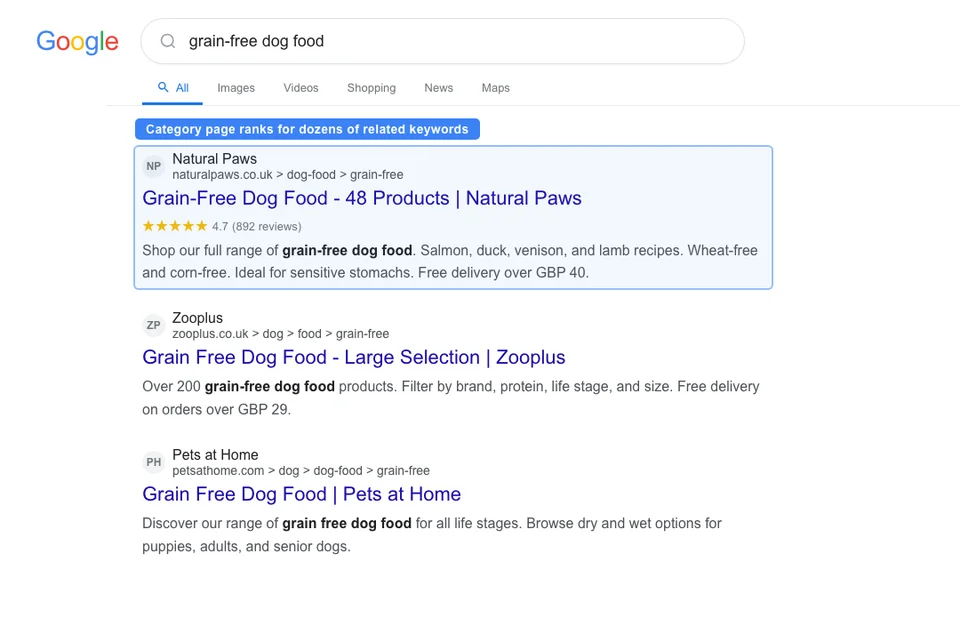
- Keyword expansion: One category page can rank for the main keyword plus dozens of variations ("best dog food," "premium dog food," "dog food brands," "dry dog food").
Large retailers like Chewy and Zooplus rank for thousands of keywords through category pages alone. As a smaller pet store, you cannot compete on domain authority - but you can compete on content depth and niche specificity. A category page for "raw dog food for small breeds" targets a segment that big retailers often ignore, giving you a realistic ranking opportunity. The global pet e-commerce market is projected to reach $94.89 billion[4], so even capturing a small share of niche category searches adds up.
Petbase automates SEO content for pet stores - publishing 10 optimized articles monthly so you can focus on running your shop - start your free trial.
How to Structure Category Page URLs for Pet Stores
URL structure affects both rankings and user experience. A clean, logical URL hierarchy helps Google understand your site architecture and helps shoppers know where they are on your site.
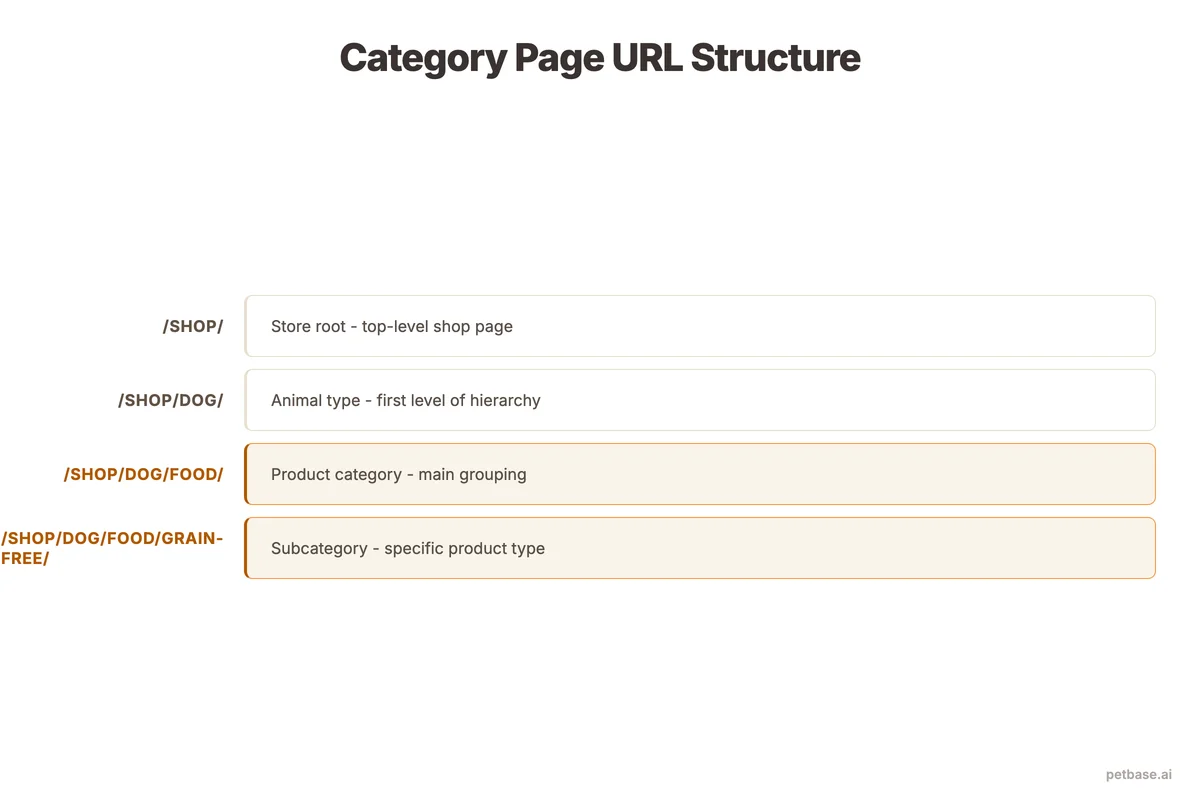
Here are URL structure examples for pet stores:
| Structure Type | URL Example | When to Use |
|---|---|---|
| Top-level category | /dogs/food/ | Broad product types |
| Subcategory | /dogs/food/grain-free/ | Specific product segments |
| Filtered view | /dogs/food/?brand=orijen | User-selected filters (not indexed) |
| Flat structure | /grain-free-dog-food/ | Small catalogs with few categories |
| Species-first | /cats/toys/interactive/ | Multi-species stores |
Rules for category URLs:
- Keep URLs under 60 characters when possible
- Use hyphens to separate words (not underscores)
- Include the primary keyword in the URL
- Avoid dynamic parameters for indexable category pages
- Maintain consistent hierarchy (always /species/category/subcategory/)
- Do not include unnecessary words like "shop," "products," or "collection"
If you are restructuring existing URLs, set up 301 redirects from old URLs to new ones. Never leave old category URLs returning 404 errors - that wastes the link equity those pages have accumulated. Your product brand SEO strategy depends on preserving URL authority across your entire site.
How to Write Category Page Content That Ranks
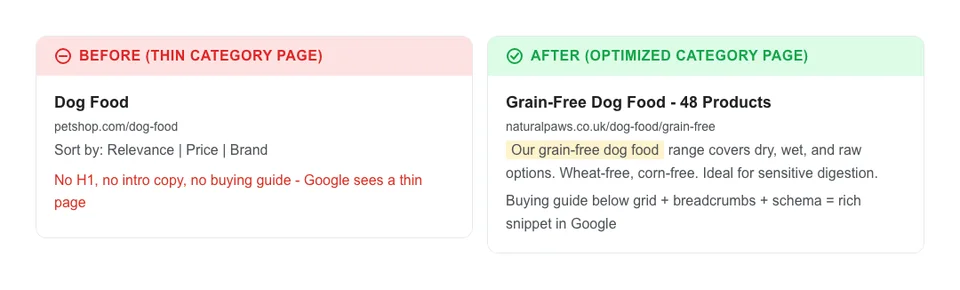
This is where most pet stores fail. A category page with nothing but a product grid and a sort dropdown gives Google zero unique text to index. You need to add written content to category pages without burying the products or making the page feel like a blog post. Companies with active blogs get 55% more website traffic[5], and the same principle of unique, helpful text applies to category pages.
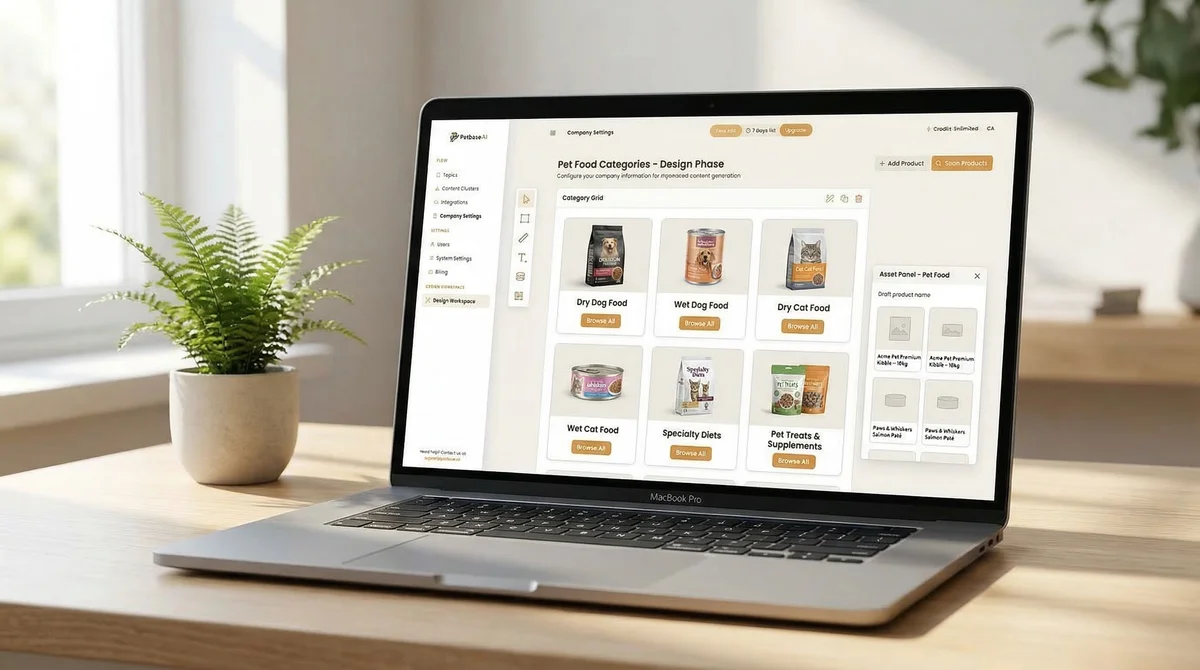
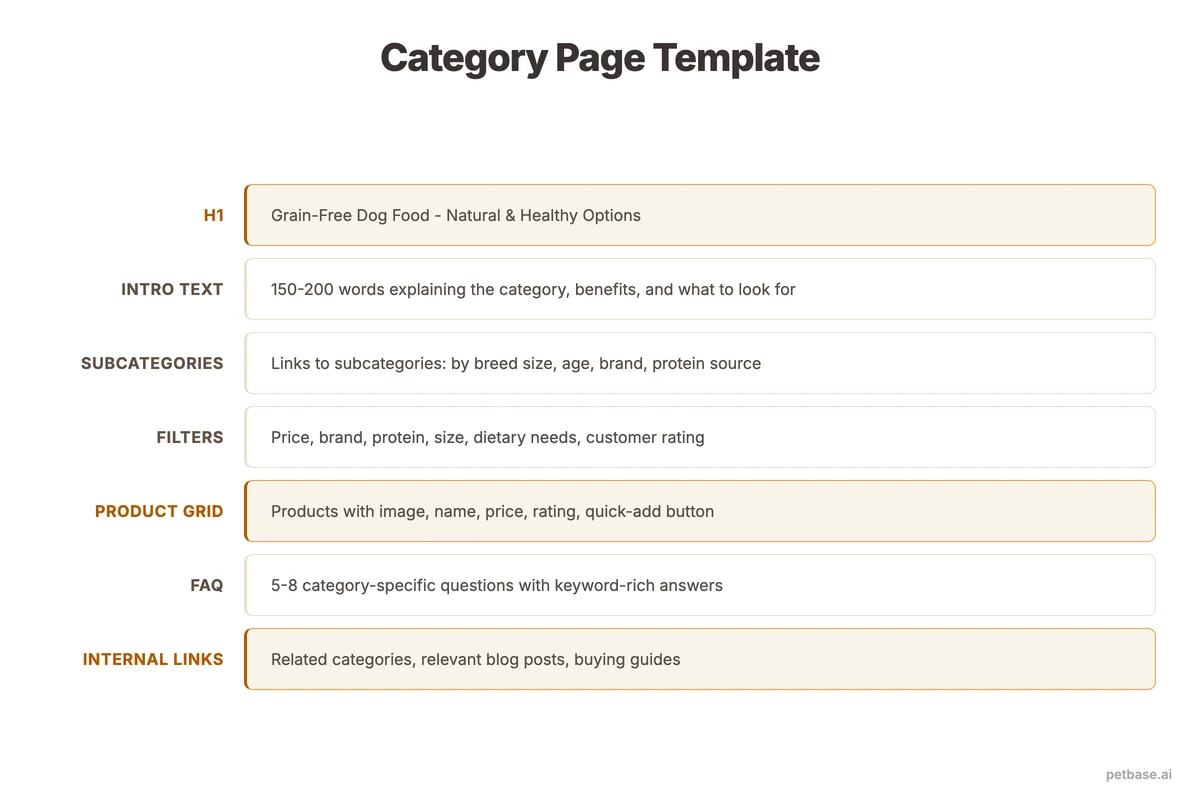
Here is the content structure that works:
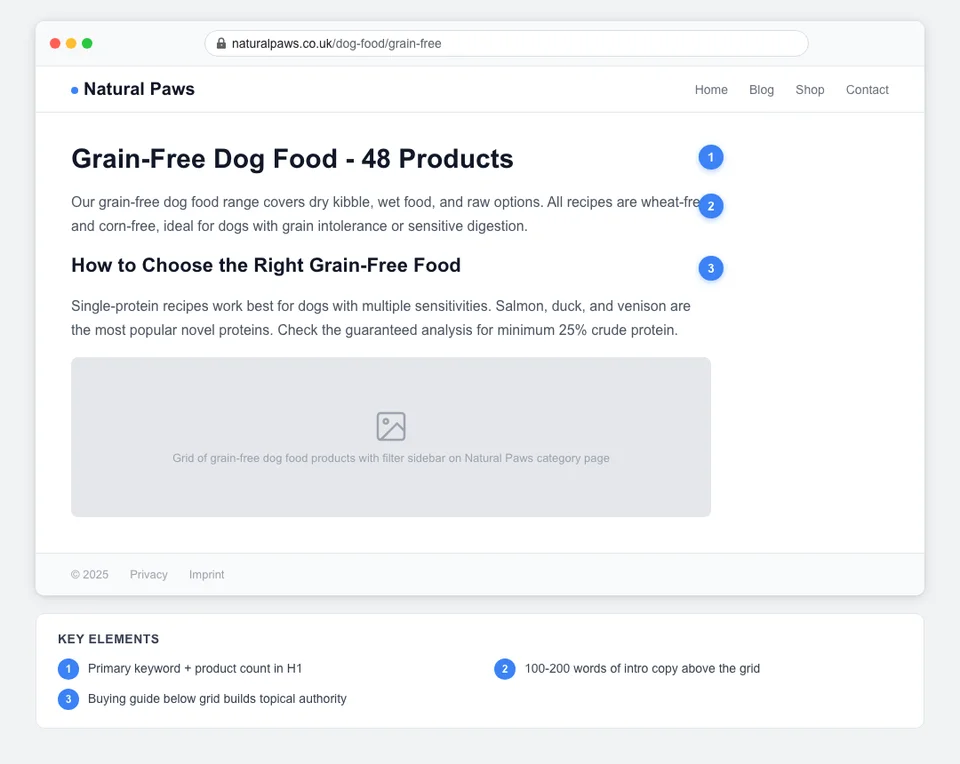
Above the product grid (100-200 words):
- One H1 heading with the primary keyword ("Grain-Free Dog Food")
- A short introductory paragraph explaining what the category includes and who it is for
- Optional: 2 to 3 bullet points highlighting key buying criteria
Below the product grid (200-400 words):
- A buying guide section with H2 subheadings
- Common questions answered in 2 to 3 sentences each
- Internal links to related categories and blog posts
This structure keeps products visible above the fold while giving Google 300 to 600 words of unique content to index. The content below the grid acts as a mini buying guide that serves both SEO and user experience.
Here is what to include in the below-grid content:
- "How to choose" paragraph: Help shoppers understand what to look for. "When choosing grain-free dog food, look for named protein sources as the first ingredient, balanced omega fatty acids, and no artificial preservatives."
- Comparison or differentiation: Explain the difference between subcategories. "Freeze-dried raw differs from air-dried in moisture content and shelf life."
- Trust signals: Mention brands you carry and why you selected them.
- Internal links: Link to your product description guide and related blog content.
How to Optimize Category Page Headings and Meta Tags
Category page headings and meta tags follow the same principles as product pages but target broader keywords. The key difference is intent matching - category pages target browsing intent, not buying intent for a specific product. The average e-commerce title tag is only 39 characters and the average meta description just 96 characters[6] - both well below best practice, meaning most stores leave visibility on the table.
H1 tag rules:
- One H1 per category page
- Include the primary keyword naturally
- Keep it under 60 characters
- Examples: "Grain-Free Dog Food," "Interactive Cat Toys," "Bird Cage Accessories"
Title tag formula:
[Category Name] - [Benefit or Quantity] | [Store Name]
Examples:
- "Grain-Free Dog Food - 40+ Brands, Free Shipping | YourPetStore"
- "Interactive Cat Toys - Vet-Approved, All Ages | YourPetStore"
Meta description formula:
[What the category contains] + [key differentiator] + [call to action]
Examples:
- "Browse 40+ grain-free dog food brands with real meat as the first ingredient. Free shipping on orders over EUR 49. Find your dog's perfect food today."
- "Shop interactive cat toys recommended by vets. From puzzle feeders to electronic mice. Keep your cat mentally stimulated. Free returns within 30 days."
Each category page needs a unique title tag and meta description. Duplicate meta tags across categories confuse Google and reduce click-through rates in search results.
How to Handle Product Filters Without Creating SEO Problems
Product filters (brand, price, size, color) create a major SEO challenge. Every filter combination generates a unique URL - and if Google indexes all of them, you end up with thousands of thin, duplicate pages competing against each other.
A pet store with 10 categories and 5 filter types could accidentally generate 10,000+ indexable URLs, most containing thin or duplicate content. This is called index bloat, and it dilutes your entire site's crawl budget and ranking authority.
Here is how to manage filters correctly:
- Noindex filtered URLs: Add a noindex meta tag to any URL generated by user filters (brand, price, size). These pages are useful for shoppers but should not be indexed by Google.
- Canonical tags: Every filtered page should have a canonical tag pointing to the main (unfiltered) category page. This tells Google to consolidate ranking signals into the parent page.
- Disallow in robots.txt: Block filter parameters from crawling entirely. Example: Disallow: /*?brand= and Disallow: /*?sort=
- Exception - high-volume filter combinations: If a specific filter combination targets a high-volume keyword ("Orijen dog food" or "dog toys under 10 EUR"), consider making it a static subcategory page instead of a filtered URL. This gives you full control over the content and SEO elements.
The decision about which filter combinations to index should be data-driven. Check keyword search volumes for your main filter combinations. If "[brand] + [category]" has significant search volume, create a dedicated subcategory page. If it does not, keep it noindexed.
How to Build Internal Links From Category Pages
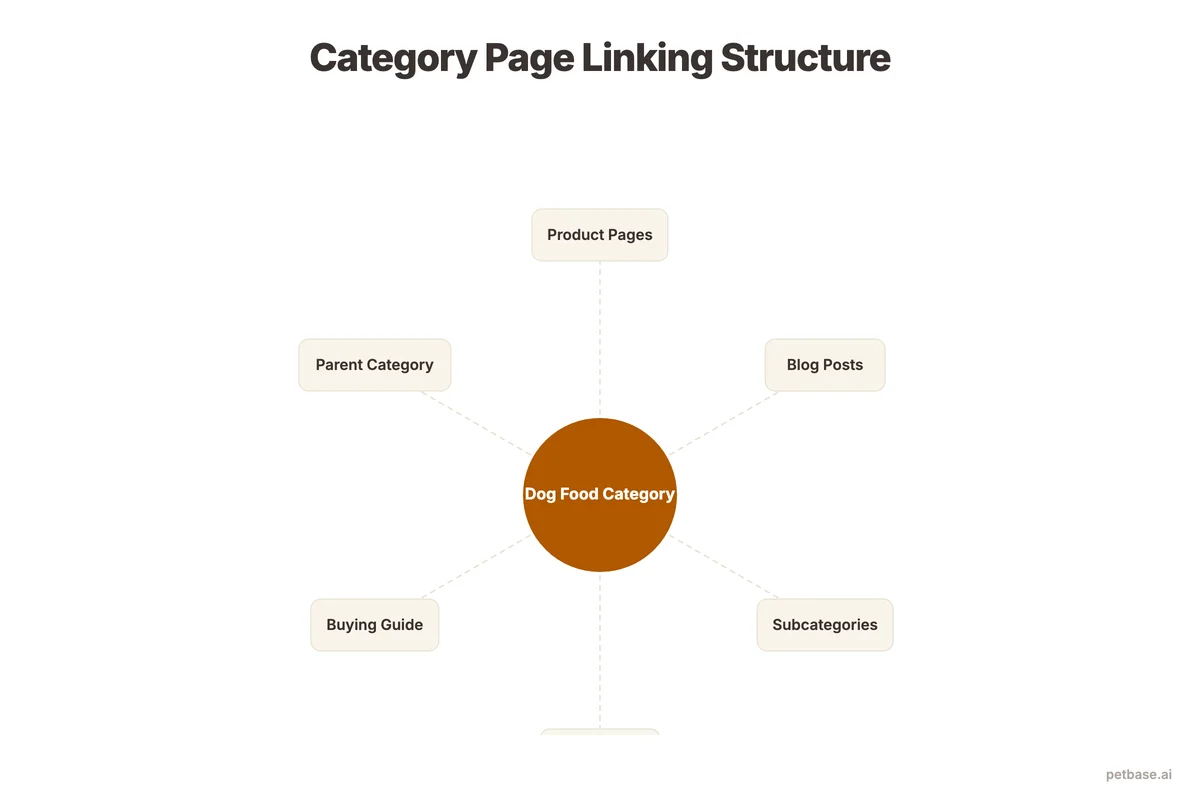
Category pages sit at the center of your internal linking structure. They link down to products, up to the homepage, and sideways to related categories and blog content. Getting this structure right is critical for both rankings and user navigation.
Links from category pages:
- To products: Every product in the category should be linked with descriptive anchor text (the product name), not just an image.
- To subcategories: If "Dog Food" has subcategories like "Grain-Free," "Puppy," and "Senior," link to each one prominently.
- To related categories: "Dog Food" should link to "Dog Treats" and "Dog Supplements" as related browsing paths.
- To blog content: Link to your most relevant guides. A "Dog Food" category page should link to your buying guide blog post and your product page optimization guide.
Links to category pages:
- From products: Every product page should include a breadcrumb that links back to its parent category.
- From blog posts: Blog articles about product types should link to the relevant category page. Your article about "how to choose the right dog harness" should link to your harness category.
- From the homepage: Feature top categories prominently on the homepage with descriptive text links.
- From the navigation: Main categories should appear in your site's primary navigation for maximum link equity.
A well-linked category page receives authority from every product page, every related blog post, and the homepage simultaneously. This concentrated authority is why category pages often rank above individual product pages for competitive keywords. For more on building a complete internal linking strategy, see our guide on on-page SEO for pet stores.
How to Add Schema Markup to Category Pages
Structured data tells Google exactly what your category page contains in a machine-readable format. Websites with schema markup see up to a 30% increase in click-through rates[7], yet only 30% of sites use it. For pet store category pages, two schema types matter most:
- ItemList schema: Tells Google the page contains an ordered list of products. Each product in the list references its own Product schema on the product detail page.
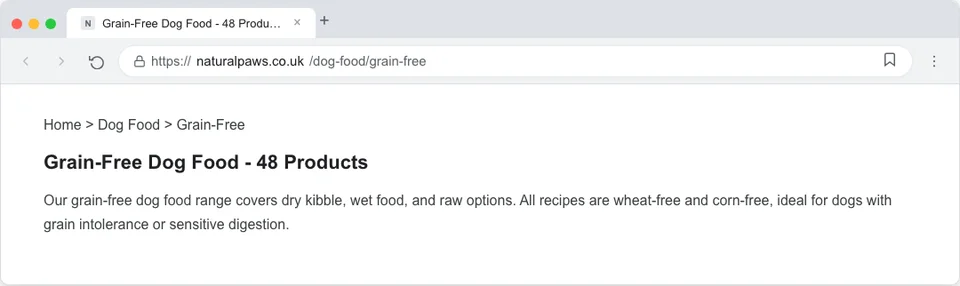
- BreadcrumbList schema: Shows your site hierarchy in search results (Home > Dog Food > Grain-Free), helping users and Google understand where the page sits in your structure.
Adding schema is a one-time effort per page template. Once your category template includes ItemList and BreadcrumbList schema, every category page benefits automatically. For a deeper walkthrough, see our schema markup guide for pet stores.
Why Page Speed Matters for Category Pages
Category pages are often the heaviest pages on a pet store website. Dozens of product images, filter JavaScript, and sorting functionality add up. 53% of visitors abandon a site that takes longer than 3 seconds to load[8], and category pages with 30 to 50 product thumbnails are the most likely to cross that threshold.
Speed fixes specific to category pages:
- Lazy load product images: Only load images visible in the viewport. As the shopper scrolls, load the next batch.
- Compress thumbnails aggressively: Category thumbnails are small on screen. A 400px-wide WebP at 80% quality looks identical to the original but loads 5 to 10 times faster.
- Minimize JavaScript: Filter and sort functionality should use lightweight code. Heavy JavaScript frameworks slow initial page load.
- Use a CDN: Serve images from a content delivery network so they load from the server closest to the shopper.
- Avoid render-blocking resources: Defer non-critical CSS and JavaScript so the product grid appears quickly.
How to Avoid Thin Content on Category Pages
Google defines thin content as pages with little or no original value. For category pages, this typically means pages with only product thumbnails and no descriptive text, or pages with only 1 to 2 products listed. Both scenarios are common in pet stores and both hurt your rankings.
Here is how to identify and fix thin category pages:
| Problem | Threshold | Solution |
|---|---|---|
| No text content | Under 50 words of unique text | Add 300-600 word intro + buying guide below grid |
| Too few products | Fewer than 4 products in category | Merge with parent category or expand inventory |
| Duplicate text | Same intro on multiple categories | Write unique content for each category |
| Boilerplate only | Only store policies and shipping info | Add category-specific content above boilerplate |
| Orphaned category | No internal links pointing to page | Add links from navigation, blog, and related pages |
If a category has fewer than 4 products, it probably should not be a standalone page. Merge it into a broader category and use product tags or filters to help shoppers find specific items. A "Hypoallergenic Cat Food" category with 2 products is better served as a filter on the "Cat Food" category page until your inventory grows.
For categories you want to keep despite low product counts, compensate with more written content. Write a 500-word buying guide, add a FAQ section, include comparison tables, and link to relevant blog posts. This ensures the page has enough value for Google to rank it even with a small product selection.
Petbase can generate unique category descriptions at scale. The platform uses your product data and pet industry knowledge to write category introductions, buying guides, and FAQ sections specific to each category. Instead of copying the same generic text across 50 category pages, you get unique content that targets the right keywords for each one - 10 articles per month at EUR 199/mo. Seasonal content can also be rotated into category pages to keep them fresh throughout the year.
Category Page Optimization Checklist
Use this checklist every time you create or update a category page. Each item directly affects your category page's ability to rank and convert.
| Element | Status | Details |
|---|---|---|
| Unique H1 with primary keyword | Required | One H1 per page, under 60 characters |
| Unique title tag | Required | Category name + differentiator + store name |
| Unique meta description | Required | 150-160 characters with keyword and CTA |
| Intro text above grid | Required | 100-200 words explaining the category |
| Buying guide below grid | Recommended | 200-400 words with H2 subheadings |
| Clean URL with keyword | Required | /species/category/ or /category-name/ |
| Product schema (ItemList) | Recommended | List of products with basic structured data |
| Breadcrumb navigation | Required | Home > Species > Category visible on page |
| Internal links to products | Required | Text links, not just images |
| Internal links to blog | Recommended | 1-2 links to related guides |
| Internal links to related categories | Recommended | Cross-link complementary categories |
| Noindex on filtered URLs | Required | Prevent index bloat from filter combinations |
| Canonical tag to unfiltered URL | Required | All filter variations point to parent |
| Mobile-responsive grid | Required | Products display correctly on all screen sizes |
| Page speed under 3 seconds | Required | Lazy load images below fold, compress assets |
Run through this checklist for your top 10 categories first. These pages drive the most traffic and revenue, so optimizing them first produces the fastest return. Then work through the remaining categories over the following weeks. See how Petbase can help you generate category content efficiently so you can focus on strategy rather than writing.
Frequently Asked Questions
How much text should a category page have for good SEO?
Aim for 300 to 600 words total across the page - 100 to 200 words above the product grid and 200 to 400 words below it. This is enough for Google to understand the page's topic and rank it for relevant keywords without overwhelming shoppers who came to browse products. For highly competitive categories like "dog food" or "cat litter," you might need closer to 800 words to compete with large retailers who have extensive category content. For niche categories with less competition, 300 words is sufficient.
Should every product filter combination have its own page?
No. Most filter combinations should be noindexed to prevent index bloat. Only create dedicated pages for filter combinations that target high-volume keywords. For example, if "Orijen dog food" gets 5,000 monthly searches, create a dedicated subcategory page for it. If "medium-sized red dog harness" gets 10 monthly searches, keep it as a noindexed filter URL. Use schema markup on your dedicated subcategory pages to maximize their visibility in search results.
How do I handle category pages for products that go out of stock seasonally?
Keep the category page live even when products are temporarily out of stock. Add a note like "Currently out of season - check back in [month]" and display related in-stock products from nearby categories. Removing and re-adding category pages destroys their ranking history. If the category is permanently discontinued, redirect it to the most relevant parent category with a 301 redirect. For seasonal categories, update the content 60 to 90 days before the season returns, following the timing outlined in our seasonal SEO guide.
References
- BrightEdge (2024). How Much Traffic Comes from Organic Search. seoinc.com
- Embryo (2024). 30 Statistics About Long-Tail Keywords. embryo.com
- Ahrefs/BuzzStream (2024). Link Building Statistics. buzzstream.com
- Grand View Research (2025). Pet Care E-Commerce Market Analysis. grandviewresearch.com
- HubSpot (2024). Marketing Statistics. hubspot.com
- Taylor Scher (2025). Ecommerce SEO Statistics. taylorscherseo.com
- Amra and Elma (2025). Top Schema Markup Statistics. amraandelma.com
- Deloitte/Google (2024). Understanding Google's Core Web Vitals. magnet.co