How to Update Old Pet Store Blog Posts for Better Rankings

Table of Contents +
- Why Updating Old Posts Works Better Than Writing New Ones
- How to Identify Which Pet Store Posts Need Updating
- What to Change (and What to Leave Alone)
- How to Add New Information Without Losing Rankings
- Optimize Titles, Meta Descriptions, and Structured Data
- Page Speed and Technical Health
- How to Update Internal Links in Old Posts
- How Often Should You Refresh Pet Store Content?
- How to Track the Impact of Content Updates
- Frequently Asked Questions
- References
Learn how to update old pet store blog posts for better Google rankings. Step-by-step guide with priority matrix, refresh schedules, and tracking methods.
Organic search drives 53% of all website traffic[1], and much of that traffic lands on blog posts. But older posts lose rankings over time as product lines change, veterinary guidelines shift, and competitors publish fresher content. Updating an existing post that already has ranking history takes less effort and produces faster results than writing something new from scratch.
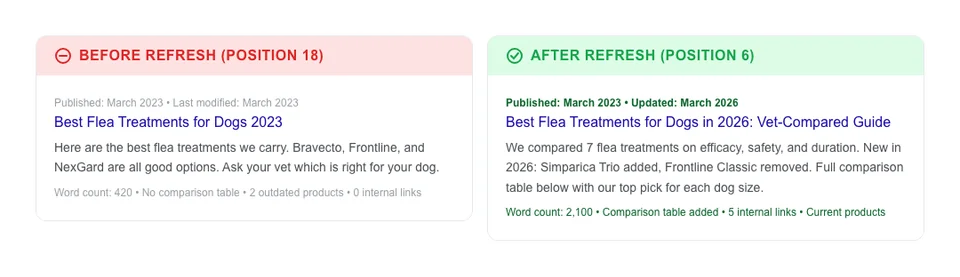
Google has already crawled and indexed your old posts. It has assigned them a baseline authority score. When you refresh that content with current information, better structure, and stronger internal links, Google re-evaluates the page - often within days instead of weeks. For pet stores, this is especially valuable. A post about flea prevention from 2023 might still rank on page two, but with outdated product recommendations that no longer serve your readers. A 30-minute update can push that post to page one and drive sales again.
This guide shows you exactly how to identify, update, and track the impact of content refreshes for your pet store blog.
Why Updating Old Posts Works Better Than Writing New Ones
Refreshing old content outperforms new content for three measurable reasons. First, existing pages have backlink equity. The #1 result on Google has 3.8x more backlinks than positions 2-10[2], and every link pointing to your page still counts after you update it. Second, Google has already indexed the URL and associated it with specific keywords. You are building on existing authority rather than starting from zero. Third, the time investment is 30 to 60 minutes per update versus 3 to 5 hours for a new post.
Companies with active blogs get 55% more website traffic[3], but that advantage erodes when posts go stale. Refreshing older content keeps your blog competitive without the cost of creating everything from scratch. For pet stores specifically, product roundups, seasonal guides, and how-to articles are the highest-impact candidates because they become outdated quickly.
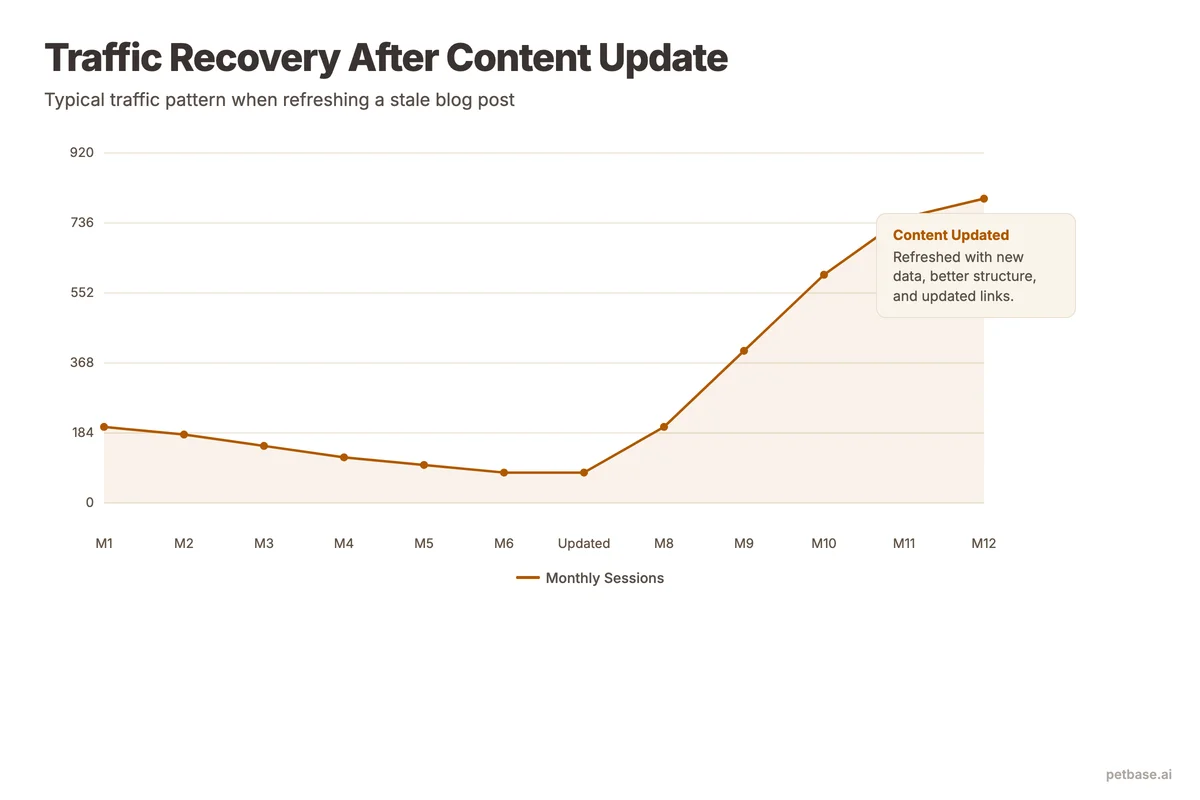
Here is a direct comparison:
| Factor | New Blog Post | Updated Old Post |
|---|---|---|
| Time to write | 3-5 hours | 30-60 minutes |
| Time to rank | 8-12 weeks | 1-3 weeks |
| Existing backlinks | Zero | Preserved |
| Existing keyword authority | None | Already established |
| Risk of cannibalization | Higher (duplicate topics) | None (same URL) |
| Cost (if outsourced) | EUR 200-500 | EUR 50-100 |
The takeaway is clear: before you add another new post to your blog strategy, check if you already have a post covering that topic. If you do, update it instead.
Petbase automates SEO content for pet stores - publishing 10 optimized articles monthly so you can focus on running your shop - start your free trial.
How to Identify Which Pet Store Posts Need Updating
Not every old post deserves a refresh. You want to focus on posts with the highest potential return. With 7.5 million blog posts published every day[4], your existing content faces growing competition. Use this priority matrix to sort your existing content into action categories.
| Current Position | Monthly Impressions | Content Age | Priority | Action |
|---|---|---|---|---|
| Position 4-20 | 100+ | 6+ months | High | Update immediately - these are your biggest opportunities |
| Position 21-50 | 50+ | 6+ months | Medium | Update within 30 days - expand content significantly |
| Position 1-3 | Any | 12+ months | Medium | Light refresh - update dates, products, minor details |
| Position 50+ | Under 50 | Any | Low | Evaluate - may need complete rewrite or consolidation |
| Not ranking | 0 | 12+ months | Low | Consider merging with a stronger post or deleting |
To find this data, open Google Search Console and navigate to the Performance report. Filter by pages from your blog, then sort by impressions. Posts with high impressions but low click-through rates are ranking but not getting clicks - often because the title or meta description is outdated. Research shows the average e-commerce title tag is only 39 characters and the average meta description is 96 characters[5], which means many pet stores are leaving valuable SERP space unused.
Posts ranking in positions 4 through 20 are your goldmine. They are close enough to page one that a well-executed update can push them into the top three results. Long-tail keywords - the specific queries that make up 70% of all searches and convert at 36%[6] - are where content refreshes have the biggest impact. Run a site audit to identify these systematically rather than guessing.
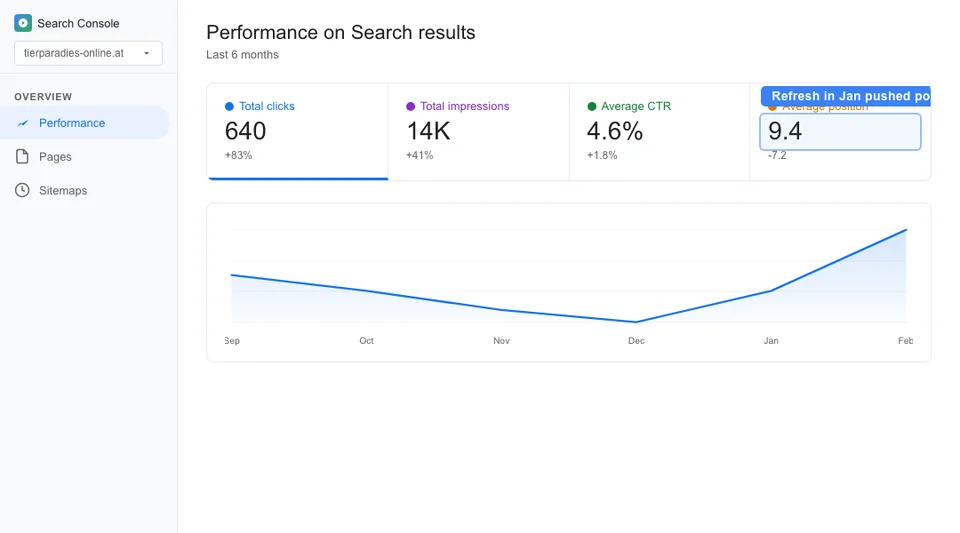
Look for these specific signals that a post needs updating:
- References to discontinued products or brands
- Statistics older than 2 years
- Missing internal links to content you have published since
- No comparison tables or structured data (adding schema markup can increase click-through rates by up to 30%[7])
- Thin word count (under 1,000 words) on a competitive topic
- Outdated screenshots or images
- Year references in the title or content ("Best Flea Treatments 2023")
What to Change (and What to Leave Alone)
The most important rule of content updates is this: do not change the URL. Your URL has accumulated authority, backlinks, and ranking history. Changing it resets everything. Keep the same slug and let the page benefit from its history.
Here is what to update and what to preserve:
| Element | Update? | Details |
|---|---|---|
| URL/slug | Never change | Preserves all ranking history and backlinks |
| Title tag | Yes, carefully | Update year, improve keyword targeting, but keep core keyword |
| Meta description | Yes | Include current year and primary keyword |
| H2/H3 structure | Yes | Add new sections, improve heading clarity |
| Body content | Yes | Add 200-500 words, update facts, add tables |
| Product mentions | Yes | Replace discontinued items with current alternatives |
| Internal links | Yes | Add links to content published since original post |
| Images | Yes | Refresh with current product photos |
| Published date | Yes | Update to reflect the refresh date |
| Author | No | Keep original author unless content direction changed |
| Core keyword focus | No | Do not shift the primary keyword target |
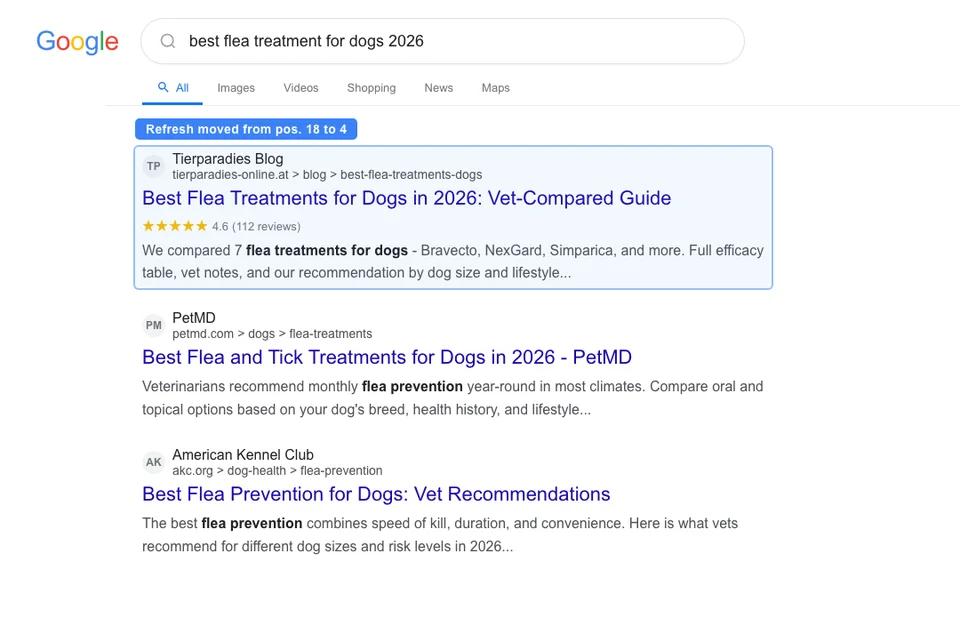
When updating the title, keep the primary keyword in the same position. If your original title was "Best Flea Treatments for Dogs," your updated title should be "Best Flea Treatments for Dogs in 2026" - not a completely different title targeting a different keyword. Shifting keywords can confuse Google about what the page is about and temporarily drop your rankings.
How to Add New Information Without Losing Rankings
The safest approach to content updates is additive. Add new sections rather than rewriting existing ones. Google has already associated specific passages in your content with specific search queries. If you delete those passages, you might lose those rankings.
Follow this process:
- Add, do not delete. If a section is outdated, add a new paragraph below it with current information. You can rephrase the old paragraph but keep the core concepts.
- Expand thin sections. If a section has only 50 words, expand it to 150 to 200 words with more detail, examples, or data.
- Add new H2 sections. If your competitors cover subtopics you do not, add them as new H2 sections at the end of the article.
- Insert tables and lists. Converting text paragraphs into comparison tables or bulleted lists improves readability and can earn featured snippets.
- Update the introduction. Your opening paragraph should reflect the current state of the topic. This is one place where rewriting is appropriate.
After adding new content, read the full article from top to bottom. Make sure the flow still makes sense and there are no contradictions between old and new sections. If you mentioned that a product was "new" in 2023, update that language. Consistency matters for both readers and Google.
Optimize Titles, Meta Descriptions, and Structured Data
Title tags and meta descriptions are your first impression in search results. The average e-commerce title tag is 39 characters and the average meta description is 96 characters[5]. Most pet stores are not using the full space Google allows (roughly 60 characters for titles, 155 for descriptions). When you update a post, rewrite the title to fill that space with your target keyword and a clear benefit.
For example:
- Before: "Flea Treatment Tips" (18 characters)
- After: "Best Flea Treatments for Dogs: Vet-Reviewed Options for 2026" (59 characters)
Schema markup is another quick win during content refreshes. Pages with structured data can see click-through rates increase by up to 30%[7]. For pet store blog posts, FAQ schema and HowTo schema are the most relevant types. Adding FAQ schema to a refreshed post takes 10 minutes and can earn your listing rich snippets in search results. For a full walkthrough of structured data options, see our schema markup guide for pet stores.
Page Speed and Technical Health
Content quality is only half the equation. If your updated post loads slowly, visitors will leave before reading it. 53% of mobile users abandon a page that takes longer than 3 seconds to load[8]. When refreshing old posts, run a quick technical check alongside the content update.
Technical items to check during every content refresh:
- Image file size: Compress old images and convert to WebP format. A single uncompressed PNG can add 2-3 seconds to load time.
- Core Web Vitals: Check Largest Contentful Paint (LCP), Cumulative Layout Shift (CLS), and Interaction to Next Paint (INP) in PageSpeed Insights.
- Broken links: Old posts often link to pages that have been deleted or redirected. Fix every broken link during the update.
- Mobile responsiveness: Verify tables and images display correctly on mobile. Many older posts were written when desktop-first was standard.
A post that loads fast, displays well on mobile, and has clean structured data sends strong quality signals to Google. Combine that with fresh, relevant content and you have the best possible chance of ranking improvements. For a full technical audit process, see our technical SEO guide for pet websites.
How to Update Internal Links in Old Posts
Internal linking is one of the most overlooked parts of content updates. Every time you publish a new blog post, your old posts miss an opportunity to link to it. Over 12 months of regular publishing, you might have dozens of orphaned posts that never link to your newest content.
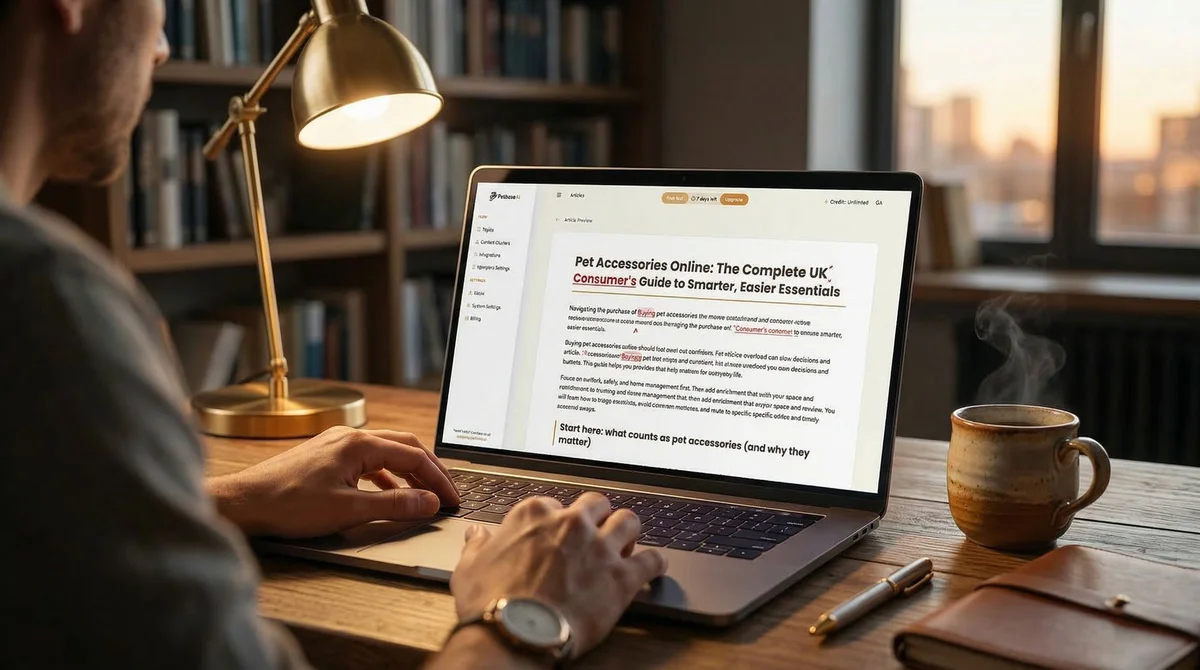
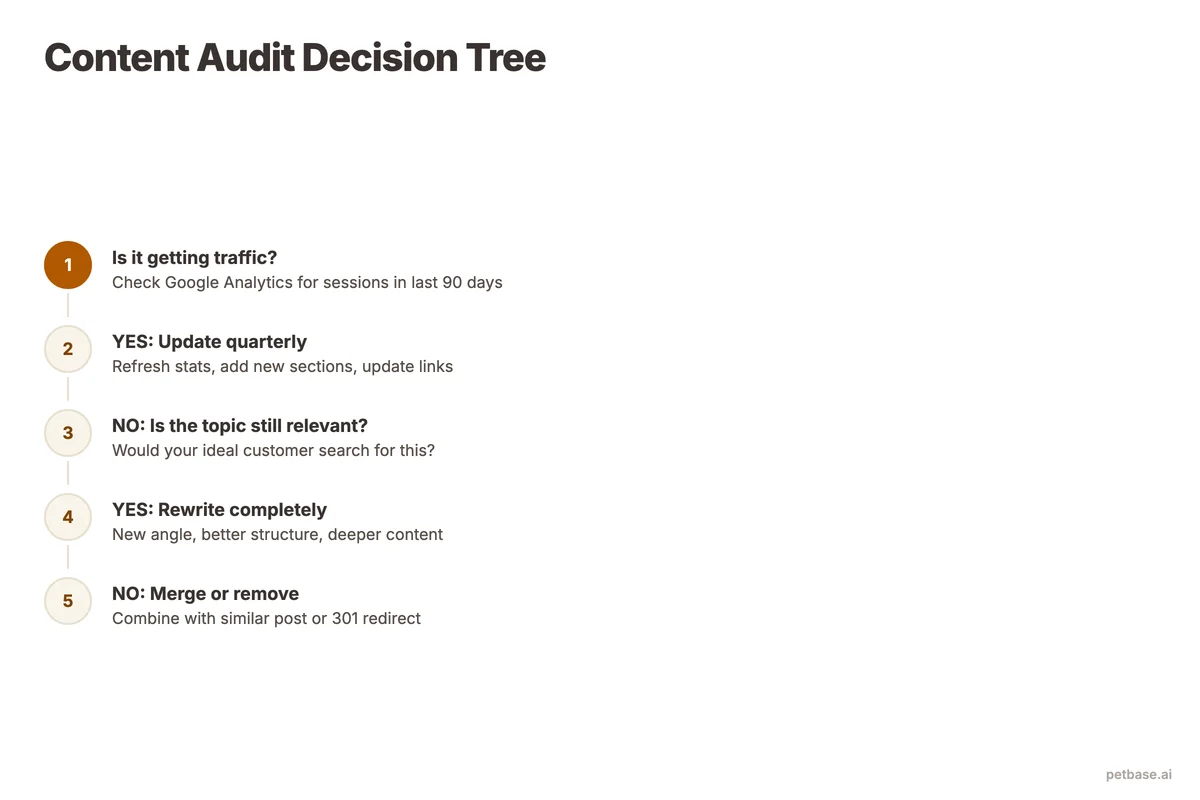
Here is how to update internal links systematically:
- List your 20 most recent posts. These are the pages most likely missing from your old content.
- Search your old posts for related topics. If you published a new guide about pet store SEO checklists, search your blog for any mention of "SEO checklist" or "SEO audit" in older posts.
- Add 2 to 3 internal links per updated post. Do not stuff 10 links into one article. Each link should feel natural and helpful to the reader.
- Use descriptive anchor text. Instead of "click here" or "read more," use anchor text that describes the linked page: "our complete guide to building a content calendar for pet stores."
- Check for broken links. Old posts might link to pages you have since deleted or redirected. Fix these during every update.
Internal links serve two purposes: they help readers find related content, and they distribute ranking authority across your site. The #1 result on Google has 3.8x more backlinks than positions 2-10[2], and internal links help concentrate that authority where it matters most. A strong internal linking structure is a core part of any traffic recovery strategy.
How Often Should You Refresh Pet Store Content?
The ideal refresh frequency depends on the content type. Some posts need quarterly updates while others can wait a full year. Here is a practical schedule:
| Content Type | Refresh Frequency | Reason |
|---|---|---|
| Product roundups/reviews | Every 3-4 months | Products change frequently, new options launch |
| Seasonal guides | Annually, 60-90 days before peak | Update year references, refresh product picks |
| How-to guides | Every 6-12 months | Techniques and best practices evolve slowly |
| Statistics/data posts | Every 6 months | New data replaces old data |
| Evergreen educational | Every 12 months | Minor updates keep content fresh |
| News/trend posts | Do not update | Time-sensitive by nature, let them age out |
For a pet store publishing 10 posts per month, allocate 2 to 3 of those slots for content refreshes instead of new articles. This ratio gives you consistent new content while keeping your existing library current. The cumulative effect over 12 months is significant: 24 to 36 refreshed posts means nearly your entire archive stays current.
Set calendar reminders for each post's next refresh date. Petbase tracks content age and performance automatically, flagging posts that are due for updates based on declining rankings or outdated information. At EUR 199/mo for 10 articles, those refresh slots are built into your monthly output.
How to Track the Impact of Content Updates
Measurement proves whether your updates are working and helps you prioritize future refreshes. Track these metrics before and after each update.
Before updating: Record the post's current Google position, monthly organic traffic, click-through rate, and bounce rate. Take a screenshot of the Search Console data for that page. This becomes your baseline.
After updating: Check the same metrics at 7 days, 14 days, and 30 days after the update. Most posts show ranking movement within 7 to 14 days of being re-crawled.
Key metrics to track:
- Average position: Did the post move up in search results?
- Impressions: Is Google showing the page for more queries?
- Clicks: Are more people visiting the page?
- Click-through rate: Did the new title and meta description improve CTR?
- Bounce rate: Are visitors staying longer after the update?
- Conversions: Are more readers clicking through to product pages or signing up?
Create a simple tracking spreadsheet with columns: URL, update date, position before, position after (7d), position after (30d), traffic before, traffic after. After a few months of updates, you will see clear patterns about which types of updates produce the biggest gains.
For pet stores using Google Search Console alongside rank tracking tools, the combination gives you a complete picture. Search Console shows impressions and clicks from Google directly, while rank tracking tools let you monitor specific keywords daily.
If a post does not improve within 30 days of an update, it might need a more significant overhaul - or it might be targeting a keyword that is too competitive. In that case, consider refocusing the post on a longer-tail keyword variation where you have a better chance of ranking. Long-tail keywords make up 70% of all searches and convert at 36%[6], so the opportunity is real.
Frequently Asked Questions
Will updating a post cause it to temporarily drop in rankings?
Minor updates like refreshing dates, adding a paragraph, or updating product links rarely cause ranking drops. Major rewrites - where you change the title, restructure the entire article, and remove large sections - can cause a temporary drop of 1 to 2 weeks while Google re-evaluates the page. To minimize risk, make additive changes rather than deletive ones. Add new sections instead of removing old ones. Keep the core keyword focus identical. Most pet store content updates are minor enough that you will see improvement without any dip.
How do I know if I should update a post or write a new one instead?
Update the existing post if it targets the same primary keyword you would use for a new post. Writing a new post on the same topic creates keyword cannibalization - two of your pages compete against each other, and both rank lower than either would alone. Only write a new post if you are targeting a meaningfully different keyword or audience. For example, if you have a post about "dog flea treatment" and want to write about "natural flea prevention for cats," that is different enough for a new post. But "best flea treatments for dogs 2026" should be an update to your existing flea treatment post, not a new article.
Can I update posts that are not getting any traffic at all?
Yes, but manage your expectations. A post with zero traffic and zero impressions in Search Console likely has a fundamental problem - weak keyword targeting, thin content, or topic cannibalization with another page. Before updating it, check if another post on your site covers the same topic better. If so, merge the two posts into the stronger URL and redirect the weaker one. If the post covers a unique topic that nobody is searching for, consider whether the topic is worth keeping. Sometimes the best action is to redirect low-value posts to related higher-performing pages and focus your update energy on posts that already show signs of life. Petbase's content calendar tools can help you identify which posts to keep, merge, or retire based on actual search data.
References
- BrightEdge (2024). How Much Traffic Comes from Organic Search. seoinc.com
- BuzzStream (2024). Link Building Statistics. buzzstream.com
- HubSpot (2024). Marketing Statistics. hubspot.com
- Orbit Media (2024). Blogging Statistics. orbitmedia.com
- Taylor Scher SEO (2024). Ecommerce SEO Statistics. taylorscherseo.com
- Embryo (2024). 30 Statistics About Long-Tail Keywords. embryo.com
- Amra and Elma (2025). Top Schema Markup Statistics. amraandelma.com
- Magnet (2024). Understanding Google's Core Web Vitals. magnet.co