Out-of-Stock SEO for Pet Stores: Keep Rankings

Table of Contents +
- Why Do Pet Stores Face Unique Out-of-Stock Challenges?
- What Are the SEO Options for Out-of-Stock Products?
- How Do You Handle Temporarily Out-of-Stock Products?
- How Do You Handle Seasonal Pet Products?
- How Do You Handle Discontinued Products?
- How Do You Handle Recalled Pet Products?
- What Is the Out-of-Stock SEO Audit Checklist?
- How Does Petbase Help Manage Product Content?
- Frequently Asked Questions
- References
Handle out-of-stock pet products without losing SEO rankings. Covers seasonal products, discontinued formulas, supply chain issues, and recalls.
When a pet store deletes an out-of-stock product page or redirects it to the homepage, every backlink, every search ranking, and every indexed keyword associated with that page is destroyed. For seasonal products, discontinued formulas, and supply chain disruptions, this happens constantly in pet retail. 43% of all e-commerce traffic comes from organic search[1]. Mishandling out-of-stock pages means losing the organic traffic those pages earned - sometimes permanently.
This guide covers exactly how pet stores handle out-of-stock products for SEO - from temporary unavailability to permanent discontinuation - with the specific technical solutions that preserve ranking equity.
TL;DR
Deleting or redirecting out-of-stock product pages destroys ranking equity. Pet stores face this constantly with seasonal products, discontinued formulas, and supply chain issues. The fix: keep temporarily unavailable pages live with back-in-stock messaging, redirect permanently discontinued products to the closest equivalent, and never 404 a page with backlinks or organic traffic.
Why Do Pet Stores Face Unique Out-of-Stock Challenges?
Pet retail has more out-of-stock scenarios than most e-commerce categories:
- Seasonal products. Flea and tick treatments, winter coats, cooling mats, and holiday-themed items go out of stock predictably. These pages rank for seasonal keywords year-round and drive traffic during peak months.
- Discontinued formulas. Pet food manufacturers reformulate, rebrand, and discontinue products regularly. Hill's, Royal Canin, and Purina update lines annually. Each discontinued product page had accumulated organic value.
- Supply chain disruptions. Ingredient shortages, shipping delays, and manufacturing issues cause temporary unavailability across entire product lines.
- Limited-run and breed-specific products. Specialized harnesses, breed-specific food, and niche supplements have irregular availability.
- Recalled products. Pet food and treats get recalled for safety reasons. These pages need special handling that preserves trust while complying with safety requirements.
20% of all purchase failures are potentially a result of missing or unclear product information[2]. An out-of-stock page with no guidance on alternatives or restock timing is a failed purchase waiting to happen.
Petbase automates SEO content for pet stores - publishing 10 optimized articles monthly so you can focus on running your shop - start your free trial.
What Are the SEO Options for Out-of-Stock Products?
There are four approaches. The right one depends on whether the product is coming back:
| Scenario | Correct Action | Wrong Action |
|---|---|---|
| Temporarily out of stock (restocking within weeks) | Keep page live, update schema to OutOfStock, add restock date | Delete page, redirect to category, hide from navigation |
| Seasonal product (returns next season) | Keep page live year-round, update messaging seasonally | Delete page off-season, recreate each year |
| Permanently discontinued (replacement exists) | 301 redirect to closest equivalent product | Redirect to homepage, return 404 |
| Permanently discontinued (no replacement) | 301 redirect to parent category page | Delete page, return 404 |
| Recalled product | Keep page live with recall notice and safety information | Delete page (hides safety information from searchers) |
How Do You Handle Temporarily Out-of-Stock Products?
This is the most common scenario and the one most stores handle incorrectly. The product is coming back. The page should stay exactly where it is.
Keep the Page Live
Do not remove the product from your sitemap, navigation, or internal links. Google should continue to crawl and index the page. Remove only the "Add to Cart" button or replace it with a "Notify Me When Back in Stock" form.
Update Product Schema
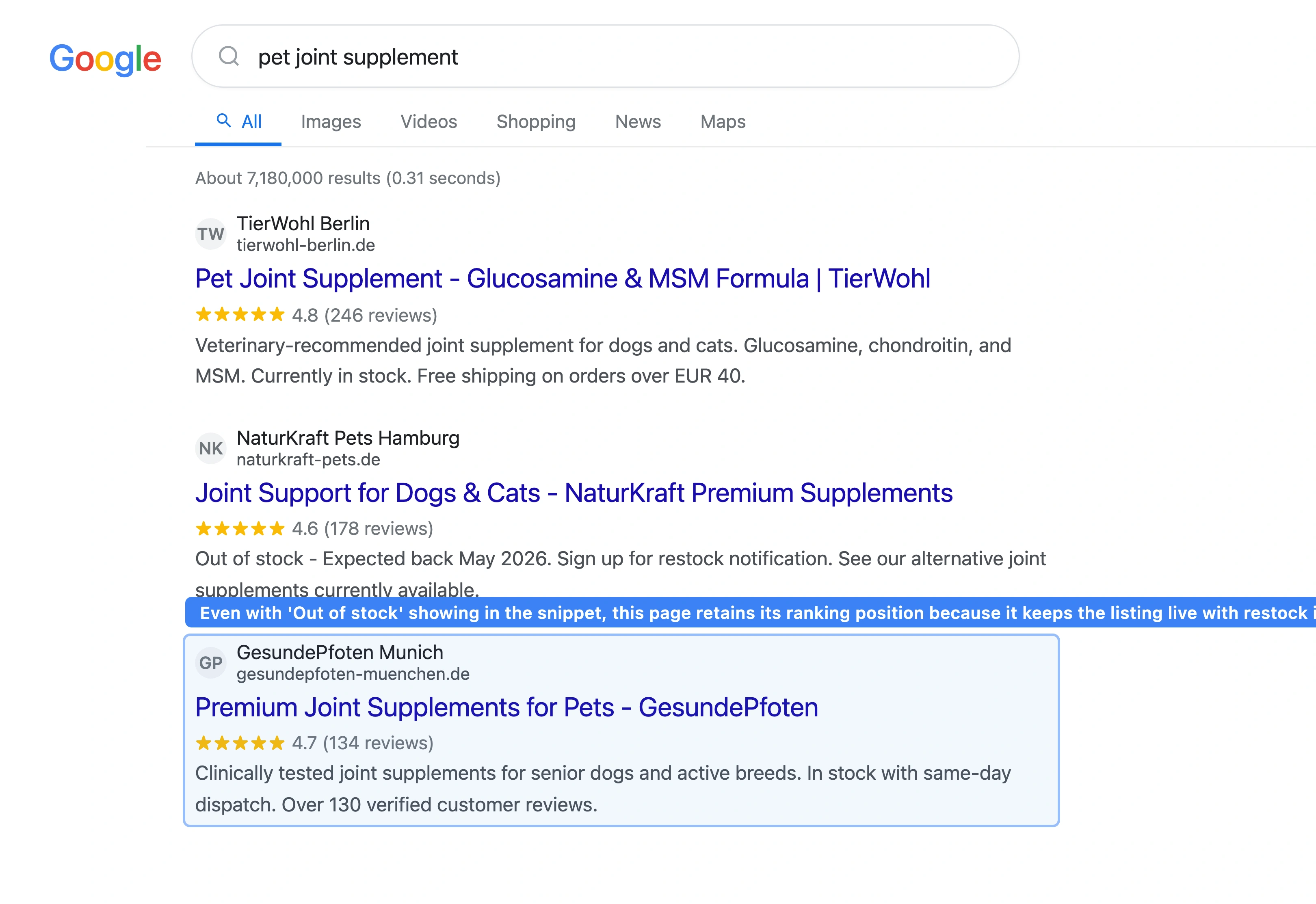
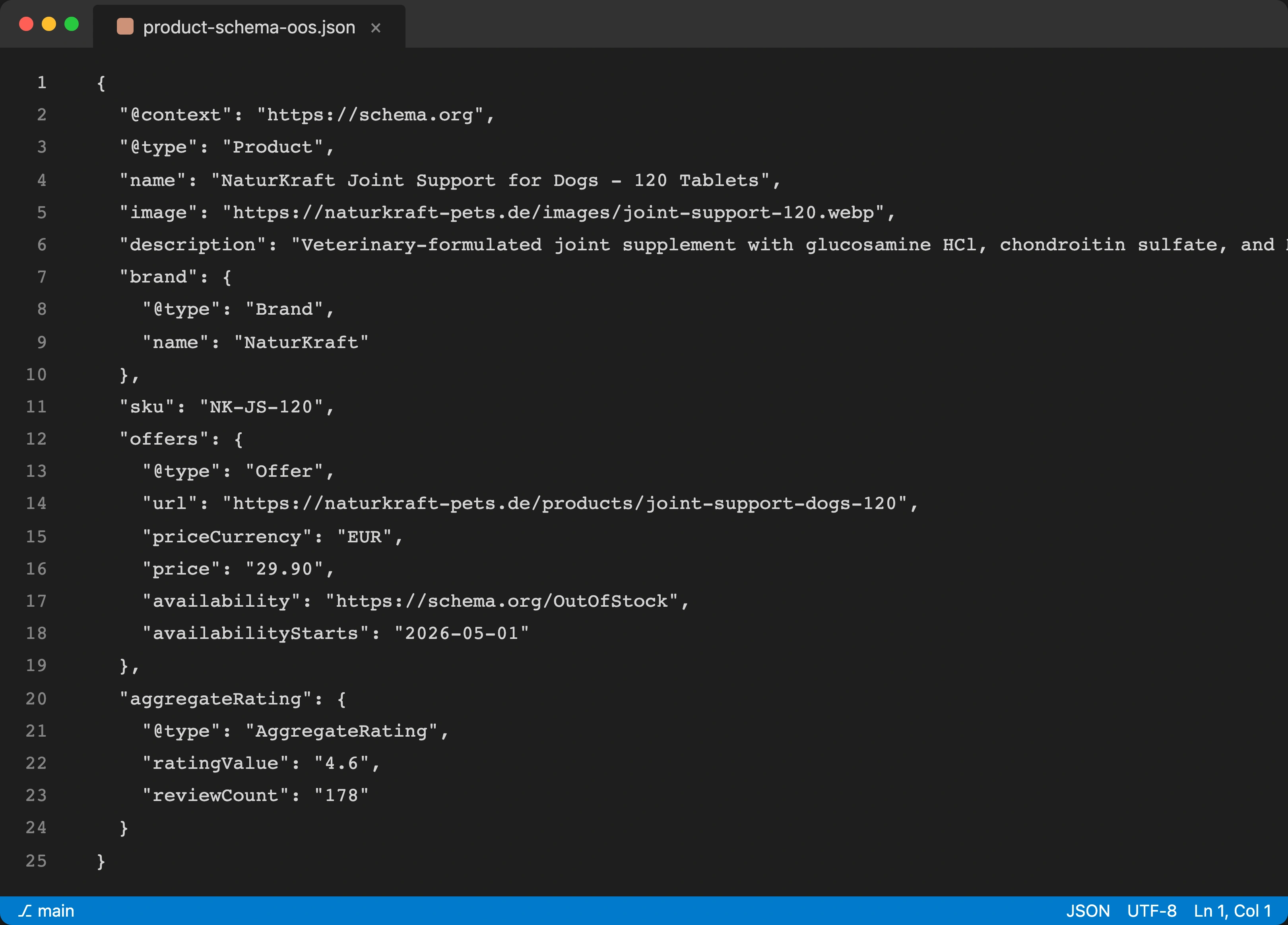
Change the availability field in your Product schema from InStock to OutOfStock or BackOrder. This tells Google the product exists but is not currently available. Google will stop showing the price in rich snippets but will keep the page indexed. When the product returns, switch back to InStock.
Add Restock Information
Tell the customer when the product is expected back. "Expected back in stock: May 2026" is better than nothing. If you do not know the restock date, say "Contact us for restock updates" with a link to your contact form.
Show Alternative Products
Display 3 to 5 similar products that are in stock. This serves two purposes: it keeps the customer on your site instead of bouncing to a competitor, and it provides internal links from the out-of-stock page to related product pages.
How Do You Handle Seasonal Pet Products?
Seasonal products need a specific strategy because they cycle between available and unavailable predictably:
- keep the page live year-round - it accumulates ranking equity during the off-season
- during the off-season, update the messaging: "Flea and tick season starts in March. Pre-order this product or sign up for a restock notification."
- update Product schema to
PreOrderwhen the season approaches - publish seasonal blog content that links to the product page during the off-season ("Preparing for flea season: what to stock up on")
- never delete and recreate the page each year - you lose all accumulated link equity and ranking history
One pattern I have seen repeatedly with pet stores: stores that keep flea and tick product pages live year-round rank on page 1 when the season starts. Stores that delete off-season pages and recreate them in spring start from zero and do not rank until midsummer - after peak demand has passed.
How Do You Handle Discontinued Products?
When a product is permanently gone, you need to redirect the URL to preserve link equity:
If a Replacement Product Exists
301 redirect the old URL to the replacement product. Example: Hill's Science Diet Adult Chicken is reformulated and renamed. Redirect the old product URL to the new formula's page. This transfers roughly 90% of the old page's link equity to the new page.
If No Direct Replacement Exists
301 redirect to the parent category page. Example: a discontinued brand of dog dental chews redirects to /dental-chews/. The category page captures some of the old page's keyword relevance and provides the visitor with alternatives.
Never Do These
- redirect to the homepage (wastes link equity on a page that does not match the search intent)
- return a 404 (destroys all ranking equity immediately)
- return a soft 404 (page exists but shows "product not found" - confuses both users and Google)
- leave the page live indefinitely with "Out of Stock" and no alternatives (frustrates users, increases bounce rate)
How Do You Handle Recalled Pet Products?
Recalled products need special treatment. Do not delete the page. Pet parents searching for the recalled product need to find your recall notice:
- keep the page live with a prominent recall notice at the top
- include the recall reason, affected lot numbers, and return instructions
- link to the manufacturer's official recall page
- remove the "Add to Cart" button and all purchase options
- display alternative safe products
- update the Product schema to
Discontinuedand add a note about the recall
This protects pet safety, builds trust with customers, and captures search traffic from pet parents searching for the recalled product name.
What Is the Out-of-Stock SEO Audit Checklist?
| Check | Action | Frequency |
|---|---|---|
| Identify all out-of-stock product pages | Filter product catalog for zero-inventory items | Weekly |
| Check schema accuracy | Verify availability field matches actual stock status | Weekly |
| Review discontinued products | Set up 301 redirects to replacements or categories | Monthly |
| Audit 404 errors | Check Google Search Console for product URL 404s, fix with redirects | Monthly |
| Monitor seasonal product pages | Update messaging for upcoming season, switch to PreOrder | Quarterly |
| Check redirect chains | Ensure no A to B to C chains (should be A to C) | Quarterly |
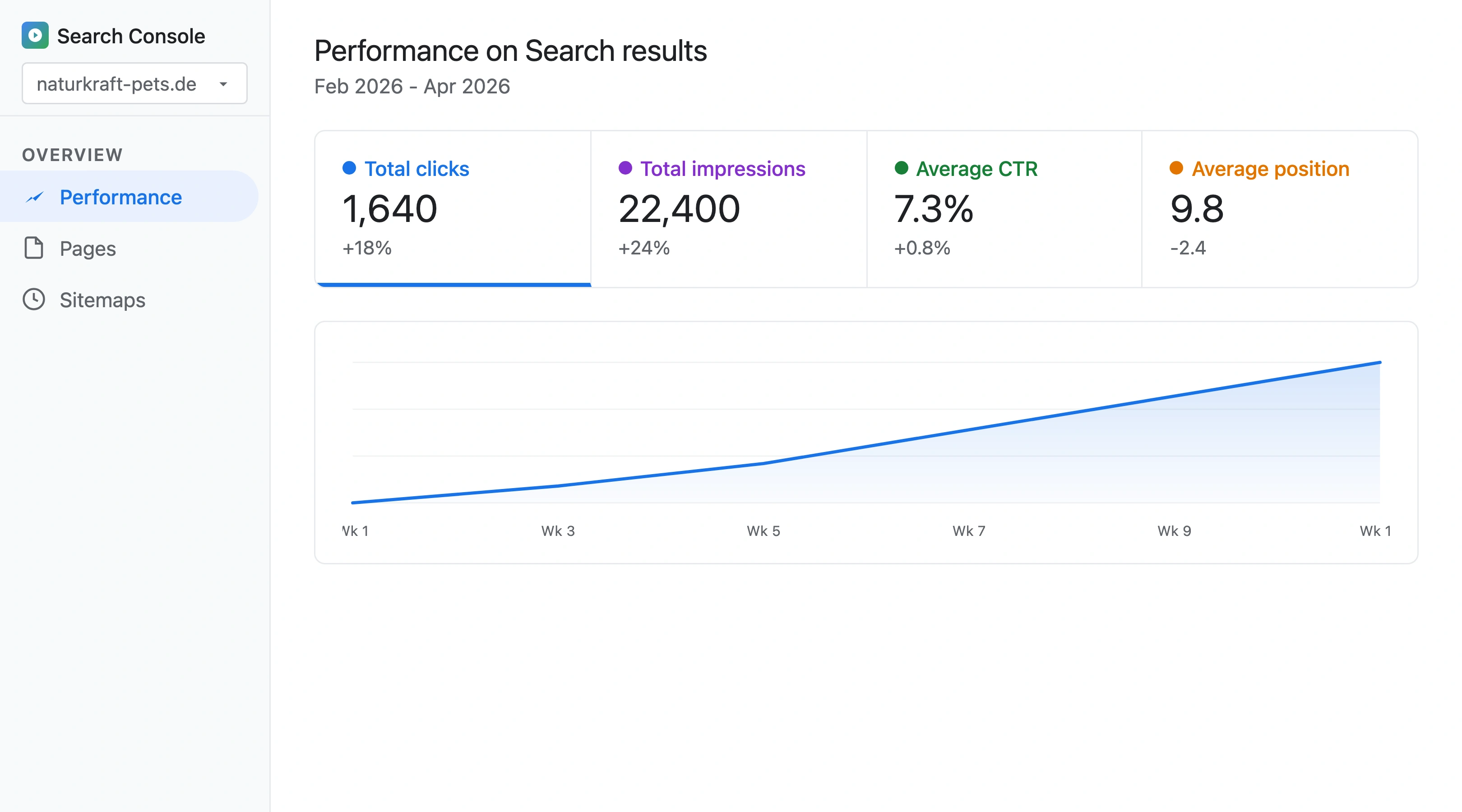
For broader technical SEO context, see our pet store technical SEO guide.
How Does Petbase Help Manage Product Content?
Out-of-stock handling works best when product pages have strong unique content to begin with. Pages with manufacturer-default descriptions have little ranking equity to protect. Pages with unique, detailed descriptions accumulate organic value worth preserving.
Petbase generates optimized product descriptions, ingredient explainers, and supporting content that builds the page-level value your out-of-stock strategy is designed to protect. 10 articles per month, published directly to your website, for USD 199/month.
43% of e-commerce traffic is organic[1]. Every product page that ranks represents months of accumulated SEO value. The right out-of-stock strategy ensures that value survives supply chain disruptions, seasonal cycles, and product line changes.
Start your 7-day free trial and build the product content worth protecting.
Frequently Asked Questions
Should you noindex out-of-stock product pages?
Almost never. Noindexing removes the page from Google's index, which destroys ranking equity just like deleting it. Only noindex a page if it has zero backlinks, zero organic traffic, and will never return to stock. For all other out-of-stock scenarios, keep the page indexed with updated availability schema and alternative product suggestions.
How long should you keep a discontinued product page before redirecting?
Redirect immediately once you confirm the product is permanently discontinued. There is no benefit to keeping a permanently discontinued product page live with an "Out of Stock" message. The sooner you redirect, the sooner the replacement page inherits the old page's link equity. For products you are unsure about, wait 90 days - if the manufacturer confirms discontinuation, redirect.
Do out-of-stock products hurt your site's overall SEO?
A few out-of-stock pages with proper schema handling do not hurt overall SEO. A large number of out-of-stock pages with no alternatives, no schema updates, and no user guidance can increase bounce rates and signal poor user experience to Google. The threshold varies, but if more than 20% of your product pages show "Out of Stock" with no context, it is worth consolidating your catalog.
How do you handle out-of-stock products on Shopify?
Shopify does not automatically update Product schema when inventory hits zero. Use a theme code modification or app (like Out of Stock Manager) to automatically switch availability to OutOfStock in your schema, display back-in-stock notification forms, and show alternative products. For permanent discontinuations, set up 301 redirects in Shopify's URL Redirects section (Settings > Navigation > URL Redirects).
References
- Charle Agency (2026). E-commerce SEO Statistics. charleagency.com
- Baymard Institute (2024). Product Descriptions and Purchase Failure. baymard.com