Faceted Navigation SEO for Pet Stores


Table of Contents +
- Why Does Faceted Navigation Hurt Pet Store SEO?
- Which Pet Store Filters Should Be Indexed?
- How Do You Block Unwanted Filter URLs?
- How Do You Turn Indexable Filters into Landing Pages?
- How Do You Audit Your Current Faceted Navigation?
- What Is the Faceted Navigation Cleanup Sprint?
- How Does Petbase Help Pet Stores With Filtered Content?
- Frequently Asked Questions
- References
Faceted navigation SEO for pet stores. Which breed, condition, and diet filters to index, which to block, and how to protect crawl budget.
A pet store with 1,000 products and 10 filterable attributes can generate over 10,000 unique URL combinations[1]. Add breed, species, age group, health condition, protein source, and format filters - common in pet retail - and that number climbs into the hundreds of thousands. Google's crawler does not know which of those URLs lead to useful content and which are dead-end combinations showing zero products. Left unconfigured, Googlebot may spend 80% of its crawl budget on filter pages[2], leaving your actual product and category pages under-crawled.
This guide covers exactly how pet stores configure faceted navigation for SEO - which filter combinations to index, which to block, and how to implement the technical controls that protect crawl budget without sacrificing user experience.
TL;DR
Pet stores have complex filter systems (breed, species, condition, ingredient) that create thousands of URL combinations. Most are worthless for SEO and waste crawl budget. The fix: index high-demand filter combinations as dedicated category pages and block the rest with canonical tags, noindex, or parameter handling. Proper faceted nav can boost indexed pages 10-15% in 30 days.
Why Does Faceted Navigation Hurt Pet Store SEO?
Faceted navigation is essential for user experience. Pet parents need to filter by species, breed size, life stage, health condition, ingredient preferences, and format (kibble, wet, raw, freeze-dried). Removing filters would destroy usability. The problem is not the filters themselves - it is how search engines process the URLs those filters generate.
Every filter click typically creates a new URL. A user filtering "Dog Food > Large Breed > Grain-Free > Chicken" might generate /dog-food/?breed_size=large&grain=free&protein=chicken. That URL has near-identical content to other filter combinations and competes with your main category pages for the same keywords. Multiply by every possible combination and your crawl budget is consumed by pages that should not exist in Google's index.
43% of all e-commerce traffic comes from organic search[3]. If Google cannot find and index your important pages because it is busy crawling filter combinations, you lose that traffic to competitors whose sites are crawl-efficient.
For broader e-commerce SEO context, see our pet store e-commerce SEO guide.
Petbase automates SEO content for pet stores - publishing 10 optimized articles monthly so you can focus on running your shop - start your free trial.
Which Pet Store Filters Should Be Indexed?
Not all filter combinations are equal. Some have real search volume and deserve their own indexed page. Others are internal navigation tools with no search demand. Here is how to decide:
Index These (High Search Volume)
| Filter Type | Example Combination | Why Index |
|---|---|---|
| Species + Category | /dog-food/, /cat-treats/, /bird-supplies/ | Core category keywords, highest volume |
| Species + Condition | /dog-food/sensitive-stomach/, /cat-food/weight-management/ | High-intent condition searches |
| Species + Life Stage | /dog-food/puppy/, /cat-food/senior/ | Life stage queries are commercially valuable |
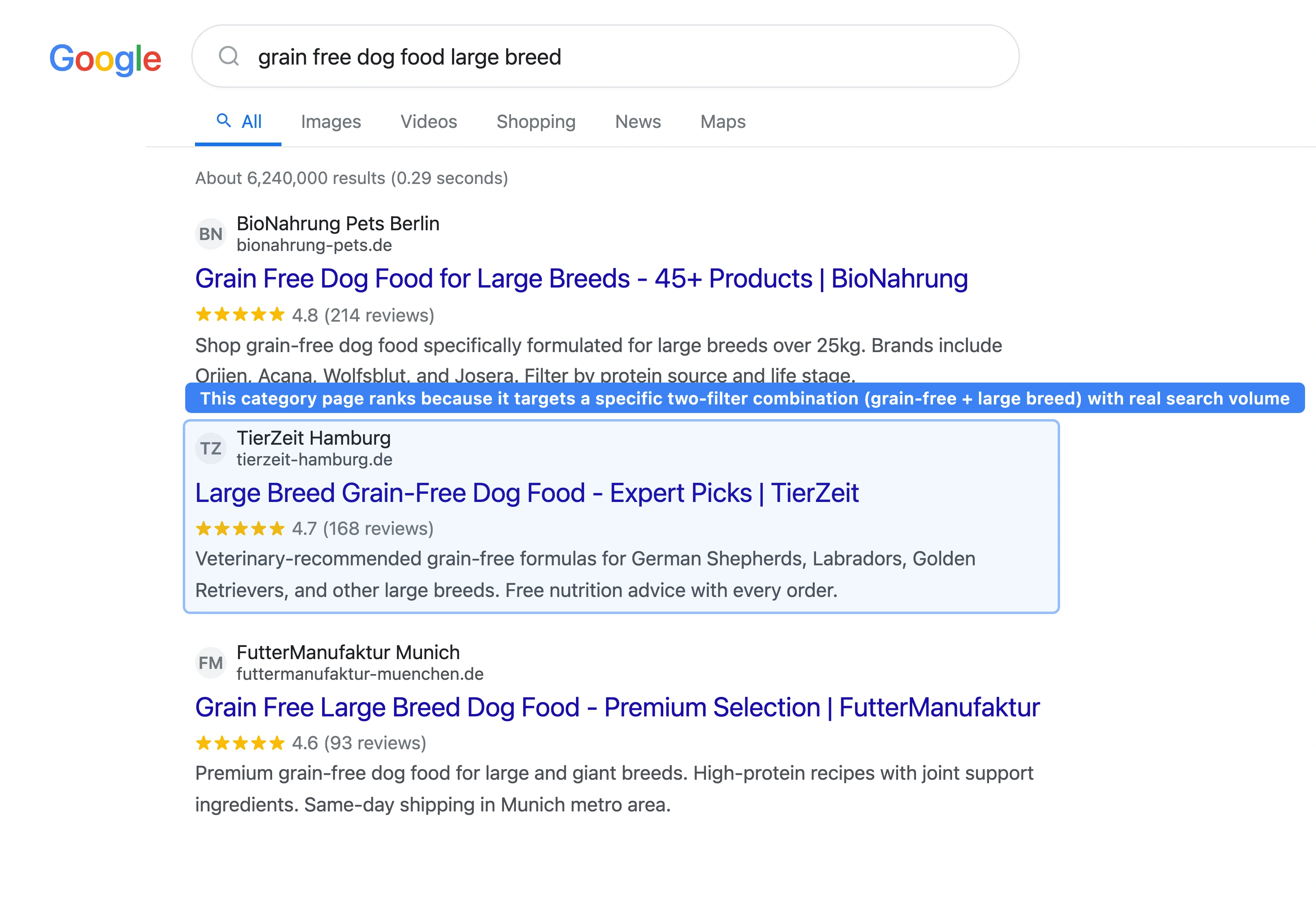
| Species + Diet Type | /dog-food/grain-free/, /cat-food/raw/ | Diet-preference searches are growing fast |
| Species + Breed Size | /dog-food/large-breed/, /dog-food/small-breed/ | Breed size queries have clear purchase intent |
Do Not Index These (Low or Zero Search Volume)
| Filter Type | Example Combination | Why Block |
|---|---|---|
| Price range | /dog-food/?price=20-40 | No one searches "dog food USD 20 to 40" |
| Brand only | /products/?brand=acana | Brand pages rank on brand name alone |
| Multiple stacked filters | /dog-food/?size=large&grain=free&protein=chicken&format=kibble | Too specific, zero search volume, near-duplicate |
| Sort order | /dog-food/?sort=price-asc | Same content, different order - pure duplicate |
| Color/size variants | /leashes/?color=red | Rarely searched as standalone queries |
How Do You Block Unwanted Filter URLs?
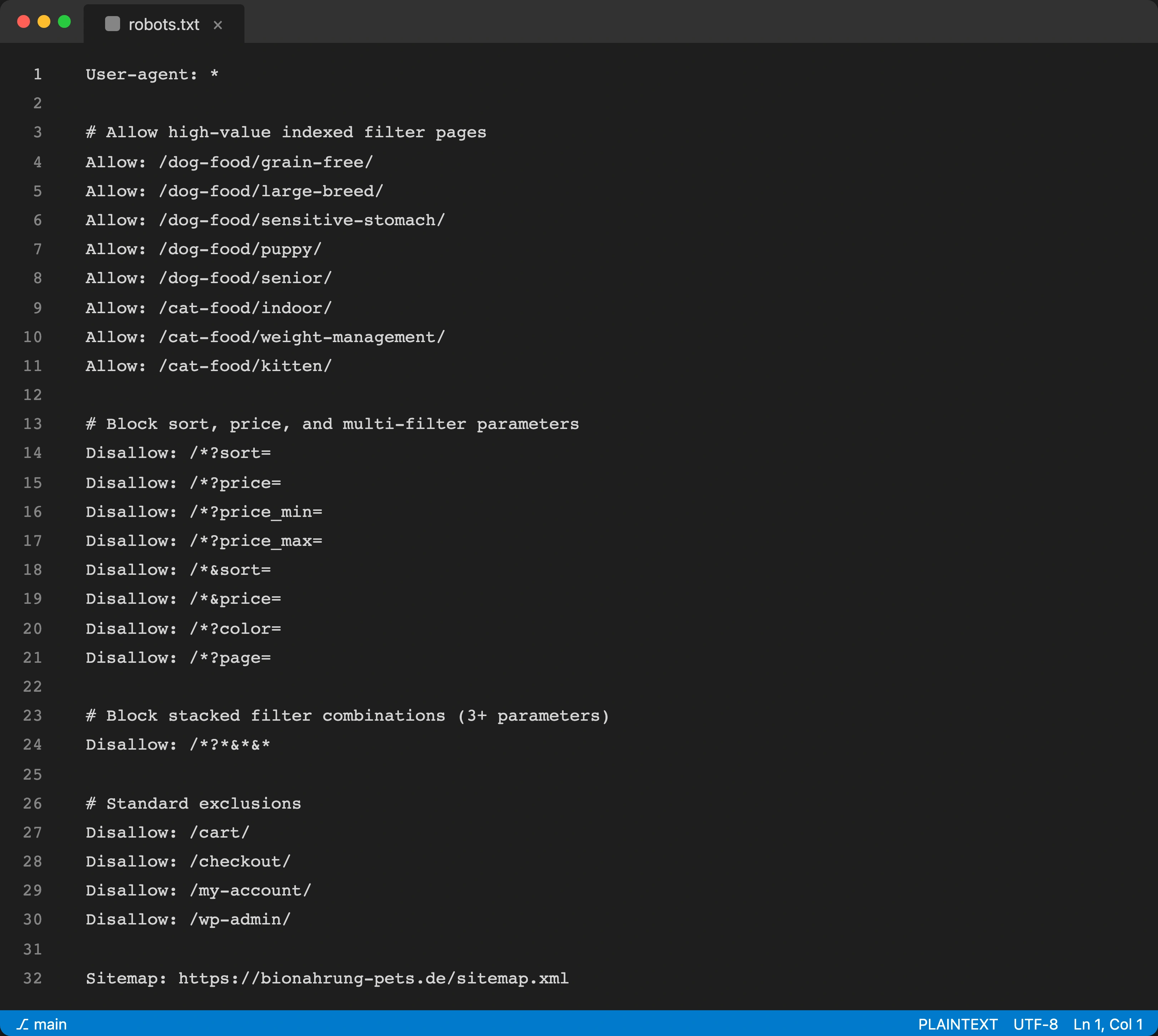
There are four technical approaches. Use them in combination for best results:
1. Canonical Tags (Preferred)
Point all filter URL variations back to the parent category page. /dog-food/?protein=chicken gets a canonical tag pointing to /dog-food/. This tells Google which page is the "real" version without blocking the URL for users. Best for filter combinations that improve UX but have no search value.
2. Noindex, Follow
Add <meta name="robots" content="noindex, follow"> to filter pages that should not appear in search but whose links should still be crawled. Use for two-filter combinations that occasionally surface useful internal links.
3. Robots.txt Disallow
Block entire filter parameter patterns. Example: Disallow: /*?sort= prevents crawling of sort-order variations. Aggressive but effective for parameters that never produce useful index-worthy content (sort, price range, pagination beyond a threshold).
4. JavaScript-Based Filtering
Render filter results via JavaScript without changing the URL. The URL stays as /dog-food/ regardless of which filters are applied. Google sees one page. This is the cleanest approach but requires a JavaScript framework and does not work well if you want some filter combinations to be indexable.
How Do You Turn Indexable Filters into Landing Pages?
For filter combinations you choose to index, treat them as full landing pages:
- give them a unique, keyword-rich title tag and meta description
- write 150 to 300 words of unique body text (not just a product grid)
- add BreadcrumbList schema with the filter hierarchy
- include internal links from related blog posts and other category pages
- add FAQ sections for long-tail keyword capture
Example: /dog-food/sensitive-stomach/ should have a unique title ("Sensitive Stomach Dog Food - Gentle Formulas for Dogs with Digestive Issues"), a 200-word introduction covering what sensitive stomach food is and why it matters, and links from your blog post about sensitive stomach management.
86% of e-commerce brands lack optimized internal links[3]. Landing-page-quality filter pages with strong internal linking are rare in pet retail, which means early movers gain disproportionate ranking advantage.
How Do You Audit Your Current Faceted Navigation?
Before making changes, audit what Google is currently crawling and indexing:
- Google Search Console > Coverage. Check how many pages Google has indexed. If your store has 800 products but Google shows 5,000+ indexed pages, filter URL bloat is the likely cause.
- Site search in Google. Run
site:yourstore.com inurl:?to see how many parameterized URLs Google has indexed. - Crawl with Screaming Frog. Crawl your site with filter parameters enabled. Count the total crawlable URLs vs your actual product count. A ratio above 5:1 signals a crawl budget problem.
- Log file analysis. If available, check server logs to see where Googlebot spends its crawl budget. Filter URLs consuming more than 30% of crawl requests need attention.
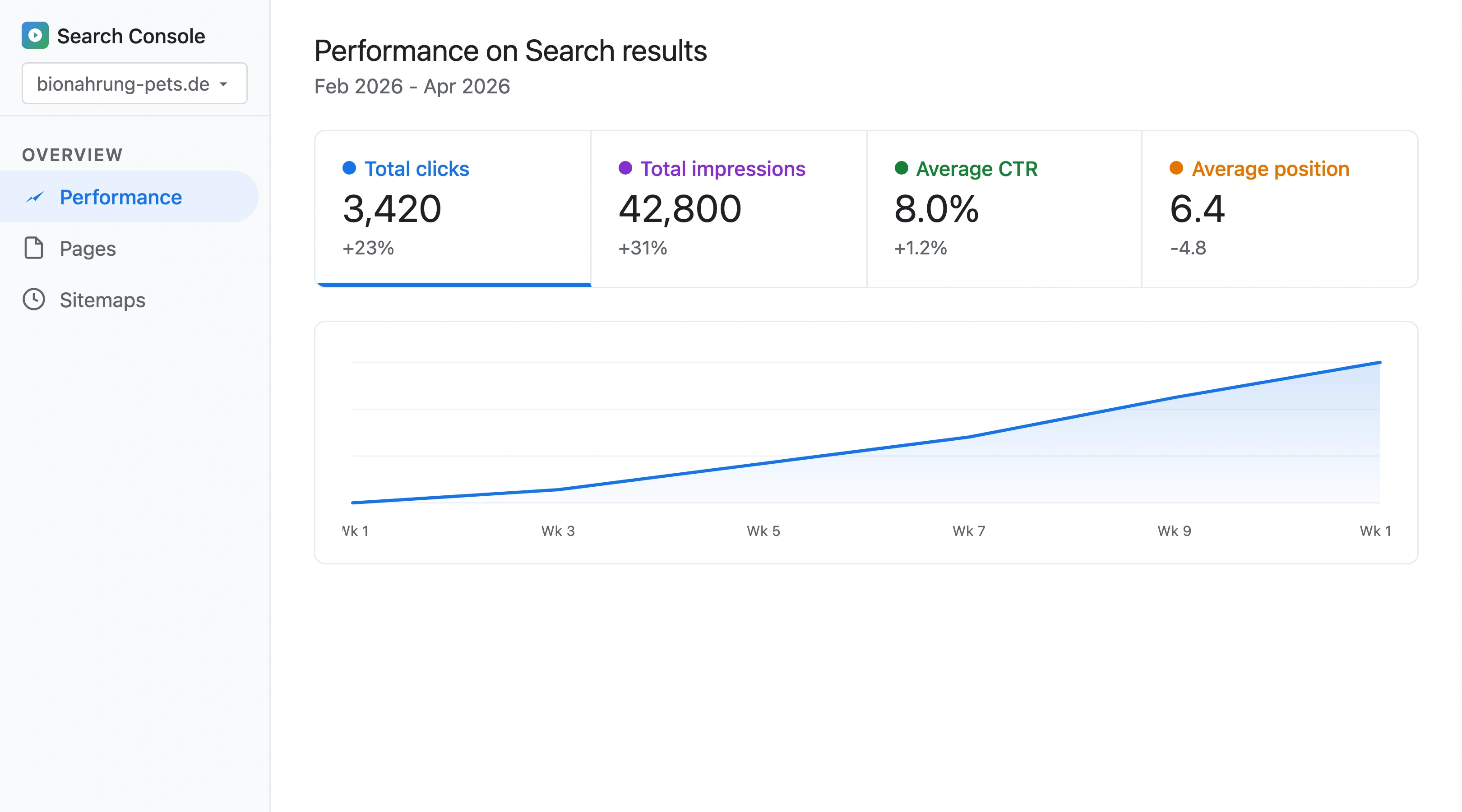
One pattern I have seen repeatedly with pet stores: a store with 600 products and well-meaning filter pages had 18,000 indexed URLs. After applying canonical tags and robots.txt blocks to non-essential filter combinations, indexed page count dropped to 1,200 and organic traffic increased 23% in 8 weeks as Google started properly crawling the pages that mattered.
Fixing crawl budget issues can boost indexed product pages 10 to 15% in just 30 days[4].
What Is the Faceted Navigation Cleanup Sprint?
| Week | Action | Impact |
|---|---|---|
| 1 | Audit: count indexed pages, identify filter URL bloat, check crawl budget allocation | Diagnostic |
| 2 | Map filters: categorize every attribute as index-worthy or block-worthy | Strategic |
| 3-4 | Implement canonical tags on all non-indexed filter combinations | High (reduces duplicate signals) |
| 4-5 | Update robots.txt to block sort, price range, and multi-stack filter patterns | High (saves crawl budget) |
| 5-7 | Upgrade top 10 indexed filter pages to landing-page quality (unique copy, FAQ, schema) | Very High |
| 7-8 | Add BreadcrumbList schema and internal links from blog to filter landing pages | High |
| 8-10 | Monitor: check indexed page count in Search Console weekly, verify crawl budget shift | Validation |
This sprint aligns with the broader timeline in our how long pet store SEO takes guide.
How Does Petbase Help Pet Stores With Filtered Content?
Landing-page-quality filter pages need unique body copy, FAQ sections, and internal links from supporting blog content. Writing unique descriptions for 30 to 50 filter landing pages is a significant content investment.
Petbase generates optimized category descriptions, condition-specific content, and educational articles that support your filter landing pages. 10 articles per month, published directly to your website, for USD 199/month.
Properly configured faceted navigation with strong landing pages is one of the highest-ROI technical SEO investments a pet store can make. The stores that get this right rank for hundreds of condition, breed, and diet-specific queries that stores with default filters miss entirely.
Start your 7-day free trial and build the content your filter pages need to rank.
Frequently Asked Questions
How many filter combinations should a pet store index?
Most pet stores should index 20 to 50 filter combinations - the ones with proven search volume. Use Google Keyword Planner or Ahrefs to check demand for combinations like "grain free dog food," "senior cat food," or "large breed puppy food." If a combination gets fewer than 50 monthly searches, it is usually not worth indexing as a standalone page.
Does faceted navigation affect Shopify stores differently?
Shopify handles faceted navigation through collection filters rather than URL parameters, which reduces the URL explosion problem. However, Shopify's third-party filter apps (like Product Filter and Search by Boost Commerce) can still create crawlable URL patterns. Audit your filter app's URL behavior and apply canonical tags where needed.
Can you use AJAX filtering instead of URL-based filters?
Yes. AJAX or JavaScript-based filtering keeps the URL static while changing the displayed products. This eliminates the crawl budget problem entirely but means filter combinations cannot be indexed as separate pages. Use AJAX for filters with no search volume (price, sort, color) and URL-based paths for filters you want to index (condition, life stage, diet type).
How do you know if crawl budget is a problem?
Check Google Search Console > Settings > Crawl Stats. If your average daily crawl request count is below 100 and you have more than 1,000 important pages, crawl budget may be limiting your indexation. Also compare your total indexed pages to your actual product count. If indexed pages exceed products by more than 5x, filter URL bloat is consuming crawl budget.
References
- Search Engine Land (2025). Faceted Navigation SEO: Best Practices. searchengineland.com
- WP Captcha (2025). Technical SEO for Large Sites: Crawl Budget & Faceted Nav. getwpcaptcha.com
- Charle Agency (2026). E-commerce SEO Statistics. charleagency.com
- Venue Cloud (2025). Tame Faceted Navigation: SEO-Safe IA and Crawl Control. venue.cloud